
 数据结构
数据结构 网络
网络 RDBMS
RDBMS 操作系统
操作系统 Java
Java MS Excel
 iOS
iOS HTML
HTML CSS
CSS Android
 Python
 C 编程
C 编程 C++
C++ C#
C# MongoDB
 MySQL
MySQL Javascript
 PHP
PHP 物理
物理 化学
化学 生物
生物 数学
数学 英语
英语 经济
经济 心理学
心理学 社会研究
社会研究 时尚研究
时尚研究 法律研究
法律研究如何使用 C++ 在 OpenCV 中追踪颜色?
颜色跟踪类似于颜色检测。出于跟踪的目的,我们额外添加了几行代码来计算检测到的对象的面积,然后跟踪该面积的当前位置,最后使用 OpenCV 的 line() 函数展示对象的运动轨迹。
以下程序演示了如何使用 C++ 在 OpenCV 中跟踪颜色。
示例
#include<iostream>
#include<opencv2/highgui/highgui.hpp>
#include<opencv2/imgproc/imgproc.hpp>
using namespace std;
using namespace cv;
int main(int argc, char** argv) {
   VideoCapture video_load(0);//capturing video from default camera//
   namedWindow("Adjust");//declaring window to show the image//
   int Hue_Low= 0;//lower range of hue//
   int Hue_high = 22;//upper range of hue//
   int Sat_Low =99;//lower range of saturation//
   int Sat_high = 255;//upper range of saturation//
   int Val_Low = 0;//lower range of value//
   int Val_high = 255;//upper range of value//
   createTrackbar("LowH", "Adjust", &Hue_Low, 179);//track-bar for min hue//
   createTrackbar("HighH","Adjust", &Hue_high, 179);//track-bar for max hue//
   createTrackbar("LowS", "Adjust", &Sat_Low, 255);//track-bar for min saturation//
   createTrackbar("HighS", "Adjust", &Sat_high, 255);// track-bar for max saturation//
   createTrackbar("LowV", "Adjust", &Val_Low,255);//track-bar for min value//
   createTrackbar("HighV", "Adjust", &Val_high, 255);// track - bar for max value//
   int Horizontal_Last = -1;//initial horizontal position//
   int vertical_Last = -1;//initial vertical position//
   Mat temp;//declaring a matrix to load frames from video stream//
   video_load.read(temp);//loading frames from video stream//
   Mat track_motion = Mat::zeros(temp.size(), CV_8UC3);//creating black matrix for detection//
   while (true) {
      Mat actual_Image;//declaring a ,atrix for actual image//
      bool temp_load= video_load.read(actual_Image);//loading frames from video to the matrix//
      Mat converted_to_HSV;//declaring a matrix to store converted image//
      cvtColor(actual_Image, converted_to_HSV, COLOR_BGR2HSV);//converting BGR image to HSV//
      Mat adjusted_frame;//declaring a matrix to detected color//
      inRange(converted_to_HSV,Scalar(Hue_Low, Sat_Low, Val_Low),
      Scalar(Hue_high, Sat_high, Val_high), adjusted_frame);//applying change of values of track-bars//
      erode(adjusted_frame,adjusted_frame,getStructuringElement(MORPH_ELLIPSE, Size(5, 5)));//morphological opening for removing small objects from foreground//
      dilate(adjusted_frame, adjusted_frame,getStructuringElement(MORPH_ELLIPSE, Size(5, 5)));//morphological opening for removing small object from foreground//
      dilate(adjusted_frame, adjusted_frame,getStructuringElement(MORPH_ELLIPSE, Size(5, 5)));//morphological closing for filling up small holes in foreground//
      erode(adjusted_frame, adjusted_frame, getStructuringElement(MORPH_ELLIPSE, Size(5, 5)));//morphological closing for filling up small holes in foreground//
      Moments detecting_object = moments(adjusted_frame);//creating an object from detected color frame//
      double vertical_moment = detecting_object.m01;//getting value of vertical position//
      double horizontal_moment = detecting_object.m10;//getting value of horizontal position//
      double tracking_area = detecting_object.m00;//getting area of the object//
      if (tracking_area > 10000){ //when area of the object is greater than 10000 pixels//
         int posX = horizontal_moment / tracking_area;//calculate the horizontal position of the object//
         int posY = vertical_moment / tracking_area;//calculate the vertical position of the object//
         if (Horizontal_Last >= 0 && vertical_Last >= 0 && posX >= 0 && posY >= 0){ //when the detected object moves//
            line(track_motion, Point(posX, posY), Point(Horizontal_Last, vertical_Last), Scalar(0, 0, 255), 2);//draw lines of red color on the path of detected object;s motion//
         }
         Horizontal_Last = posX;//getting new horizontal position//
         vertical_Last = posY;// getting new vertical position value//
      }
      imshow("Detected_Object", adjusted_frame);//showing detected object//
      actual_Image = actual_Image + track_motion;//drawing continuous line in original video frames//
      imshow("Actual",actual_Image);//showing original video//
      cout << "position of the object is:" << Horizontal_Last << "," << vertical_Last << endl;//showing tracked co-ordinated values//
      if(waitKey(30)==27){ //if esc is pressed loop will break//
         cout << "esc key is pressed by user" << endl;
         break;
      }
   }
   return 0;
}
输出
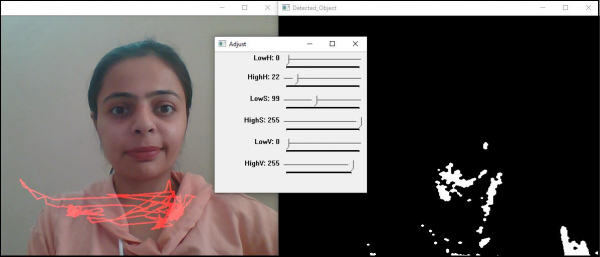
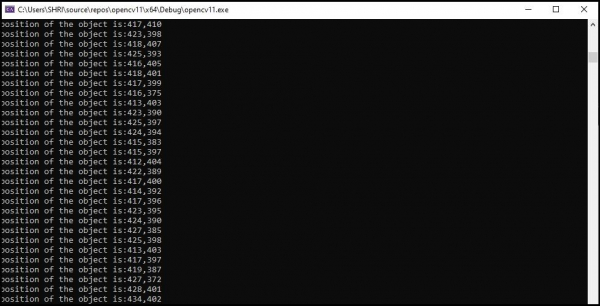

更新于: 10-3-2021
625 次浏览

广告