
 数据结构
数据结构 网络
网络 关系型数据库管理系统
 操作系统
操作系统 Java
Java MS Excel
 iOS
iOS HTML
HTML CSS
CSS Android
 Python
 C 语言编程
 C++
C++ C#
C# MongoDB
 MySQL
MySQL Javascript
 PHP
PHP 物理学
物理学 化学
化学 生物学
生物学 数学
数学 英语
英语 经济学
经济学 心理学
心理学 社会学
社会学 时尚研究
时尚研究 法律研究
法律研究如何在 Tkinter Combobox 中获取选定选项的索引?
如果您想创建一个下拉列表项并允许用户选择列表项,则可以使用 Combobox 小部件。Combobox 小部件允许您创建一个下拉列表,其中可以即时选择项目列表。但是,如果您想获取组合框小部件中所选项目的索引,则可以使用 **get()** 方法。**get()** 方法返回所选项目的整数,称为项目的索引。
示例
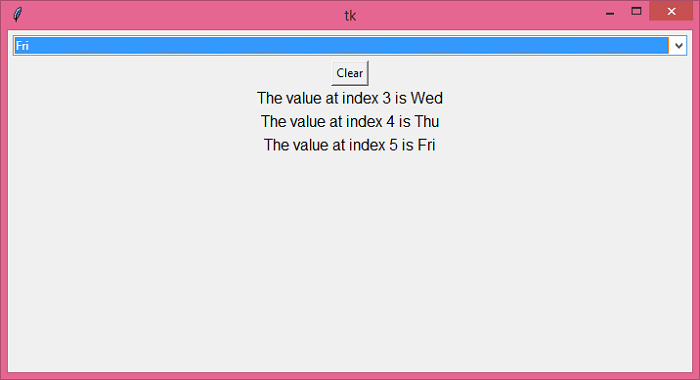
让我们举个例子看看它是如何工作的。在这个例子中,我们在下拉列表中创建了一个星期几的列表,并且每当用户从下拉列表中选择一天时,它都会打印并在 Label 小部件上显示所选项目的索引。要打印索引,我们可以通过将给定的索引类型转换为字符串来连接字符串。
# Import the required libraries
from tkinter import *
from tkinter import ttk

# Create an instance of tkinter frame or window
win = Tk()

# Set the size of the window
win.geometry("700x350")

# Create a function to clear the combobox
def clear_cb():
   cb.set('')

# Define Days Tuple
days= ('Sun','Mon','Tue','Wed','Thu','Fri','Sat')

# Function to print the index of selected option in Combobox
def callback(*arg):
   Label(win, text= "The value at index " + str(cb.current()) + " is" + " "+ str(var.get()), font= ('Helvetica 12')).pack()

# Create a combobox widget
var= StringVar()
cb= ttk.Combobox(win, textvariable= var)
cb['values']= days
cb['state']= 'readonly'
cb.pack(fill='x',padx= 5, pady=5)

# Set the tracing for the given variable
var.trace('w', callback)

# Create a button to clear the selected combobox text value
button= Button(win, text= "Clear", command= clear_cb)
button.pack()

win.mainloop()
输出
运行以上代码将显示一个带有日期列表的组合框小部件。每当您从列表中选择一天时,它都会在标签小部件上打印索引和相应的项目。

更新于:2021-12-16
10K+ 浏览量

广告