
 数据结构
数据结构 网络
网络 关系型数据库管理系统
 操作系统
操作系统 Java
Java MS Excel
 iOS
iOS HTML
HTML CSS
CSS Android
 Python
 C 语言编程
 C++
C++ C#
C# MongoDB
 MySQL
MySQL Javascript
 PHP
PHP 物理学
物理学 化学
化学 生物学
生物学 数学
数学 英语
英语 经济学
经济学 心理学
心理学 社会学
社会学 服装设计
服装设计 法律学
法律学如何获取 Tkinter 组件的当前 x 和 y 坐标?
Tkinter 广泛用于创建基于 GUI 的应用程序。它提供了许多工具包、函数或模块,可用于定义特定应用程序的不同属性。对于构建 GUI 应用程序,它提供了一些小部件,包括按钮、文本框和标签。我们可以使用其他函数和库来自定义小部件的位置及其在 tkinter 框架上的坐标。
假设我们创建了一个文本标签小部件,它在 tkinter 框架中占据某个位置。现在,要获取小部件的实际坐标,可以使用 tkinter 库中提供的 **geometry** 方法。
我们将使用 **winfo_rootx()** 和 **winfo_rooty()** 函数,它们分别返回小部件相对于框架或窗口的实际坐标。
示例
#Import the tkinter library
from tkinter import *

#Create an instance of the tkinter frame
win = Tk()

#Define the geometry of the frame
win.geometry("600x400")

#Define the text-widget
my_text= Text(win, height = 5, width = 52)

# Create label
lab = Label(win, text ="TutorialsPoint.com")

#Configure it using other properties
lab.config(font =("Helvetica", 20))

#Create a button widget
my_button = Button(text="Hello")

#Define the position of the widget
my_button.place(x=100, y=100)

#Update the coordinates with respect to the tkinter frame
win.update()

#Get the coordinates of both text widget and button widget
widget_x1, widget_y1 = my_button.winfo_rootx(),
my_button.winfo_rooty()
widget_x2, widget_y2 = my_text.winfo_rootx(),
my_button.winfo_rooty()

lab.pack()

print(widget_x1, widget_y1)
print(widget_x2, widget_y2)

#Keep the window running
win.mainloop()
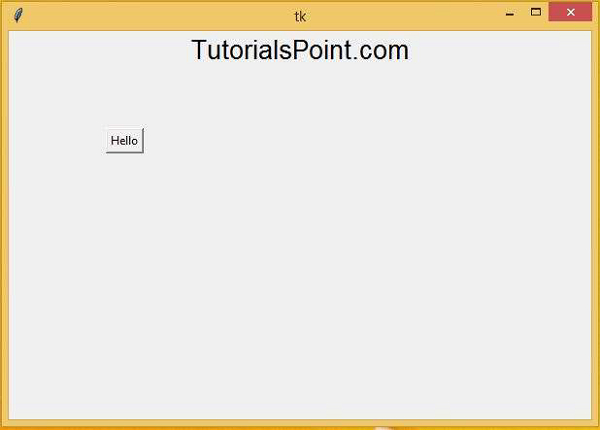
输出
运行以上代码片段将打印小部件的当前位置,如下所示:
134 157
0 157

更新于: 2021年3月6日
8K+ 浏览量

广告