
 数据结构
数据结构 网络
网络 RDBMS
RDBMS 操作系统
操作系统 Java
Java MS Excel
 iOS
iOS HTML
HTML CSS
CSS Android
 Python
 C 编程
C 编程 C++
C++ C#
C# MongoDB
 MySQL
MySQL Javascript
 PHP
PHP 物理
物理 化学
化学 生物
生物 数学
数学 英语
英语 经济学
经济学 心理学
心理学 社会研究
社会研究 时尚研究
时尚研究 法律研究
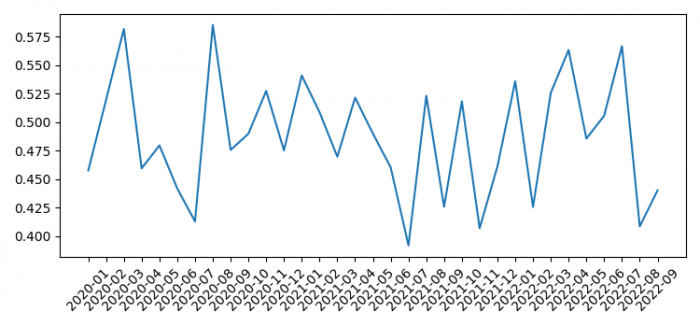
法律研究如何绘制包含所有 xticks 的 Pandas 多重索引数据框(Matplotlib)?
要绘制具有所有 xticks 的 Pandas 多重索引数据框,我们可以执行以下步骤 -
- 设置图形大小并调整子图之间和周围的边距。
- 使用 1000 个示例数据创建索引值。
- 使用轴标签创建一个一维ndarray。
- 获取序列的平均值。
- 绘制g数据框。
- 在当前轴上设置 ticks 和 ticklabel
- 要显示图形,请使用show()方法。
示例
import numpy as np
import matplotlib.pyplot as plt
import pandas as pd

plt.rcParams["figure.figsize"] = [7.50, 3.50]
plt.rcParams["figure.autolayout"] = True

idx = pd.date_range("2020-01-01", periods=1000)
val = np.random.rand(1000)
s = pd.Series(val, idx)

g = s.groupby([s.index.year, s.index.month]).mean()

ax = g.plot()
ax.set_xticks(range(len(g)))
ax.set_xticklabels(["%s-%02d" % item for item in g.index.tolist()],
rotation=45, ha='center')

plt.show()
输出

更新时间:05-Jun-2021
4K+ 浏览

广告