
 数据结构
数据结构 网络
网络 关系型数据库管理系统(RDBMS)
 操作系统
操作系统 Java
Java MS Excel
 iOS
iOS HTML
HTML CSS
CSS Android
 Python
 C语言编程
C语言编程 C++
C++ C#
C# MongoDB
 MySQL
MySQL Javascript
 PHP
PHP 物理学
物理学 化学
化学 生物学
生物学 数学
数学 英语
英语 经济学
经济学 心理学
心理学 社会学
社会学 服装设计
服装设计 法学
法学如何在Android中每10秒启动一次Intent Service?
在进入示例之前,我们应该了解Android中的Intent Service是什么。Intent Service将异步执行后台操作。当用户从活动中调用startService()时,它不会为每个请求创建实例。它将在服务类中完成某些操作后停止服务,否则我们需要使用stopSelf()停止服务。
此示例演示如何每10秒启动一次Intent Service。
步骤1 - 在Android Studio中创建一个新项目,转到文件 ⇒ 新建项目,并填写所有必需的详细信息以创建新项目。
步骤2 - 将以下代码添加到res/layout/activity_main.xml。
<?xml version = "1.0" encoding = "utf-8"?>
<android.support.constraint.ConstraintLayout xmlns:android = "http://schemas.android.com/apk/res/android"
   xmlns:app = "http://schemas.android.com/apk/res-auto"
   xmlns:tools = "http://schemas.android.com/tools"
   android:layout_width = "match_parent"
   android:layout_height = "match_parent"
   tools:context = ".MainActivity">
   <TextView
      android:id = "@+id/text"
      android:layout_width = "wrap_content"
      android:layout_height = "wrap_content"
      android:text = "Start Service"
      android:textSize = "25sp"
      app:layout_constraintBottom_toBottomOf = "parent"
      app:layout_constraintLeft_toLeftOf = "parent"
      app:layout_constraintRight_toRightOf = "parent"
      app:layout_constraintTop_toTopOf = "parent" />
</android.support.constraint.ConstraintLayout>
在上面的代码中,我们使用了TextView,当用户从Intent Service获取数据时,它将更新。
步骤3 - 将以下代码添加到src/MainActivity.java
package com.example.andy.myapplication;

import android.content.BroadcastReceiver;
import android.content.Context;
import android.content.Intent;
import android.content.IntentFilter;
import android.os.Bundle;
import android.os.Handler;
import android.support.v4.content.LocalBroadcastManager;
import android.support.v7.app.AppCompatActivity;
import android.view.View;
import android.widget.TextView;

import java.util.Timer;
import java.util.TimerTask;

public class MainActivity extends AppCompatActivity {
   TextView text;
   BroadcastReceiver broadcastReceiver = new BroadcastReceiver() {
      @Override
      public void onReceive(Context context, Intent intent) {
         String someValue = intent.getStringExtra("someName");
         text.setText(someValue);
      }
   };

   @Override
   protected void onStart() {
      super.onStart();
      IntentFilter intentFilter = new IntentFilter();
      intentFilter.addAction("com.example.andy.myapplication");
      LocalBroadcastManager.getInstance(this).registerReceiver(broadcastReceiver, intentFilter);
   }

   @Override
   protected void onCreate(Bundle savedInstanceState) {
      super.onCreate(savedInstanceState);
      setContentView(R.layout.activity_main);
      text = findViewById(R.id.text);
      final Handler handler = new Handler();
      TimerTask timertask = new TimerTask() {
         @Override
         public void run() {
            handler.post(new Runnable() {
               public void run() {
                  startService(new Intent(MainActivity.this, service.class));
               }
            });
         }
      };
      Timer timer = new Timer();
      timer.schedule(timertask, 0, 10000);
   }

   @Override
   protected void onStop() {
      super.onStop();
      LocalBroadcastManager.getInstance(this).unregisterReceiver(broadcastReceiver);
   }
}
创建一个名为service.class的文件,并添加以下代码:
package com.example.andy.myapplication;

import android.app.IntentService;
import android.content.Intent;
import android.os.IBinder;
import android.support.v4.content.LocalBroadcastManager;

public class service extends IntentService {
   public static volatile boolean shouldStop = false;
   public service() {
       super(service.class.getSimpleName());
   }

   @Override
   public IBinder onBind(Intent intent) {
      return null;
   }

   @Override
   protected void onHandleIntent(Intent intent) {
      Intent intent1 = new Intent("com.example.andy.myapplication");
      intent1.putExtra("someName", "Tutorialspoint.com");
      LocalBroadcastManager.getInstance(this).sendBroadcast(intent1);
      if(shouldStop) {
         stopSelf();
         return;
      }
   }
}
步骤4 - 将以下代码添加到AndroidManifest.xml
<?xml version = "1.0" encoding = "utf-8"?>
<manifest xmlns:android = "http://schemas.android.com/apk/res/android"
   package = "com.example.andy.myapplication">
   <uses-permission android:name = "android.permission.WAKE_LOCK"/>
   <application
      android:allowBackup = "true"
      android:icon = "@mipmap/ic_launcher"
      android:label = "@string/app_name"
      android:roundIcon = "@mipmap/ic_launcher_round"
      android:supportsRtl = "true"
      android:theme = "@style/AppTheme">
      <activity android:name = ".MainActivity">
         <intent-filter>
            <action android:name = "android.intent.action.MAIN" />
            <category android:name = "android.intent.category.LAUNCHER" />
         </intent-filter>
      </activity>
      <service android:name = ".service"/>
   </application>
</manifest>
让我们尝试运行您的应用程序。我假设您已将您的实际Android移动设备连接到您的计算机。要从Android Studio运行应用程序,请打开项目的其中一个活动文件,然后单击运行  工具栏中的图标。选择您的移动设备作为选项,然后检查您的移动设备,它将显示您的默认屏幕 -
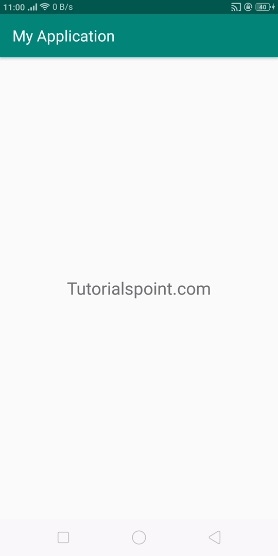
在以上结果中,显示了应用程序的默认屏幕。每10秒,它将启动服务并检查后台数据并更新数据。
点击这里下载项目代码

更新于:2019年7月30日
1K+ 浏览量

广告