
 数据结构
数据结构 网络
网络 RDBMS
RDBMS 操作系统
操作系统 Java
Java MS Excel
 iOS
iOS HTML
HTML CSS
CSS Android
 Python
 C 编程
C 编程 C++
C++ C#
C# MongoDB
 MySQL
MySQL Javascript
 PHP
PHP 物理学
物理学 化学
化学 生物学
生物学 数学
数学 英语
英语 经济学
经济学 心理学
心理学 社会科学
社会科学 时装研究
时装研究 法律研究
法律研究HTML DOM 输入表单 formEnctype 属性
HTML DOM 提交 formEnctype 属性用于设置或返回提交按钮的 formEnctype 属性值。它是 HTML5 中引入的 type 提交输入元素,用于指定表单数据在提交到服务器时应如何编码。
此属性仅在存在 method=”post”属性时才有效。formEnctype 属性值会覆盖与 <form> 元素关联的 enctype 属性值
语法
以下是语法 -
设置提交表单 formEnctype 属性 -
submitObject.enctype = encoding
在这里,编码可以是 “application/x-www-form-urlencoded”,这意味着所有字符在发送之前都经过编码,这是默认编码。另一个编码是 “multipart/form-data”,该编码指定不应编码任何字符,并用于将文件上传到服务器。第三种编码是 “text/plain”,它只将空格转换为 “+” 符号,不进行其他编码。text./plain 编码不得使用,因为它不安全。
示例
让我们看一个提交表单 formEnctype 属性的示例 -
<!DOCTYPE html>
<html>
<head>
<script>
   function changeEnc() {
      document.getElementById("SUBMIT1").formEnctype = "application/x-www-formurlencoded";
      document.getElementById("Sample").innerHTML = "The formenctype attribute value is now 'application/x-www-form-urlencoded' ";
   }
</script>
</head>
<body>
<h1>Submit formEnctype property example</h1>
<form id="FORM_1" action="/Sample.php" style="border:solid 2px green;padding:2px">
UserName: <input type="text" id="USR"> <br>
Location: <input type="text" id=“Loc”> <br><br>
<input type="submit" id="SUBMIT1" formenctype="multipart/form-data">
</form>
<br>
<button onclick="changeEnc()">CHANGE</button>
<p id="Sample"></p>
</body>
</html>
输出
这将产生以下输出 -
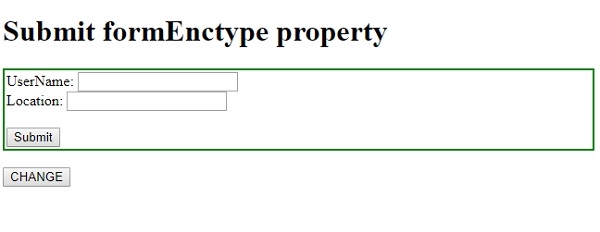
单击更改按钮 -
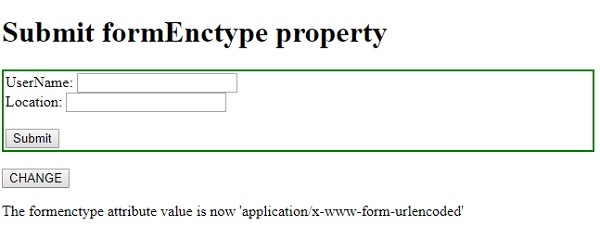

更新于: 19-Feb-2021
73 次浏览

广告