
- Next.js 教程
- Next.js - 主页
- Next.js - 概述
- Next.js - 环境设置
- Next.js 功能
- Next.js - 页面
- Next.js - 静态文件提供
- Next.js - 元数据
- Next.js - CSS 支持
- Next.js - 全局 CSS 支持
- Next.js - 预渲染
- Next.js 路由
- Next.js - 路由
- Next.js - 动态 API 路由
- Next.js - 命令式路由
- Next.js - 浅层路由
- Next.js API 路由
- Next.js - API 路由
- Next.js - API 中间件
- Next.js - 响应帮助器
- Next.js 杂项
- Next.js - TypeScript
- Next.js - 环境变量
- Next.js - 部署
- Next.js - CLI
- Next.js 实用资源
- Next.js - 快速指南
- Next.js - 实用资源
- Next.js - 讨论
Next.js - 环境变量
Next.js 支持在 node 中发布环境变量,我们可以在连接到服务器、数据库等时使用。为此,我们需要在根目录中创建 .env.local 文件。我们还可以创建 .env.production。
创建 .env.local
在根目录中创建 .env.local,内容如下。
DB_HOST=localhost
DB_USER=tutorialspoint
DB_PASS=nextjs
创建 env.js
在 pages/posts 目录中创建一个名为 env.js 的页面,内容如下,我们将使用 process.env 在其中使用环境变量。
import Head from 'next/head'
import Container from '../../components/container'

export default function FirstPost(props) {
   return (
      <>
         <Container>
            <Head>
               <title>Environment Variables</title>
            </Head>
            <h1>Database Credentials</h1>
               <p>Host: {props.host}</p>
               <p>Username: {props.username}</p>
               <p>Password: {props.password}</p>
         </Container>
      </>
   )
}

export async function getStaticProps() {
   // Connect to Database using DB properties
   return {
      props: {
         host: process.env.DB_HOST,
         username: process.env.DB_USER,
         password: process.env.DB_PASS
      }
   }
}
现在启动服务器。
Next.JS 将检测到 .env.local,并在控制台上显示以下消息。
npm run dev

> nextjs@1.0.0 dev D:\Node\nextjs
> next

ready - started server on https://:3000
info  - Loaded env from D:\Node\nextjs\.env.local
event - compiled successfully
wait  - compiling...
event - compiled successfully
event - build page: /posts/env
wait  - compiling...
event - compiled successfully
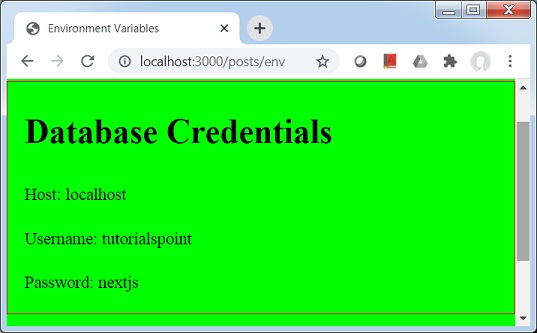
验证输出
在浏览器中打开 localhost:3000/posts/env,你将看到以下输出。
广告