
 数据结构
数据结构 网络
网络 RDBMS
RDBMS 操作系统
操作系统 Java
Java MS Excel
 iOS
iOS HTML
HTML CSS
CSS Android
 Python
 C 程序设计
 C++
C++ C#
C# MongoDB
 MySQL
MySQL Javascript
 PHP
PHP 物理
物理 化学
化学 生物
生物 数学
数学 英语
英语 经济学
经济学 心理学
心理学 社会学
社会学 时尚教程
时尚教程 法律教程
法律教程在 Matplotlib 中绘制回归图和残差图
为了建立给定变量联合分布的观测值之间的简单关系,我们可以使用 Seaborn 来创建回归模型的图。
要使用回归模型对数据集进行拟合,我们首先必须在 Python 中导入必要的库。
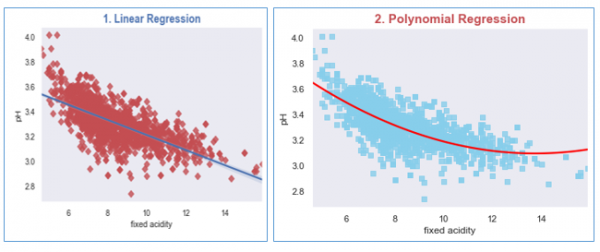
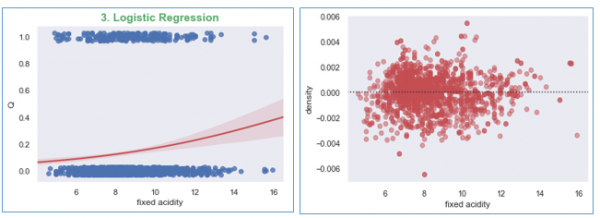
我们将为每个回归模型创建图:(a) 线性回归、(b) 多项式回归和 (c) 逻辑回归。
在此示例中,我们将使用可从此处访问的葡萄酒质量数据集,https://archive.ics.uci.edu/ml/datasets/wine+quality
示例
import matplotlib.pyplot as plt
import seaborn as sns
from scipy.stats import pearsonr
sns.set(style="dark", color_codes=True)

#import the dataset
wine_quality = pd.read_csv('winequality-red.csv', delimiter=';')

#Plotting Linear Regression
R, p = pearsonr(wine_quality['fixed acidity'], wine_quality.pH)
g1 = sns.regplot(x='fixed acidity', y='pH', data=wine_quality, truncate=True, ci=99,
marker='D', scatter_kws={'color': 'r'});
textstr = '$\mathrm{pearson}\hspace{0.5}\mathrm{R}^2=%.2f$
$\mathrm{pval}=%.2e$ '% (R**2, p)
props = dict(boxstyle='round', facecolor='wheat', alpha=0.5)
g1.text(0.55, 0.95, textstr, fontsize=14, va='top', bbox=props)
plt.title('1. Linear Regression', size=15, color='b', weight='bold')

#Let us Plot the Polynomial Regression plot for the wine dataset
g2 = sns.regplot(x='fixed acidity', y='pH', data=wine_quality, order=2, ci=None,
   marker='s', scatter_kws={'color': 'skyblue'},
   line_kws={'color': 'red'});
plt.title('2. Polynomial Regression', size=15, color='r', weight='bold')

#Now plotting the Logistic Regression
wine_quality['Q'] = wine_quality['quality'].map({'Low': 0, 'Med': 0, 'High':1})
g2 = sns.regplot(x='fixed acidity', y='Q', logistic=True,
   n_boot=750, y_jitter=.03, data=wine_quality,
   line_kws={'color': 'r'})
plt.show();

#Now plot the residual plot
g3 = sns.residplot(x='fixed acidity', y='density', order=2,
   data=wine_quality, scatter_kws={'color': 'r',
   'alpha': 0.5});
plt.show();
运行以上代码将生成如下输出:
输出

更新时间:23-Feb-2021
2K+ 浏览量

广告