
- Python 数据访问教程
- Python 数据访问 - 首页
- Python MySQL
- Python MySQL - 简介
- Python MySQL - 数据库连接
- Python MySQL - 创建数据库
- Python MySQL - 创建表
- Python MySQL - 插入数据
- Python MySQL - 查询数据
- Python MySQL - WHERE 子句
- Python MySQL - ORDER BY 子句
- Python MySQL - 更新表
- Python MySQL - 删除数据
- Python MySQL - 删除表
- Python MySQL - LIMIT 子句
- Python MySQL - JOIN 操作
- Python MySQL - 游标对象
- Python PostgreSQL
- Python PostgreSQL - 简介
- Python PostgreSQL - 数据库连接
- Python PostgreSQL - 创建数据库
- Python PostgreSQL - 创建表
- Python PostgreSQL - 插入数据
- Python PostgreSQL - 查询数据
- Python PostgreSQL - WHERE 子句
- Python PostgreSQL - ORDER BY 子句
- Python PostgreSQL - 更新表
- Python PostgreSQL - 删除数据
- Python PostgreSQL - 删除表
- Python PostgreSQL - LIMIT 子句
- Python PostgreSQL - JOIN 操作
- Python PostgreSQL - 游标对象
- Python SQLite
- Python SQLite - 简介
- Python SQLite - 建立连接
- Python SQLite - 创建表
- Python SQLite - 插入数据
- Python SQLite - 查询数据
- Python SQLite - WHERE 子句
- Python SQLite - ORDER BY 子句
- Python SQLite - 更新表
- Python SQLite - 删除数据
- Python SQLite - 删除表
- Python SQLite - LIMIT 子句
- Python SQLite - JOIN 操作
- Python SQLite - 游标对象
- Python MongoDB
- Python MongoDB - 简介
- Python MongoDB - 创建数据库
- Python MongoDB - 创建集合
- Python MongoDB - 插入文档
- Python MongoDB - 查找
- Python MongoDB - 查询
- Python MongoDB - 排序
- Python MongoDB - 删除文档
- Python MongoDB - 删除集合
- Python MongoDB - 更新
- Python MongoDB - LIMIT
- Python 数据访问资源
- Python 数据访问 - 快速指南
- Python 数据访问 - 有用资源
- Python 数据访问 - 讨论
Python MySQL - 数据库连接
连接MySQL的一种方法是,像下面这样打开你系统中的MySQL命令提示符:
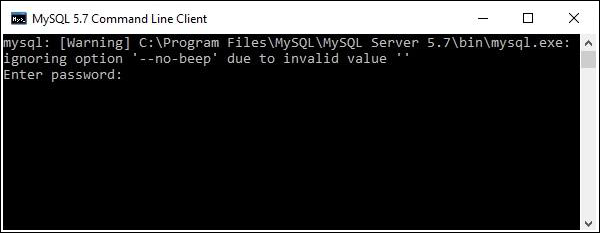
这里会要求输入密码;你需要输入你在安装时为默认用户(root)设置的密码。
然后将建立与MySQL的连接,并显示以下消息:
Welcome to the MySQL monitor. Commands end with ; or \g.
Your MySQL connection id is 4
Server version: 5.7.12-log MySQL Community Server (GPL)

Copyright (c) 2000, 2016, Oracle and/or its affiliates. All rights reserved.

Oracle is a registered trademark of Oracle Corporation and/or its
affiliates. Other names may be trademarks of their respective
owners.

Type 'help;' or '\h' for help. Type '\c' to clear the current input statement.
你可以在任何时候使用mysql>提示符下的exit命令断开与MySQL数据库的连接。
mysql> exit
Bye
使用python建立与MySQL的连接
在使用python建立与MySQL数据库的连接之前,假设:
我们已经创建了一个名为mydb的数据库。
我们已经创建了一个名为EMPLOYEE的表,其列为FIRST_NAME、LAST_NAME、AGE、SEX和INCOME。
我们用来连接MySQL的凭据是用户名:root,密码:password。
你可以使用connect()构造函数建立连接。它接受用户名、密码、主机和需要连接的数据库名称(可选),并返回一个MySQLConnection类的对象。
示例
以下是连接MySQL数据库“mydb”的示例。
import mysql.connector

#establishing the connection
conn = mysql.connector.connect(user='root', password='password', host='127.0.0.1', database='mydb')

#Creating a cursor object using the cursor() method
cursor = conn.cursor()

#Executing an MYSQL function using the execute() method
cursor.execute("SELECT DATABASE()")

# Fetch a single row using fetchone() method.
data = cursor.fetchone()
print("Connection established to: ",data)

#Closing the connection
conn.close()
输出
执行此脚本后,将产生以下输出:
D:\Python_MySQL>python EstablishCon.py
Connection established to: ('mydb',)
你也可以通过将凭据(用户名、密码、主机名和数据库名称)传递给connection.MySQLConnection()来建立与MySQL的连接,如下所示:
from mysql.connector import (connection)

#establishing the connection
conn = connection.MySQLConnection(user='root', password='password', host='127.0.0.1', database='mydb')

#Closing the connection
conn.close()
广告