- Python Pyramid 教程
- Python Pyramid - 首页
- Python Pyramid - 概述
- Pyramid - 环境搭建
- Python Pyramid - Hello World
- Pyramid - 应用配置
- Python Pyramid - URL 路由
- Python Pyramid - 视图配置
- Python Pyramid - 路由前缀
- Python Pyramid - 模板
- Pyramid - HTML 表单模板
- Python Pyramid - 静态资源
- Python Pyramid - 请求对象
- Python Pyramid - 响应对象
- Python Pyramid - 会话
- Python Pyramid - 事件
- Python Pyramid - 消息闪现
- Pyramid - 使用 SQLAlchemy
- Python Pyramid - Cookiecutter
- Python Pyramid - 创建项目
- Python Pyramid - 项目结构
- Python Pyramid - 包结构
- 手动创建项目
- 命令行 Pyramid
- Python Pyramid - 测试
- Python Pyramid - 日志记录
- Python Pyramid - 安全性
- Python Pyramid - 部署
- Python Pyramid 有用资源
- Python Pyramid - 快速指南
- Python Pyramid - 有用资源
- Python Pyramid - 讨论
Python Pyramid - 日志记录
为了收集关于应用程序的有用信息,Pyramid 使用 Python 标准库中的logging模块。它在开发和生产模式中都非常有用,可以检测应用程序运行期间出现的任何问题。应用程序日志可以包含您自己的消息以及来自第三方模块的消息。
已记录的消息具有以下预定义类型(按严重性递减顺序):
- CRITICAL(严重错误)
- ERROR(错误)
- WARNING(警告)
- INFO(信息)
- DEBUG(调试)
- NOTSET(未设置)
默认情况下,日志消息会重定向到 sys.stderr 流。要开始收集日志消息,我们需要声明一个 Logger 对象。
import logging
log = logging.getLogger(__name__)
现在可以使用与所需日志级别对应的 logger 方法生成日志消息。要生成对调试应用程序有用的消息,请使用带有相应消息字符串的log.debug()消息。
基于 PasteDeploy 配置的 Pyramid 应用程序使得启用日志支持变得非常容易。PasteDeploy 文件(development.ini 和 production.ini)使用 logging 模块配置参数中使用的ConfigParser格式。当 pserve 命令调用时,development.ini 中与日志相关的部分会被传递到 logging 模块的配置过程。
配置文件中的各种 logger 部分指定了应用程序对象的键、格式和 logger 级别。
典型的 "development.ini" 文件中声明了以下与日志相关的部分:
# Begin logging configuration
[loggers]
keys = root, hello
[logger_hello]
level = DEBUG
handlers =
qualname = hello
[handlers]
keys = console
[formatters]
keys = generic
[logger_root]

#level = INFO
level=DEBUG
handlers = console
[handler_console]
class = StreamHandler
args = (sys.stderr,)
level = NOTSET
formatter = generic
[formatter_generic]
format = %(asctime)s %(levelname)-5.5s [%(name)s][%(threadName)s] %(message)s

# End logging configuration
让我们将这些部分添加到上一章中 Hello 应用程序的development.ini文件中。
示例
接下来,声明 Logger 对象并在hello_world()函数中添加一条调试消息。这是__init__.py代码:
from pyramid.config import Configurator
from pyramid.response import Response
from pyramid.view import view_config
import logging

log = logging.getLogger(__name__)

from pyramid.renderers import render_to_response

def hello_world(request):
   log.debug('In hello view')
   return render_to_response('templates/hello.html',
{'name':request.matchdict['name']},request=request)

def main(global_config, **settings):
   config = Configurator(settings=settings)
   config.include('pyramid_jinja2')
   config.add_jinja2_renderer(".html")
   config.add_route('hello', '/{name}')
   config.add_view(hello_world, route_name='hello')
   return config.make_wsgi_app()
hello_world() 视图呈现以下 hello.html 模板:
<html>
   <body>
      <h1>Hello, {{ name }}!</h1>
   </body>
</html>
像往常一样运行应用程序:
pserve development.ini
当在浏览器中输入https://:6543/Tutorialpoint URL 时,命令窗口会回显以下调试消息:
Starting monitor for PID 11176.
Starting server in PID 8472.
2022-06-26 01:22:47,032 INFO [waitress][MainThread] Serving on http://[::1]:6543
2022-06-26 01:22:47,032 INFO [waitress][MainThread] Serving on http://127.0.0.1:6543
2022-06-26 01:22:47,418 DEBUG [hello][waitress-1] In hello view
输出
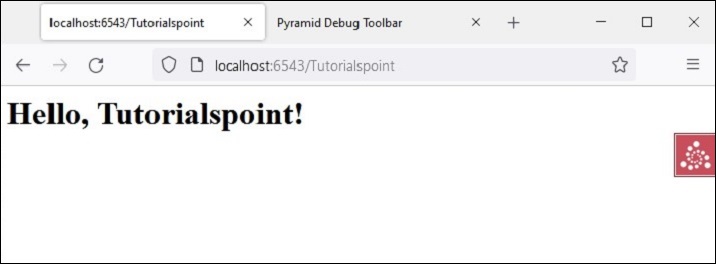
由于在配置中启用了调试工具栏,它会显示在浏览器中:
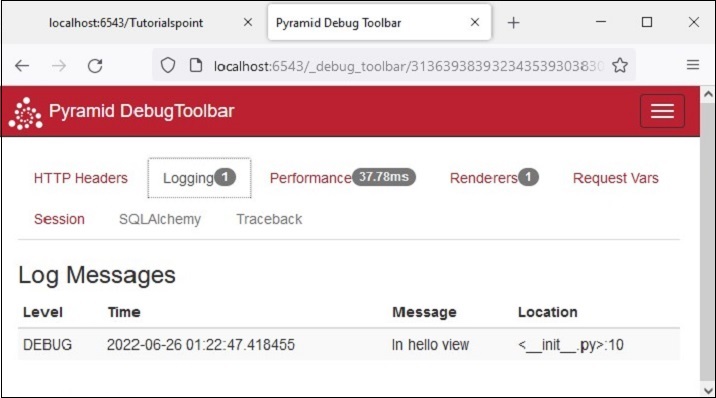
调试消息也会显示在调试工具栏的日志选项卡上,如下所示: