- Python Pyramid 教程
- Python Pyramid - 首页
- Python Pyramid - 概述
- Pyramid - 环境设置
- Python Pyramid - Hello World
- Pyramid - 应用程序配置
- Python Pyramid - URL 路由
- Python Pyramid - 视图配置
- Python Pyramid - 路由前缀
- Python Pyramid - 模板
- Pyramid - HTML 表单模板
- Python Pyramid - 静态资源
- Python Pyramid - 请求对象
- Python Pyramid - 响应对象
- Python Pyramid - 会话
- Python Pyramid - 事件
- Python Pyramid - 消息闪现
- Pyramid - 使用 SQLAlchemy
- Python Pyramid - Cookiecutter
- Python Pyramid - 创建项目
- Python Pyramid - 项目结构
- Python Pyramid - 包结构
- 手动创建项目
- 命令行 Pyramid
- Python Pyramid - 测试
- Python Pyramid - 日志记录
- Python Pyramid - 安全性
- Python Pyramid - 部署
- Python Pyramid 有用资源
- Python Pyramid - 快速指南
- Python Pyramid - 有用资源
- Python Pyramid - 讨论
Python Pyramid - 消息闪现
消息闪现机制被 Web 应用程序框架用于向用户提供关于其与应用程序交互的某些反馈。闪现的消息由会话对象保存在队列中。
闪现消息机制使得可以在一个视图中创建消息并在下一个调用的视图函数中渲染它成为可能。与上一节一样,我们必须首先启用会话工厂才能处理会话。要向消息队列中添加消息,请使用会话对象的 **flash()** 方法。
request.session.flash('Hello World')
会话具有 **pop_flash()** 和 **peek_flash()** 方法。pop_flash() 方法从队列中删除最后添加的消息。peek_flash() 方法如果队列中有消息则返回 true,如果队列为空则返回 false。
这两种方法都用于模板网页中,从队列中获取一个或多个消息并将其渲染为响应的一部分。
消息闪现示例
下面的示例演示了消息闪现机制。在这里,login() 视图代码检查它是否是由 POST 或 GET 方法调用的。如果方法是 GET,它将渲染带有用户名和密码字段的登录表单。提交的表单将使用 POST 方法提交到相同的 URL。
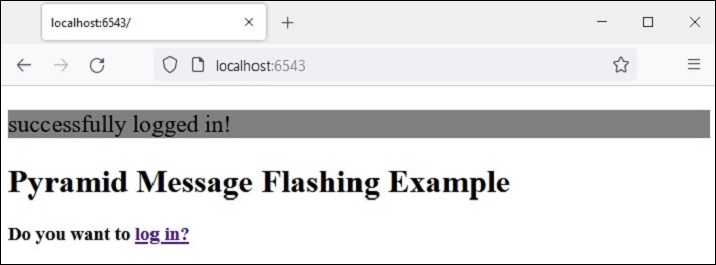
当检测到 POST 方法时,视图进一步检查输入的有效性并将适当的消息闪现到会话队列中。这些错误闪现消息由 login 模板本身提取,而成功闪现消息闪现后,客户端将重定向到 index() 视图以渲染 index 模板。
应用程序代码中的两个视图为:
@view_config(route_name='login', renderer='templates/login.html')
def login(request):
   if request.method == 'POST':
   if request.POST['password']=='' or request.POST['username']=='':
      request.session.flash('User name and password is required')
      return HTTPFound(location=request.route_url('login'))
   if len(request.POST['password'])in range(1,9):
      request.session.flash('Weak password!')
   if request.POST['username']not in ['admin', 'manager', 'supervisor']:
      request.session.flash('successfully logged in!')
      return HTTPFound(location=request.route_url('index'))
   else:
      request.session.flash('Reserved user ID Forbidden!')
      return HTTPFound(location=request.route_url('login'))
   return {}

@view_config(route_name='index', renderer='templates/index.html')
def index(request):
   return {}
login.html 模板包含以下代码:
<!doctype html>
<html>
<head>
   <style>
      p {background-color:grey; font-size: 150%}
   </style>
</head>
<body>
   <h1>Pyramid Message Flashing Example</h1>
   {% if request.session.peek_flash()%}
      <div id="flash">
         {% for message in request.session.pop_flash() %}
         <p>{{ message }}</p>
         {% endfor %}
      </div>
   {% endif %}
   <h3>Login Form</h3>
   <form action="" method="POST">
      <dl>
         <dt>Username:
            <dd><input type="text" name="username">
         <dt>Password:
         <dd><input type="password" name="password">
      </dl>
      <input type="submit" value="Login">
   </form>
</body>
</html>
在显示登录表单之前,jinja2 模板代码遍历消息队列,将每个消息弹出到 **<div id='flash'>** 部分。
以下是 **index.html** 的脚本,它闪现由 login() 视图插入的成功消息:
<!doctype html>
<html>
<head>
   <style>
      p {background-color:grey; font-size: 150%}
   </style>
</head>
<body>
   {% if request.session.peek_flash()%}
   <div id="flash">
   {% for message in request.session.pop_flash() %}
   <p>{{ message }}</p>
   {% endfor %}
   {% endif %}
   <h1>Pyramid Message Flashing Example</h1>
   <h3>Do you want to <a href = "/login">
   <b>log in?</b></a></h3>
</body>
</html>
示例
此示例的应用程序代码为 **main.py**
from wsgiref.simple_server import make_server
from pyramid.config import Configurator
from pyramid.response import Response
from pyramid.view import view_config
from pyramid.session import SignedCookieSessionFactory
from pyramid.httpexceptions import HTTPFound

my_session_factory = SignedCookieSessionFactory(' abcQWE123!@#')
@view_config(route_name='login', renderer='templates/login.html')
def login(request):
   if request.method == 'POST':
      if request.POST['password']=='' or  request.POST['username']=='':
      request.session.flash('User name and password is required')
      return HTTPFound(location=request.route_url('login'))
   if len(request.POST['password'])in range(1,9):
      request.session.flash('Weak password!')
   if request.POST['username']not in ['admin', 'manager', 'supervisor']:
      request.session.flash('successfully logged in!')
      return HTTPFound(location=request.route_url('index'))
   else:
      request.session.flash('Reserved user ID Forbidden!')
      return HTTPFound(location=request.route_url('login'))
   return {}

@view_config(route_name='index', renderer='templates/index.html')
def index(request):
   return {}

if __name__ == '__main__':
   with Configurator() as config:
      config.set_session_factory(my_session_factory)
      config.include('pyramid_jinja2')
      config.add_jinja2_renderer(".html")
      config.add_route('login','/login')
      config.add_route('index','/')
      config.scan('flash')
      app = config.make_wsgi_app()
   server = make_server('0.0.0.0', 6543, app)
   server.serve_forever()
将此程序代码另存为 Pyramid 虚拟环境中 flash 子文件夹下的 **app.py**,并在其中放置一个空白的 **__init__.py**。将两个模板(“index.html”和“login.html”)存储在 **flush\templates** 文件夹中。
输出
运行 main.py 并通过点击 **https://:6543/login** 链接在浏览器中打开登录表单。

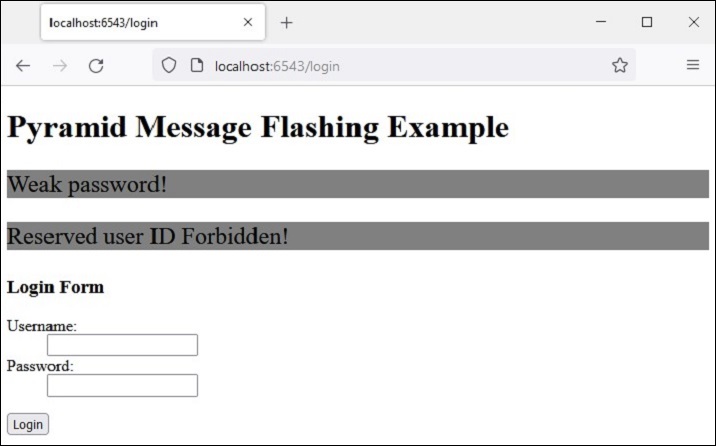
尝试输入一个保留用户名“admin”、“manager”或“supervisor”。错误消息将如下所示闪现:
这次,输入可接受的凭据并查看结果: