
- Python Pyramid 教程
- Python Pyramid - 首页
- Python Pyramid - 概述
- Pyramid - 环境设置
- Python Pyramid - Hello World
- Pyramid - 应用配置
- Python Pyramid - URL 路由
- Python Pyramid - 视图配置
- Python Pyramid - 路由前缀
- Python Pyramid - 模板
- Pyramid - HTML 表单模板
- Python Pyramid - 静态资源
- Python Pyramid - 请求对象
- Python Pyramid - 响应对象
- Python Pyramid - 会话
- Python Pyramid - 事件
- Python Pyramid - 消息闪现
- Pyramid - 使用 SQLAlchemy
- Python Pyramid - Cookiecutter
- Python Pyramid - 创建项目
- Python Pyramid - 项目结构
- Python Pyramid - 包结构
- 手动创建项目
- 命令行 Pyramid
- Python Pyramid - 测试
- Python Pyramid - 日志记录
- Python Pyramid - 安全性
- Python Pyramid - 部署
- Python Pyramid 有用资源
- Python Pyramid - 快速指南
- Python Pyramid - 有用资源
- Python Pyramid - 讨论
Python Pyramid - URL 路由
在 MVC 架构出现之前,Web 应用使用将用户在浏览器中输入的 URL 映射到程序文件,该程序文件的输出被渲染为 HTML 作为响应返回到浏览器的机制。Pyramid 框架使用路由机制,其中 URL 的端点与应用注册表中注册的不同 URL 模式匹配,调用其映射的视图并呈现响应。
一个典型的 URL 包含三个部分:协议(例如 http:// 或 https://)后跟 IP 地址或主机名。主机名之后第一个 / 后面的 URL 剩余部分称为路径或端点。
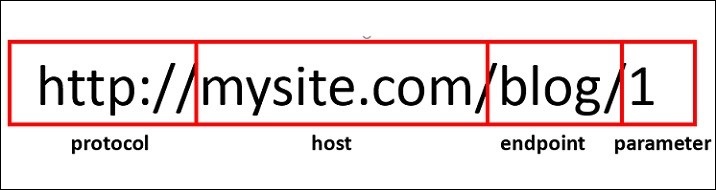
端点后跟一个或多个可变部分构成路由。可变部分标识符用花括号括起来。例如,对于上述 URL,路由为 /blog/{id}
WSGI 应用充当路由器。它根据路由映射中存在的 URL 模式检查传入请求。如果找到匹配项,则执行其关联的视图可调用项并返回响应。
路由配置
通过调用 Configurator 对象的 add_route() 方法,将新路由添加到应用中。路由有一个名称,用作 URL 生成时使用的标识符,以及一个模式,该模式旨在与 URL 的 PATH_INFO 部分(方案和端口之后的部分,例如 URL http://example.com/blog/1 中的 /blog/1)匹配。
如前所述,add_route() 方法的 pattern 参数可以有一个或多个用花括号括起来并用 / 分隔的占位符标识符。以下语句将 'index' 作为分配给 '/{name}/{age}' 模式的路由名称。
config.add_route('index', '/{name}/{age}')
要将视图可调用项与该路由关联,我们使用 add_view() 函数,如下所示:
config.add_view(index, route_name='index')
index() 函数应可用于将路由与其匹配。
def index(request):
   return Response('Root Configuration Example')
示例
我们将这些语句放在下面的程序中:
from wsgiref.simple_server import make_server
from pyramid.config import Configurator
from pyramid.response import Response

def index(request):
   return Response('Root Configuration Example')

if __name__ == '__main__':
   with Configurator() as config:
      config.add_route('index', '/{name}/{age}')
      config.add_view(index, route_name='index')
      app = config.make_wsgi_app()
server = make_server('0.0.0.0', 6543, app)
server.serve_forever()
输出
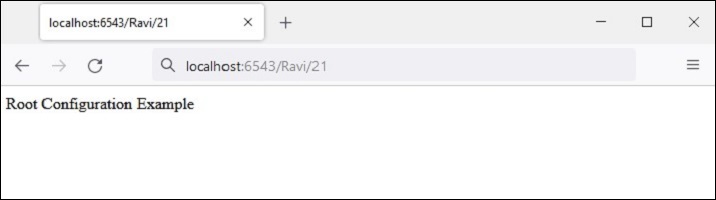
运行以上代码并在浏览器中访问 https://:6543/Ravi/21。由于 URL 的 PATH_INFO 与 index 路由匹配,因此显示以下输出:
路由配置中使用的模式通常以正斜杠 (/) 字符开头。模式段(模式中 / 字符之间的单个项目)可以是文字字符串,也可以是占位符标记(例如 {name}),或者两者组合。替换标记不需要以 / 字符开头。
以下是一些路由模式示例
/student/{name}/{marks}
/{id}/student/{name}/{marks}
/customer/{id}/item/{itemno}
/{name}/{age}
占位符标识符必须是有效的 Python 标识符。因此,它必须以大写或小写 ASCII 字母或下划线开头,并且只能包含大写或小写 ASCII 字母、下划线和数字。
路由匹配
当传入请求与特定路由配置关联的 URL 模式匹配时,名为 matchdict 的字典对象作为请求对象的属性添加。
request.matchdict 包含与模式元素中的替换模式匹配的值。matchdict 中的键是字符串,而它们的值是 Unicode 对象。
在上一个示例中,将 index() 视图函数更改为以下内容:
def index(request):
   return Response(str(request.matchdict))
浏览器以 dict 对象的形式显示路径参数。
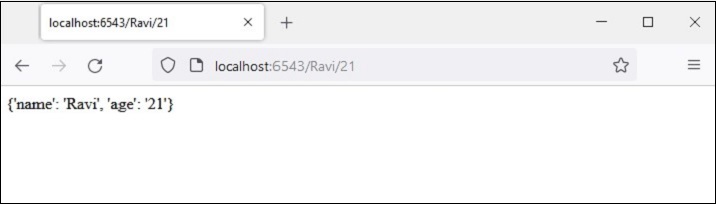
当请求与路由模式匹配时,传递给视图函数的请求对象还包括 matched_route 属性。匹配路由的名称可以从其 name 属性获取。
示例
在以下示例中,我们使用 @view.config() 装饰器定义了两个视图函数 student_view() 和 book_view()。
应用的注册表配置为具有两个相应的路由 - 'student' 映射到 '/student/{name}/{age}' 模式,'book' 映射到 '/book/{title}/{price}' 模式。我们调用 configurator 对象的 scan() 方法来添加视图。
from wsgiref.simple_server import make_server
from pyramid.config import Configurator
from pyramid.response import Response
from pyramid.view import view_config

@view_config(route_name='student')
def student_view(request):
   return Response(str(request.matchdict))
@view_config(route_name='book')
def book_view(request):
   title=request.matchdict['title']
   price=request.matchdict['price']
   return Response('Title: {}, Price: {}'.format(title,price))
if __name__ == '__main__':
   with Configurator() as config:
      config.add_route('student', '/student/{name}/{age}')
      config.add_route('book', '/book/{title}/{price}')
      config.scan()
      app = config.make_wsgi_app()
   server = make_server('0.0.0.0', 6543, app)
   server.serve_forever()
输出
当浏览器给出 https://:6543/student/Ravi/21 URL 时,输出为
{'name': 'Ravi', 'age': '21'}
如果输入的 URL 为 https://:6543/book/Python/300,则输出为
Title: Python, Price: 300