
- Python Pyramid 教程
- Python Pyramid - 首页
- Python Pyramid - 概述
- Pyramid - 环境设置
- Python Pyramid - Hello World
- Pyramid - 应用配置
- Python Pyramid - URL 路由
- Python Pyramid - 视图配置
- Python Pyramid - 路由前缀
- Python Pyramid - 模板
- Pyramid - HTML 表单模板
- Python Pyramid - 静态资源
- Python Pyramid - 请求对象
- Python Pyramid - 响应对象
- Python Pyramid - 会话
- Python Pyramid - 事件
- Python Pyramid - 消息闪现
- Pyramid - 使用 SQLAlchemy
- Python Pyramid - Cookiecutter
- Python Pyramid - 创建项目
- Python Pyramid - 项目结构
- Python Pyramid - 包结构
- 手动创建项目
- 命令行 Pyramid
- Python Pyramid - 测试
- Python Pyramid - 日志记录
- Python Pyramid - 安全性
- Python Pyramid - 部署
- Python Pyramid 有用资源
- Python Pyramid - 快速指南
- Python Pyramid - 有用资源
- Python Pyramid - 讨论
Python Pyramid - 安全性
Pyramid 的声明式安全系统确定当前用户的身份并验证用户是否可以访问某些资源。安全策略可以阻止用户调用视图。在调用任何视图之前,授权系统使用请求中的凭据来确定是否允许访问。
安全策略定义为一个类,它借助于在pyramid.security模块中定义的以下方法来控制用户访问权限:
forget(request) - 此方法返回适合“忘记”当前已认证用户拥有的凭据集的标头元组。它通常在视图函数的主体中使用。
remember(request, userid) - 此方法在请求的响应上返回标头元组序列。它们适合于使用当前安全策略“记住”一组凭据,例如 userid。常见的用法可能如下所示,在视图函数的主体中。
已认证用户的访问权限由此模块中Allowed和Denied类的对象控制。
为了实现身份、记住和忘记机制的功能,Pyramid 提供了在pyramid.authentication模块中定义的以下辅助类:
SessionAuthenticationHelper - 将 userid 存储在会话中。
AuthTktCookieHelper - 使用“身份验证票证”cookie 存储 userid。
我们还可以使用extract_http_basic_credentials()函数通过 HTTP 基本身份验证检索用户凭据。
要从 WSGI 环境中的 REMOTE_USER 中检索 userid,可以使用request.environ.get('REMOTE_USER')。
示例
现在让我们学习如何借助以下示例实现安全策略。“development.ini”的示例如下:
[app:main]
use = egg:tutorial
pyramid.reload_templates = true
pyramid.includes = pyramid_debugtoolbar
hello.secret = a12b

[server:main]
use = egg:waitress#main
listen = localhost:6543
然后,我们在以下 Python 代码中编写安全策略类,并将其保存为security.py:
from pyramid.authentication import AuthTktCookieHelper
USERS = {'admin': 'admin', 'manager': 'manager'}
class SecurityPolicy:
   def __init__(self, secret):
      self.authtkt = AuthTktCookieHelper(secret=secret)
   def identity(self, request):
      identity = self.authtkt.identify(request)
      if identity is not None and identity['userid'] in USERS:
      return identity
   def authenticated_userid(self, request):
      identity = self.identity(request)
      if identity is not None:
         return identity['userid']
   def remember(self, request, userid, **kw):
      return self.authtkt.remember(request, userid, **kw)
   def forget(self, request, **kw):
      return self.authtkt.forget(request, **kw)
我们包文件夹中的__init__.py文件定义了以下配置。上面定义的安全策略类使用Configurator类的set_security_policy()方法添加到配置中。三个路由 - home、login 和 logout - 添加到配置中。
from pyramid.config import Configurator
from .security import SecurityPolicy

def main(global_config, **settings):
   config = Configurator(settings=settings)
   config.include('pyramid_chameleon')
   config.set_security_policy(
      SecurityPolicy(
         secret=settings['hello.secret'],
      ),
   )
   config.add_route('home', '/')
   config.add_route('login', '/login')
   config.add_route('logout', '/logout')
   config.scan('.views')
   return config.make_wsgi_app()
三个与上述路由对应的视图在 views.py 中定义。
from pyramid.httpexceptions import HTTPFound
from pyramid.security import remember, forget

from pyramid.view import view_config, view_defaults
from .security import USERS

@view_defaults(renderer='home.pt')
class HelloViews:
   def __init__(self, request):
      self.request = request
      self.logged_in = request.authenticated_userid
   @view_config(route_name='home')
   def home(self):
      return {'name': 'Welcome'}
   @view_config(route_name='login', renderer='login.pt')
   def login(self):
      request = self.request
      login_url = request.route_url('login')
      referrer = request.url
      if referrer == login_url:
         referrer = '/'
      came_from = request.params.get('came_from', referrer)
      message = ''
      login = ''
      password = ''
      if 'form.submitted' in request.params:
         login = request.params['login']
         password = request.params['password']
         pw = USERS.get(login)
         if pw == password:
            headers = remember(request, login)
            return HTTPFound(location=came_from, headers=headers)
         message = 'Failed login'
         return dict(
            name='Login', message=message,
            url=request.application_url + '/login',
            came_from=came_from,
            login=login, password=password,)

   @view_config(route_name='logout')
   def logout(self):
      request = self.request
      headers = forget(request)
      url = request.route_url('home')
      return HTTPFound(location=url, headers=headers)
login 视图呈现登录表单。当用户输入的用户 ID 和密码针对 USERS 列表进行验证时,“记住”这些详细信息。另一方面,logout 视图通过“忘记”来释放这些详细信息。
home 视图呈现以下变色龙模板 - home.pt
<!DOCTYPE html>
<html lang="en">
<body>
   <div>
      <a tal:condition="view.logged_in is None" href="${request.application_url}/login">Log In</a>
      <a tal:condition="view.logged_in is not None" href="${request.application_url}/logout">Logout</a>
   </div>
   <h1>Hello. ${name}</h1>
</body>
</html>
以下是 login 视图的变色龙模板login.pt。
<!DOCTYPE html>
<html lang="en">
<body>
   <h1>Login</h1>
   <span tal:replace="message"/>

   <form action="${url}" method="post">
      <input type="hidden" name="came_from" value="${came_from}"/>
      <label for="login">Username</label>
      <input type="text" id="login" name="login" value="${login}"/><br/>
      <label for="password">Password</label>
      <input type="password" id="password" name="password" value="${password}"/><br/>
      <input type="submit" name="form.submitted" value="Log In"/>
   </form>
</body>
</html>
development.ini 和 setup.py 放在外部项目文件夹中,而__init__.py、views.py、security.py和模板home.pt以及login.pt应保存在名为 hello 的包文件夹下。
使用以下命令安装包:
Env\hello>pip3 install -e.
使用pserve实用程序启动服务器。
pserve development.ini
输出
打开浏览器并访问https://:6543/链接。

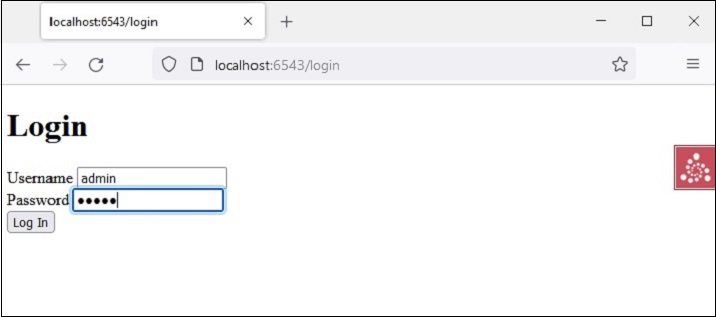
单击“登录”链接以打开登录表单:
主页返回,链接更改为注销,因为凭据已记住。
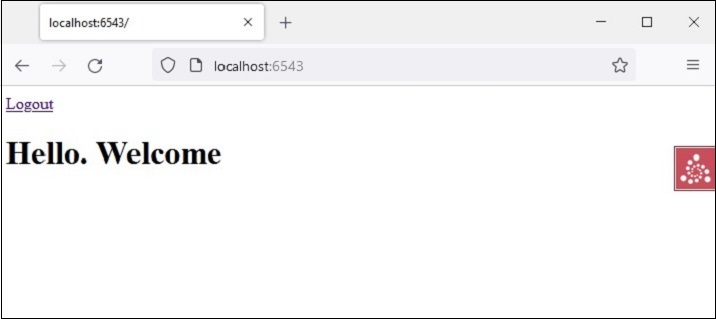
单击“注销”链接将导致忘记凭据并显示默认主页。