
- SpecFlow 教程
- SpecFlow - 首页
- SpecFlow - 简介
- 测试驱动开发
- 行为驱动开发
- SpecFlow - Visual Studio 安装
- Visual Studio 扩展安装
- SpecFlow - 项目设置
- 其他项目依赖项
- SpecFlow - 运行器激活
- SpecFlow - HTML 报告
- SpecFlow - 绑定测试步骤
- SpecFlow - 创建第一个测试
- 配置 Selenium Webdriver
- SpecFlow - Gherkin
- SpecFlow - Gherkin 关键字
- SpecFlow - 特性文件
- SpecFlow - 步骤定义文件
- SpecFlow - Hook
- SpecFlow - 背景说明
- 使用示例进行数据驱动测试
- 不使用示例进行数据驱动测试
- 表格转换为数据表
- 表格转换为字典
- 使用 CreateInstance 的表格
- SpecFlow - 使用 CreateSet 的表格
- SpecFlow 有用资源
- SpecFlow - 快速指南
- SpecFlow - 有用资源
- SpecFlow - 讨论
SpecFlow - 使用示例进行数据驱动测试
我们可以借助关键字Examples执行数据驱动测试。我们还将借助关键字Scenario Outline在多个值上执行相同的场景。
需要考虑的数据集将按顺序传递到 Examples 部分下方,并以|符号分隔。因此,如果存在三行,我们将从单个场景执行三个测试用例。
Scenario Outline用于使用不同的数据集复制相同的场景。使用不同的值编写相同的测试既麻烦又耗时。例如,
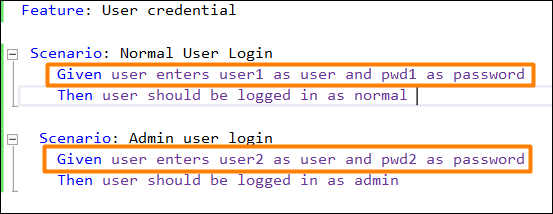
我们可以使用Scenario Outline将以上两个场景组合起来。

因此,我们看到 Scenario Outline 应该与关键字Examples一起使用。对于 Examples 段下方出现的每一行,Scenario Outline 都将执行一次。
此外,我们还看到 Given 步骤具有<>分隔符。它指向 Examples 表的标题。SpecFlow 将在将步骤与步骤定义匹配的任务之前,将值放入此表中。
要验证登录模块,我们需要执行以下步骤:
用户输入用户名和密码。
验证用户应该能够登录。
我们将以上步骤合并到特性文件中。
步骤 1:创建特性文件
有关如何创建特性文件的详细信息在“特性文件”章节中进行了详细讨论。
Feature: User credential
Scenario Outline: Login module
   Given user types <username> and <password>
   Then user should be able to login
   Examples:
   | username       | password |
   | tutorialspoint1| pwd      |
   | tutorialspoint2| pwd1     |
步骤 2:步骤定义文件
有关如何创建步骤定义文件的详细信息在“步骤定义文件”章节中进行了详细讨论。
using System;
using TechTalk.SpecFlow;
namespace SpecFlowProject1.Features{
   [Binding]
   public class UserCredentialSteps{
      //regular expression used to point to data
      [Given(@"user types (.*) and (.*)")]
      public void GivenUserTypesUserAndPwds(string username, string password){
         Console.WriteLine(username);
         Console.WriteLine(password);
      }
      [Then(@"user should be able to login")]
      public void ThenUserShouldBeAbleToLogin(){
         Console.WriteLine("User should be able to login");
      }
   }
}
步骤 3:执行和结果
选择用户凭据(2),然后单击“查看”中的“运行所有测试”。
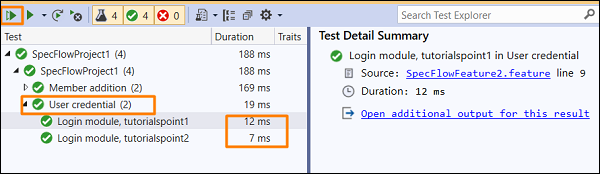
选择登录模块、tutorialspoint1 场景,然后单击“为此结果打开其他输出”链接。

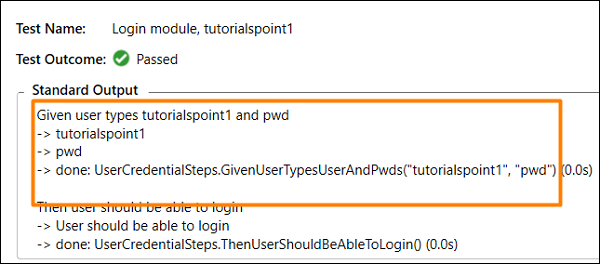
场景已执行,用户名为 tutorialspoint1,密码为 pwd,如 Examples(第一行)中指定。
选择登录模块、tutorialspoint2 场景,然后单击“为此结果打开其他输出”链接。

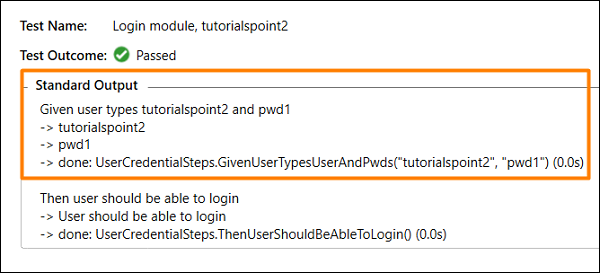
测试已执行,用户名为 tutorialspoint2,密码为 pwd1,如 Examples(第二行)中指定。
广告