
- Spring Security 教程
- Spring Security - 首页
- Spring Security - 简介
- Spring Security - 架构
- Spring Security - 项目模块
- Spring Security - 环境搭建
- Spring Security - 表单登录
- Spring Security - 自定义表单登录
- Spring Security - 注销
- Spring Security - 记住我
- Spring Security - 重定向
- Spring Security - 标签库
- Spring Security - XML 配置
- Spring Security - 认证提供者
- Spring Security - 基本认证
- Spring Security - AuthenticationFailureHandler
- Spring Security - JWT
- Spring Security - 获取用户信息
- Spring Security - Maven
- Spring Security - 默认密码编码器
- Spring Security – 密码编码
- Spring Security - 方法级别
- Spring Security 有用资源
- Spring Security - 快速指南
- Spring Security - 有用资源
- Spring Security - 讨论
Spring Security - 获取用户信息
Spring Security 在用户认证后会在 SecurityContext 中提供用户信息。我们可以通过几种方式检索用户详细信息。让我们逐一讨论。
使用 SecurityContextHolder
SecurityContextHolder 提供对安全上下文的静态访问,可用于获取 Authentication 实例。一旦 Authentication 实例可用,我们就可以像下面所示轻松获取用户名
Authentication authentication = SecurityContextHolder.getContext().getAuthentication();
String username = authentication.getName();
这种方法适用于任何类检索用户详细信息,而不限于控制器类。
使用 Principal
我们可以将 Principal 作为控制器类方法的参数,然后可以使用它来获取用户名称,如下所示
@Controller
public class AuthController {
...
@GetMapping("/admin")
public String admin(Principal principal) {
   String username = principal.getName();
   System.out.println("AuthController.admin()::Username: " + username);
   ...
}
使用 Authetication
我们可以将 Authentication 作为控制器类方法的参数,然后可以使用它来获取用户名称和角色,如下所示
@Controller
public class AuthController {
...
@GetMapping("/admin")
public String admin(Authentication authentication) {
   String username = authentication.getName();
   System.out.println("AuthController.admin()::Username: " + username);

   UserDetails userDetails = (UserDetails) authentication.getPrincipal();
   System.out.println("User Role: " + userDetails.getAuthorities());
   ...
}
使用 HttpServletRequest
我们可以将 HttpServletRequest 作为控制器类方法的参数来获取 UserPrincipal,然后可以使用它来获取用户名称,如下所示
@Controller
public class AuthController {
...
@GetMapping("/admin")
public String admin(HttpServletRequest request) {
   Principal principal = request.getUserPrincipal();
   String username = principal.getName();
   System.out.println("AuthController.admin()::Username: " + username);
   ...
}
使用 @AuthenticationPrincipal 注解注入 UserDetails
我们可以在控制器类方法中使用 @AuthenticationPrincipal 注解来获取 UserDetails,然后可以使用它来获取用户名称,如下所示
@Controller
public class AuthController {
...
@GetMapping("/admin")
public String admin(@AuthenticationPrincipal UserDetails userDetails) {
   String username = userDetails.getUsername();
   System.out.println("AuthController.admin()::Username: " + username);
   ...
}
使用 Thymeleaf 模板引擎
Thymeleaf 是一个服务器端 Web 模板引擎,并提供与 Spring MVC 的轻松集成。我们可以指定身份验证标签来获取用户名,如下所示
<!DOCTYPE html>
<html xmlns="http://www.w3.org/1999/xhtml"
   xmlns:th="https://www.thymeleaf.org"
   xmlns:sec="https://www.thymeleaf.org/thymeleaf-extras-springsecurity6">
   ...
      <h1 th:inline="text">Hello <span sec:authentication="name"></span>!</h1>
   ...
<html>
我们需要添加以下 thymeleaf spring 依赖项以将 thymeleaf 与 Spring security 集成。
<dependency>
   <groupId>org.springframework.boot</groupId>
   <artifactId>spring-boot-starter-thymeleaf</artifactId>
</dependency>
<dependency>
   <groupId>org.thymeleaf.extras</groupId>
   <artifactId>thymeleaf-extras-springsecurity6</artifactId>
</dependency>
现在让我们看看以下完整代码中各种选项的实际操作。
在开始使用 Spring 框架编写第一个示例之前,您必须确保已正确设置 Spring 环境,如 Spring Security - 环境搭建 章节中所述。我们还假设您对 Spring Tool Suite IDE 有基本的了解。
现在让我们继续编写一个基于 Spring MVC 的应用程序,该应用程序由 Maven 管理,它将要求用户登录、对用户进行身份验证,然后提供使用 Spring Security 表单登录功能注销的选项。
使用 Spring Initializr 创建项目
Spring Initializr 是开始 Spring Boot 项目的好方法。它提供了一个易于使用的用户界面来创建项目、添加依赖项、选择 Java 运行时等。它生成一个骨架项目结构,下载后可以在 Spring Tool Suite 中导入,然后我们可以继续使用我们的现成项目结构。
我们选择一个 Maven 项目,将项目命名为 formlogin,Java 版本为 21。添加了以下依赖项
Spring Web
Spring Security
Spring Boot DevTools
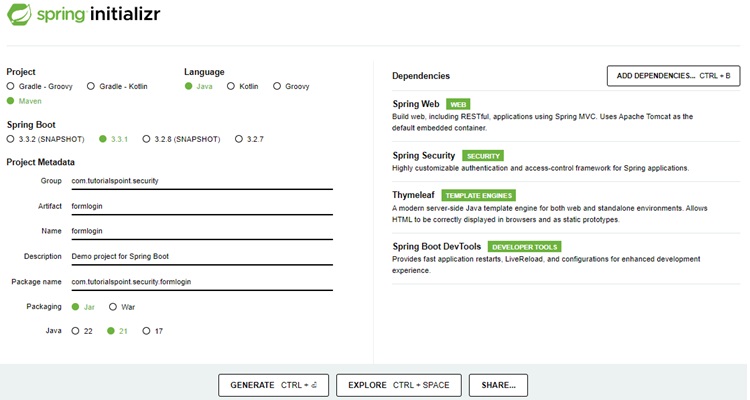
Thymeleaf 是一个用于 Java 的模板引擎。它允许我们快速开发静态或动态网页以在浏览器中呈现。它具有极强的扩展性,允许我们详细定义和自定义模板的处理过程。此外,我们可以通过点击此 链接 了解更多关于 Thymeleaf 的信息。
让我们继续生成我们的项目并下载它。然后我们将其解压缩到我们选择的文件夹中,并使用任何 IDE 打开它。我将使用 Spring Tools Suite 4。它可以从 https://springframework.org.cn/tools 网站免费下载,并针对 Spring 应用程序进行了优化。
包含所有相关依赖项的 pom.xml
让我们看一下我们的 pom.xml 文件。它应该看起来与此类似 -
pom.xml
<?xml version="1.0" encoding="UTF-8"?>
<project xmlns="http://maven.apache.org/POM/4.0.0" xmlns:xsi="http://www.w3.org/2001/XMLSchema-instance"
xsi:schemaLocation="http://maven.apache.org/POM/4.0.0 https://maven.apache.org/xsd/maven-4.0.0.xsd">
   <modelVersion>4.0.0</modelVersion>
   <parent>
      <groupId>org.springframework.boot</groupId>
      <artifactId>spring-boot-starter-parent</artifactId>
      <version>3.3.1</version>
      <relativePath/> <!-- lookup parent from repository -->
   </parent>
   <groupId>com.tutorialspoint.security</groupId>
   <artifactId>formlogin</artifactId>
   <version>0.0.1-SNAPSHOT</version>
   <name>formlogin</name>
   <description>Demo project for Spring Boot</description>
   <url/>
   <licenses>
      <license/>
   </licenses>
   <developers>
      <developer/>
   </developers>
   <scm>
      <connection/>
      <developerConnection/>
      <tag/>
      <url/>
   </scm>
   <properties>
      <java.version>21</java.version>
   </properties>
   <dependencies>
      <dependency>
         <groupId>org.springframework.boot</groupId>
         <artifactId>spring-boot-starter-security</artifactId>
      </dependency>
      <dependency>
         <groupId>org.springframework.boot</groupId>
         <artifactId>spring-boot-starter-thymeleaf</artifactId>
      </dependency>
      <dependency>
         <groupId>org.springframework.boot</groupId>
         <artifactId>spring-boot-starter-web</artifactId>
      </dependency>
      <dependency>
         <groupId>org.thymeleaf.extras</groupId>
         <artifactId>thymeleaf-extras-springsecurity6</artifactId>
      </dependency>
      <dependency>
         <groupId>org.springframework.boot</groupId>
         <artifactId>spring-boot-devtools</artifactId>
         <scope>runtime</scope>
         <optional>true</optional>
      </dependency>
      <dependency>
         <groupId>org.springframework.boot</groupId>
         <artifactId>spring-boot-starter-test</artifactId>
         <scope>test</scope>
      </dependency>
      <dependency>
         <groupId>org.springframework.security</groupId>
         <artifactId>spring-security-test</artifactId>
         <scope>test</scope>
      </dependency>
   </dependencies>
   <build>
      <plugins>
         <plugin>
            <groupId>org.springframework.boot</groupId>
            <artifactId>spring-boot-maven-plugin</artifactId>
         </plugin>
      </plugins>
   </build>
</project>
Spring Security 配置类
在我们的 config 包中,我们创建了 WebSecurityConfig 类。我们将使用此类进行我们的安全配置,因此让我们使用 @Configuration 注解和 @EnableWebSecurity 对其进行注释。因此,Spring Security 知道将此类视为一个配置类。正如我们所看到的,Spring 使配置应用程序变得非常容易。
WebSecurityConfig
package com.tutorialspoint.security.formlogin.config;

import org.springframework.context.annotation.Bean;
import org.springframework.context.annotation.Configuration;
import org.springframework.security.config.annotation.web.builders.HttpSecurity;
import org.springframework.security.config.annotation.web.configuration.EnableWebSecurity;
import org.springframework.security.config.annotation.web.configurers.AbstractHttpConfigurer;
import org.springframework.security.core.userdetails.User;
import org.springframework.security.core.userdetails.UserDetails;
import org.springframework.security.core.userdetails.UserDetailsService;
import org.springframework.security.crypto.bcrypt.BCryptPasswordEncoder;
import org.springframework.security.crypto.password.PasswordEncoder;
import org.springframework.security.provisioning.InMemoryUserDetailsManager;
import org.springframework.security.web.SecurityFilterChain;

@Configuration
@EnableWebSecurity
public class WebSecurityConfig  {

   @Bean
   protected UserDetailsService userDetailsService() {
      UserDetails user = User.builder()
         .username("user")
         .password(passwordEncoder().encode("user123"))
         .roles("USER")
         .build();
      UserDetails admin = User.builder()
         .username("admin")
         .password(passwordEncoder().encode("admin123"))
         .roles("USER", "ADMIN")
         .build();
      return new InMemoryUserDetailsManager(user, admin);
   }

   @Bean
   protected PasswordEncoder passwordEncoder() {
      return new BCryptPasswordEncoder();
   }

   @Bean
   protected SecurityFilterChain filterChain(HttpSecurity http) throws Exception {
      return http
         .csrf(AbstractHttpConfigurer::disable)
         .authorizeHttpRequests(
            request -> request.requestMatchers("/login").permitAll()
         .requestMatchers("/**").authenticated()
      )
      .formLogin(form -> form.loginPage("/login")
      .defaultSuccessUrl("/")
      .failureUrl("/login?error=true")
      .permitAll())
      .logout(config -> config
      .logoutUrl("/logout")
      .logoutSuccessUrl("/login"))
      .build();
   }
}
控制器类
在这个类中,我们为该应用程序的索引、登录、管理员页面创建了多个端点的映射。
AuthController
package com.tutorialspoint.security.formlogin.controllers;

import java.security.Principal;

import org.springframework.security.core.Authentication;
import org.springframework.security.core.annotation.AuthenticationPrincipal;
import org.springframework.security.core.context.SecurityContextHolder;
import org.springframework.security.core.userdetails.UserDetails;
import org.springframework.stereotype.Controller;
import org.springframework.web.bind.annotation.GetMapping;

import jakarta.servlet.http.HttpServletRequest;

@Controller
public class AuthController {
   @GetMapping("/")
   public String home(Authentication authentication, HttpServletRequest request) {
      // get username from Authetication instance
      String username = authentication.getName();
      System.out.println("AuthController.home()::Username: " + username);

      // get principal instance from Authentication instance to get user role
      UserDetails userDetails = (UserDetails) authentication.getPrincipal();
      System.out.println("User Role: " + userDetails.getAuthorities());

      // get principal instance from HTTP Request
      Principal principal = request.getUserPrincipal();
      // get username
      username = principal.getName();

      System.out.println("AuthController.home()::principal.getName(): " + username);
      return "index";
   }

   @GetMapping("/login")
   public String login() {
      return "login";
   }
   @GetMapping("/user")
   public String user() {
      // get authentication instance from Security Context
      Authentication authentication = SecurityContextHolder.getContext().getAuthentication();
      // get the user name
      String username = authentication.getName();
      System.out.println("AuthController.user()::Username: " + username);
      return "user";
   }
   @GetMapping("/admin")
   public String admin(Principal principal, @AuthenticationPrincipal UserDetails userDetails) {
      // get the username from principal instance
      String username = principal.getName();
      System.out.println("AuthController.admin()::Username: " + username);

      // get the username from userdetails instance
      username = userDetails.getUsername();
      System.out.println("AuthController.admin()::userDetails.getUsername(): " + username);
      return "admin";
   }
}
视图
在 /src/main/resources/templates 文件夹中创建 index.html,其内容如下,用作主页。
index.html
<!DOCTYPE html>
<html xmlns="http://www.w3.org/1999/xhtml"
   xmlns:th="https://www.thymeleaf.org"
   xmlns:sec="https://www.thymeleaf.org/thymeleaf-extras-springsecurity6">
   <head>
      <title>
         Hello World!
      </title>
   </head>
   <body>
      <h1 th:inline="text">Hello World!</h1>
      <a href="/logout" alt="logout">Sign Out</a>
   </body>
<html>
在 /src/main/resources/templates 文件夹中创建 user.html,其内容如下,用作用户页面。
user.html
<!DOCTYPE html>
<html xmlns="http://www.w3.org/1999/xhtml"
   xmlns:th="https://www.thymeleaf.org"
   xmlns:sec="https://www.thymeleaf.org/thymeleaf-extras-springsecurity6">
   <head>
      <title>
         Hello User!
      </title>
   </head>
   <body>
      <p>User Dashboard</p>
      <h1 th:inline="text">Hello <span sec:authentication="name"></span>!</h1>
      <a href="/logout" alt="logout">Sign Out</a>
   </body>
<html>
在 /src/main/resources/templates 文件夹中创建 admin.html,其内容如下,用作管理员页面。
admin.html
<!DOCTYPE html>
<html xmlns="http://www.w3.org/1999/xhtml"
   xmlns:th="https://www.thymeleaf.org"
   xmlns:sec="https://www.thymeleaf.org/thymeleaf-extras-springsecurity6">
   <head>
      <title>
         Hello User!
      </title>
   </head>
   <body>
      <p>User Dashboard</p>
      <h1 th:inline="text">Hello <span sec:authentication="name"></span>!</h1>
      <a href="/logout" alt="logout">Sign Out</a>
   </body>
<html>
运行应用程序
由于我们所有组件都已准备就绪,因此让我们运行应用程序。右键单击项目,选择 Run As,然后选择 Spring Boot App。
它将启动应用程序,并且在应用程序启动后,我们可以运行 localhost:8080 以检查更改。
输出
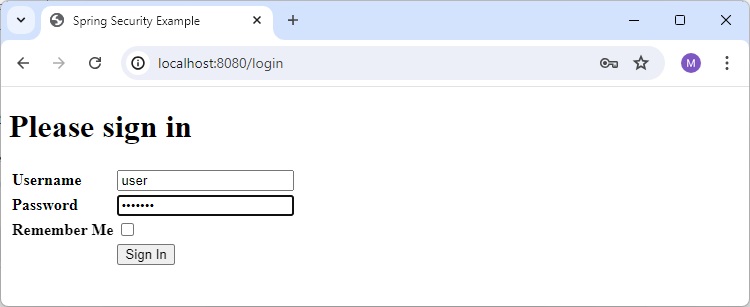
现在打开 localhost:8080,您可以看到登录页面。
主页
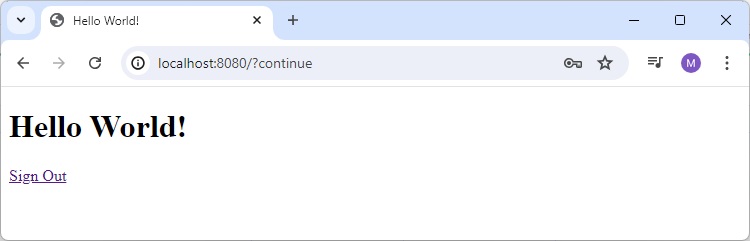
检查主页日志
现在检查应用程序日志。除了 Spring Boot 日志之外,它还将包含以下条目
AuthController.home()::Username: user
User Role: [ROLE_USER]
AuthController.home()::principal.getName(): user
用户页面
现在打开 localhost:8080/user,您可以在应用程序日志中检查以下日志。
AuthController.user()::Username: user
您也可以检查 html 中显示的用户名。

管理员页面
现在打开 localhost:8080/admin,您可以在应用程序日志中检查以下日志。
AuthController.admin()::Username: user
AuthController.admin()::userDetails.getUsername(): user