- Spring Security 教程
- Spring Security - 首页
- Spring Security - 简介
- Spring Security - 架构
- Spring Security - 项目模块
- Spring Security - 环境搭建
- Spring Security - 表单登录
- Spring Security - 自定义表单登录
- Spring Security - 注销
- Spring Security - 记住我
- Spring Security - 重定向
- Spring Security - 标签库
- Spring Security - XML 配置
- Spring Security - 身份验证提供程序
- Spring Security - 基本身份验证
- Spring Security - AuthenticationFailureHandler
- Spring Security - JWT
- Spring Security - 获取用户信息
- Spring Security - Maven
- Spring Security - 默认密码编码器
- Spring Security – 密码编码
- Spring Security - 方法级别
- Spring Security 有用资源
- Spring Security - 快速指南
- Spring Security - 有用资源
- Spring Security - 讨论
Spring Security - JWT
概述
JSON Web Token 或 JWT,更常见的是这样称呼,是一种开放的互联网标准 (RFC 7519),用于以紧凑的方式安全地传输各方之间的可信信息。令牌包含编码为 JSON 对象的声明,并使用私钥或公钥/私钥对进行数字签名。它们是自包含且可验证的,因为它们经过数字签名。JWT 可以被签名和/或加密。签名的令牌验证令牌中包含的声明的完整性,而加密的令牌则向其他方隐藏声明。
JWT 也可以用于信息交换,尽管它们更常用于授权,因为它们比使用内存中随机令牌的会话管理具有许多优势。其中最大的一点是能够将身份验证逻辑委派给第三方服务器,例如AuthO 等。
JWT 令牌分为三个部分:标头、有效负载和签名,格式如下:
[Header].[Payload].[Signature]
标头 - JWT 标头包含应用于 JWT 的密码操作列表。这可以是签名技术、关于内容类型的元数据信息等等。标头以 JSON 对象的形式呈现,并编码为 base64URL。有效的 JWT 标头的示例如下:
{ "alg": "HS256", "typ": "JWT" }这里,“alg”提供关于所用算法类型的信息,“typ”提供信息类型。
有效负载 - JWT 的有效负载部分包含使用令牌传输的实际数据。这部分也称为 JWT 令牌的“声明”部分。声明可以分为三种类型:注册的、公共的和私有的。
注册的声明是推荐但非强制性声明,例如 iss(发行者)、sub(主题)、aud(受众)等。
公共声明是由使用 JWT 的用户定义的声明。
私有声明或自定义声明是为在相关各方之间共享信息而创建的用户定义声明。
有效负载对象的示例可能是:
{ "sub": "12345", "name": "Johnny Hill", "admin": false }有效负载对象与标头对象一样,也进行 base64Url 编码,此字符串构成 JWT 的第二部分。
签名 - JWT 的签名部分用于验证消息在传输过程中是否未被更改。如果令牌使用私钥签名,它还验证发送者是否是它声称的那个人。它是使用编码的标头、编码的有效负载、密钥和标头中指定的算法创建的。签名的示例如下:
HMACSHA256( base64UrlEncode(header) + "." + base64UrlEncode(payload), secret)
如果我们把标头、有效负载和签名放在一起,我们会得到如下所示的令牌。
eyJhbGciOiJSUzI1NiIsInR5cCI6IkpXVCJ9.eyJzdWIiOiIxMjM0NTY3ODkwIiwibmFtZSI6I
kpvaG4gRG9lIiwiYWRtaW4iOmZhbHNlfQ.gWDlJdpCTIHVYKkJSfAVNUn0ZkAjMxskDDm-5Fhe
WJ7xXgW8k5CllcGk4C9qPrfa1GdqfBrbX_1x1E39JY8BYLobAfAg1fs_Ky8Z7U1oCl6HL63yJq_
wVNBHp49hWzg3-ERxkqiuTv0tIuDOasIdZ5FtBdtIP5LM9Oc1tsuMXQXCGR8GqGf1Hl2qv8MCyn
NZJuVdJKO_L3WGBJouaTpK1u2SEleVFGI2HFvrX_jS2ySzDxoO9KjbydK0LNv_zOI7kWv-gAmA
j-v0mHdJrLbxD7LcZJEGRScCSyITzo6Z59_jG_97oNLFgBKJbh12nvvPibHpUYWmZuHkoGvuy5RLUA
现在,此令牌可用于使用 Bearer 模式在 Authorization 标头中,如Authorization - Bearer <token>
JWT 令牌用于授权是最常见的应用。令牌通常在服务器中生成并发送到客户端,并在会话存储或本地存储中存储。为了访问受保护的资源,客户端会在标头中发送 JWT,如上所示。我们将在下面的部分中看到 Spring Security 中的 JWT 实现。
让我们开始使用 Spring Security 进行实际编程。在开始使用 Spring 框架编写您的第一个示例之前,您必须确保已正确设置 Spring 环境,如Spring Security - 环境搭建章节中所述。我们还假设您对 Spring Tool Suite IDE 有点了解。
现在让我们继续编写一个基于 Spring MVC 的应用程序,该应用程序由 Maven 管理,它将要求用户登录、验证用户身份,然后使用 Spring Security 表单登录功能提供注销选项。
使用 Spring Initializr 创建项目
Spring Initializr 是开始 Spring Boot 项目的好方法。它提供了一个易于使用的用户界面来创建项目、添加依赖项、选择 Java 运行时等。它生成一个骨架项目结构,下载后可以在 Spring Tool Suite 中导入,然后我们可以继续使用我们的现成项目结构。
我们选择一个 Maven 项目,将项目命名为 formlogin,Java 版本为 21。添加以下依赖项:
Spring Web
Spring Security
Spring Boot DevTools
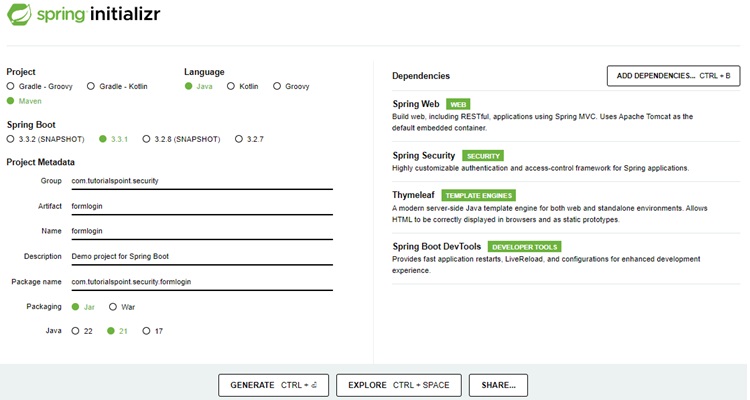
Thymeleaf 是 Java 的模板引擎。它允许我们快速开发静态或动态网页以在浏览器中呈现。它具有极高的可扩展性,允许我们详细定义和自定义模板的处理。此外,我们可以点击此链接了解更多关于 Thymeleaf 的信息。
让我们继续生成项目并下载它。然后我们将其解压缩到我们选择的文件夹中,并使用任何 IDE 打开它。我将使用Spring Tools Suite 4。它可以从https://springframework.org.cn/tools网站免费下载,并针对 Spring 应用程序进行了优化。
包含所有相关依赖项的 pom.xml
让我们看一下我们的 pom.xml 文件。它应该看起来类似于这样:
pom.xml
<?xml version="1.0" encoding="UTF-8"?>
<project xmlns="http://maven.apache.org/POM/4.0.0" xmlns:xsi="http://www.w3.org/2001/XMLSchema-instance"
xsi:schemaLocation="http://maven.apache.org/POM/4.0.0 https://maven.apache.org/xsd/maven-4.0.0.xsd">
   <modelVersion>4.0.0</modelVersion>
   <parent>
      <groupId>org.springframework.boot</groupId>
      <artifactId>spring-boot-starter-parent</artifactId>
      <version>3.3.1</version>
      <relativePath/> <!-- lookup parent from repository -->
   </parent>
   <groupId>com.tutorialspoint.security</groupId>
   <artifactId>formlogin</artifactId>
   <version>0.0.1-SNAPSHOT</version>
   <name>formlogin</name>
   <description>Demo project for Spring Boot</description>
   <url/>
   <licenses>
      <license/>
   </licenses>
   <developers>
      <developer/>
   </developers>
   <scm>
      <connection/>
      <developerConnection/>
      <tag/>
      <url/>
   </scm>
   <properties>
      <java.version>21</java.version>
   </properties>
   <dependencies>
      <dependency>
         <groupId>org.springframework.boot</groupId>
         <artifactId>spring-boot-starter-security</artifactId>
      </dependency>
      <dependency>
         <groupId>org.springframework.boot</groupId>
         <artifactId>spring-boot-starter-thymeleaf</artifactId>
      </dependency>
      <dependency>
         <groupId>org.springframework.boot</groupId>
         <artifactId>spring-boot-starter-web</artifactId>
      </dependency>
      <dependency>
         <groupId>org.thymeleaf.extras</groupId>
         <artifactId>thymeleaf-extras-springsecurity6</artifactId>
      </dependency>
      <dependency>
         <groupId>org.springframework.boot</groupId>
         <artifactId>spring-boot-devtools</artifactId>
         <scope>runtime</scope>
         <optional>true</optional>
      </dependency>
      <dependency>
         <groupId>org.springframework.boot</groupId>
         <artifactId>spring-boot-starter-test</artifactId>
         <scope>test</scope>
      </dependency>
      <dependency>
         <groupId>org.springframework.security</groupId>
         <artifactId>spring-security-test</artifactId>
         <scope>test</scope>
      </dependency>
      <dependency>
         <groupId>io.jsonwebtoken</groupId>
         <artifactId>jjwt-api</artifactId>
         <version>0.11.5</version>
      </dependency>
      <dependency>
         <groupId>io.jsonwebtoken</groupId>
         <artifactId>jjwt-impl</artifactId>
         <version>0.11.5</version>
         <scope>runtime</scope>
      </dependency>
      <dependency>
         <groupId>io.jsonwebtoken</groupId>
         <artifactId>jjwt-jackson</artifactId>
         <version>0.11.5</version>
         <scope>runtime</scope>
      </dependency>
   </dependencies>
   <build>
      <plugins>
         <plugin>
            <groupId>org.springframework.boot</groupId>
            <artifactId>spring-boot-maven-plugin</artifactId>
         </plugin>
      </plugins>
   </build>
</project>
JWT 密钥
JWT 包含一个密钥,我们将在我们的 application.properties 文件中定义,如下所示。
application.properties
spring.application.name=formlogin
secret=somerandomsecretsomerandomsecretsomerandomsecretsomerandomsecret
JWT 相关类
现在让我们创建一个名为 jwtutils 的包。此包将包含与 JWT 操作相关的所有类和接口,其中包括:
- 生成令牌
- 验证令牌
- 检查签名
- 验证声明和权限
在这个包中,我们创建了我们的第一个名为 TokenManager 的类。此类将负责使用 io.jsonwebtoken.Jwts 创建和验证令牌。
TokenManager.java
package com.tutorialspoint.security.formlogin.jwtutils;

import java.security.Key;
import java.util.Date;
import java.util.HashMap;
import java.util.Map;

import org.springframework.beans.factory.annotation.Value;
import org.springframework.security.core.userdetails.UserDetails;
import org.springframework.stereotype.Component;

import io.jsonwebtoken.Claims;
import io.jsonwebtoken.Jwts;
import io.jsonwebtoken.SignatureAlgorithm;
import io.jsonwebtoken.io.Decoders;
import io.jsonwebtoken.security.Keys;

@Component
public class TokenManager {

   private static final long serialVersionUID = 7008375124389347049L;
   public static final long TOKEN_VALIDITY = 10 * 60 * 60;

   @Value("${secret}")
   private String jwtSecret;

   // Generates a token on successful authentication by the user
   // using username, issue date of token and the expiration date of the token.
   public String generateJwtToken(UserDetails userDetails) {
      Map<String, Object> claims = new HashMap<>();
      return Jwts
         .builder()
         .setClaims(claims)  // set the claims
         .setSubject(userDetails.getUsername())  // set the username as subject in payload
         .setIssuedAt(new Date(System.currentTimeMillis()))
         .setExpiration(new Date(System.currentTimeMillis() + TOKEN_VALIDITY * 1000))
         .signWith(getKey(), SignatureAlgorithm.HS256)  // signature part
         .compact();
   }

   // Validates the token
   // Checks if user is an authenticatic one and using the token is the one that was generated and sent to the user.
   // Token is parsed for the claims such as username, roles, authorities, validity period etc.
   public Boolean validateJwtToken(String token, UserDetails userDetails) {
      final String username = getUsernameFromToken(token);
      final Claims claims = Jwts
         .parserBuilder()
         .setSigningKey(getKey())
         .build()
         .parseClaimsJws(token).getBody();
      Boolean isTokenExpired = claims.getExpiration().before(new Date());
      return (username.equals(userDetails.getUsername())) && !isTokenExpired;
   }

   // get the username by checking subject of JWT Token
   public String getUsernameFromToken(String token) {
      final Claims claims = Jwts
         .parserBuilder()
         .setSigningKey(getKey())
         .build()
         .parseClaimsJws(token).getBody();
      return claims.getSubject();
   }

   // create a signing key based on secret
   private Key getKey() {
      byte[] keyBytes = Decoders.BASE64.decode(jwtSecret);
      Key key = Keys.hmacShaKeyFor(keyBytes);
      return key;
   }
}
JwtUserDetailsService.java
package com.tutorialspoint.security.formlogin.jwtutils;

import java.util.ArrayList;
import org.springframework.security.core.userdetails.User;
import org.springframework.security.core.userdetails.UserDetails;
import org.springframework.security.core.userdetails.UserDetailsService;
import org.springframework.security.core.userdetails.UsernameNotFoundException;
import org.springframework.stereotype.Service;

@Service
public class JwtUserDetailsService implements UserDetailsService {
   @Override
   public UserDetails loadUserByUsername(String username) throws UsernameNotFoundException {
      // create a user for "randomuser123"/"password".
      if ("randomuser123".equals(username)) {
         return new User("randomuser123", // username
            "$2a$10$slYQmyNdGzTn7ZLBXBChFOC9f6kFjAqPhccnP6DxlWXx2lPk1C3G6", // encoded password
            new ArrayList<>());
      } else {
         throw new UsernameNotFoundException("User not found with username: " + username);
      }
   }
}
现在是时候创建我们的过滤器了。过滤器类将用于跟踪我们的请求并检测它们是否在标头中包含有效的令牌。如果令牌有效,我们允许请求继续,否则我们发送 401 错误(未授权)。
JwtFilter.java
package com.tutorialspoint.security.formlogin.jwtutils;

import java.io.IOException;
import jakarta.servlet.FilterChain;
import jakarta.servlet.ServletException;
import jakarta.servlet.http.HttpServletRequest;
import jakarta.servlet.http.HttpServletResponse;
import org.springframework.beans.factory.annotation.Autowired;
import org.springframework.security.authentication.UsernamePasswordAuthenticationToken;
import org.springframework.security.core.context.SecurityContextHolder;
import org.springframework.security.core.userdetails.UserDetails;
import org.springframework.security.web.authentication.WebAuthenticationDetailsSource;
import org.springframework.stereotype.Component;
import org.springframework.web.filter.OncePerRequestFilter;
import io.jsonwebtoken.ExpiredJwtException;


// filter to run for every request
@Component
public class JwtFilter extends OncePerRequestFilter {
   @Autowired
   private JwtUserDetailsService userDetailsService;
   @Autowired
   private TokenManager tokenManager;
   @Override
   protected void doFilterInternal(HttpServletRequest request,
      HttpServletResponse response, FilterChain filterChain)
      throws ServletException, IOException {

      String tokenHeader = request.getHeader("Authorization");
      String username = null;
      String token = null;
      // if bearer token is provided, get the username
      if (tokenHeader != null && tokenHeader.startsWith("Bearer ")) {
         token = tokenHeader.substring(7);
         try {
            username = tokenManager.getUsernameFromToken(token);
         } catch (IllegalArgumentException e) {
            System.out.println("Unable to get JWT Token");
         } catch (ExpiredJwtException e) {
            System.out.println("JWT Token has expired");
         }
      } else {
         System.out.println("Bearer String not found in token");
      }
      // validate the JWT Token and create a new authentication token and set in security context
      if (null != username && SecurityContextHolder.getContext().getAuthentication() == null) {
         UserDetails userDetails = userDetailsService.loadUserByUsername(username);
         if (tokenManager.validateJwtToken(token, userDetails)) {
            UsernamePasswordAuthenticationToken
               authenticationToken = new UsernamePasswordAuthenticationToken(
                  userDetails, null, userDetails.getAuthorities());
               authenticationToken.setDetails(new
                  WebAuthenticationDetailsSource().buildDetails(request));
            SecurityContextHolder.getContext().setAuthentication(authenticationToken);
         }
      }
      filterChain.doFilter(request, response);
   }
}
创建了请求过滤器后,我们现在创建 JwtAutheticationEntryPoint 类。此类扩展了 Spring 的 AuthenticationEntryPoint 类,并拒绝所有未经身份验证的请求,并向客户端发送错误代码 401。我们已重写 AuthenticationEntryPoint 类的 commence() 方法来执行此操作。
JwtAuthenticationEntryPoint.java
package com.tutorialspoint.security.formlogin.jwtutils;

import java.io.IOException;
import java.io.Serializable;
import jakarta.servlet.ServletException;
import jakarta.servlet.http.HttpServletRequest;
import jakarta.servlet.http.HttpServletResponse;
import org.springframework.security.core.AuthenticationException;
import org.springframework.security.web.AuthenticationEntryPoint;
import org.springframework.stereotype.Component;

@Component
public class JwtAuthenticationEntryPoint implements AuthenticationEntryPoint, Serializable {

   private static final long serialVersionUID = 1L;

   @Override
   public void commence(HttpServletRequest request, HttpServletResponse response,
      AuthenticationException authException) throws IOException, ServletException {
      response.sendError(HttpServletResponse.SC_UNAUTHORIZED, "Unauthorized");
   }
}
接下来,我们在 models 包下为我们的请求和响应模型创建类。这些模型确定我们的请求和响应格式将如何进行身份验证。
JwtRequestModel.java
package com.tutorialspoint.security.formlogin.jwtutils.models;

import java.io.Serializable;
public class JwtRequestModel implements Serializable {
   /**
   *
   */
   private static final long serialVersionUID = 2636936156391265891L;
   private String username;
   private String password;
   public JwtRequestModel() {
   }
   public JwtRequestModel(String username, String password) {
      super();
      this.username = username; this.password = password;
   }
   public String getUsername() {
      return username;
   }
   public void setUsername(String username) {
      this.username = username;
   }
   public String getPassword() {
      return password;
   }
   public void setPassword(String password) {
      this.password = password;
   }
}
JwtResponseModel.java
package com.tutorialspoint.security.formlogin.jwtutils.models;

import java.io.Serializable;
public class JwtResponseModel implements Serializable {
   /**
   *
   */
   private static final long serialVersionUID = 1L;
   private final String token;
   public JwtResponseModel(String token) {
      this.token = token;
   }
   public String getToken() {
      return token;
   }
}
现在,我们正在创建一个控制器类,以便在用户使用POST /login调用登录后创建 JWT 令牌。
JwtController.java
package com.tutorialspoint.security.formlogin.jwtutils;

import org.springframework.beans.factory.annotation.Autowired;
import org.springframework.http.ResponseEntity;
import org.springframework.security.authentication.AuthenticationManager;
import org.springframework.security.authentication.BadCredentialsException;
import org.springframework.security.authentication.DisabledException;
import org.springframework.security.authentication.UsernamePasswordAuthenticationToken;
import org.springframework.security.core.userdetails.UserDetails;
import org.springframework.web.bind.annotation.CrossOrigin;
import org.springframework.web.bind.annotation.PostMapping;
import org.springframework.web.bind.annotation.RequestBody;
import org.springframework.web.bind.annotation.RestController;

import com.tutorialspoint.security.formlogin.jwtutils.models.JwtRequestModel;
import com.tutorialspoint.security.formlogin.jwtutils.models.JwtResponseModel;

@RestController
@CrossOrigin
public class JwtController {
   @Autowired
   private JwtUserDetailsService userDetailsService;
   @Autowired
   private AuthenticationManager authenticationManager;
   @Autowired
   private TokenManager tokenManager;

   // Get a JWT Token once user is authenticated, otherwise throw BadCredentialsException
   @PostMapping("/login")
   public ResponseEntity<JwtResponseModel> createToken(@RequestBody JwtRequestModel
      request) throws Exception {
      try {
         authenticationManager.authenticate(
            new UsernamePasswordAuthenticationToken(request.getUsername(), request.getPassword()));
      } catch (DisabledException e) {
         throw new Exception("USER_DISABLED", e);
      } catch (BadCredentialsException e) {
         throw new Exception("INVALID_CREDENTIALS", e);
      }
      final UserDetails userDetails = userDetailsService.loadUserByUsername(request.getUsername());
      final String jwtToken = tokenManager.generateJwtToken(userDetails);
      return ResponseEntity.ok(new JwtResponseModel(jwtToken));
   }
}
Spring Security 配置类
在我们的 config 包中,我们创建了 WebSecurityConfig 类。我们将使用此类进行我们的安全配置,因此让我们使用 @Configuration 注解和 @EnableWebSecurity 对其进行注释。结果,Spring Security 知道将此类视为配置类。正如我们所看到的,Spring 使配置应用程序变得非常容易。
WebSecurityConfig
package com.tutorialspoint.security.formlogin.config;

import org.springframework.beans.factory.annotation.Autowired;
import org.springframework.context.annotation.Bean;
import org.springframework.context.annotation.Configuration;
import org.springframework.security.authentication.AuthenticationManager;
import org.springframework.security.authentication.UsernamePasswordAuthenticationToken;
import org.springframework.security.config.Customizer;
import org.springframework.security.config.annotation.web.builders.HttpSecurity;
import org.springframework.security.config.annotation.web.configuration.EnableWebSecurity;
import org.springframework.security.config.annotation.web.configurers.AbstractHttpConfigurer;
import org.springframework.security.config.http.SessionCreationPolicy;
import org.springframework.security.core.userdetails.UserDetailsService;
import org.springframework.security.crypto.bcrypt.BCryptPasswordEncoder;
import org.springframework.security.crypto.password.PasswordEncoder;
import org.springframework.security.web.SecurityFilterChain;
import org.springframework.security.web.authentication.UsernamePasswordAuthenticationFilter;

import com.tutorialspoint.security.formlogin.jwtutils.JwtAuthenticationEntryPoint;
import com.tutorialspoint.security.formlogin.jwtutils.JwtFilter;

@Configuration
@EnableWebSecurity
public class WebSecurityConfig {

   @Autowired
   private JwtAuthenticationEntryPoint authenticationEntryPoint;
   @Autowired
   private JwtFilter filter;

   @Bean
   protected PasswordEncoder passwordEncoder() {
      return new BCryptPasswordEncoder();
   }

   @Bean
   protected SecurityFilterChain filterChain(HttpSecurity http) throws Exception {
      return http
         .csrf(AbstractHttpConfigurer::disable)
         .authorizeHttpRequests(request -> request.requestMatchers("/login").permitAll()
         .anyRequest().authenticated())
         // Send a 401 error response if user is not authentic.
         .exceptionHandling(exception -> exception.authenticationEntryPoint(authenticationEntryPoint))
         // no session management
         .sessionManagement(session -> session.sessionCreationPolicy(SessionCreationPolicy.STATELESS))
         // filter the request and add authentication token
         .addFilterBefore(filter,  UsernamePasswordAuthenticationFilter.class)
         .build();
   }

   @Bean
   AuthenticationManager customAuthenticationManager() {
      return authentication -> new UsernamePasswordAuthenticationToken("randomuser123","password");
   }
}
控制器类
在这个类中,我们为单个 GET "/hello" 端点创建了一个映射。
HelloController
package com.tutorialspoint.security.formlogin.controllers;

import org.springframework.web.bind.annotation.GetMapping;
import org.springframework.web.bind.annotation.RestController;

@RestController
public class HelloController {
   @GetMapping("/hello")
   public String hello() {
      return "hello";
   }
}
输出
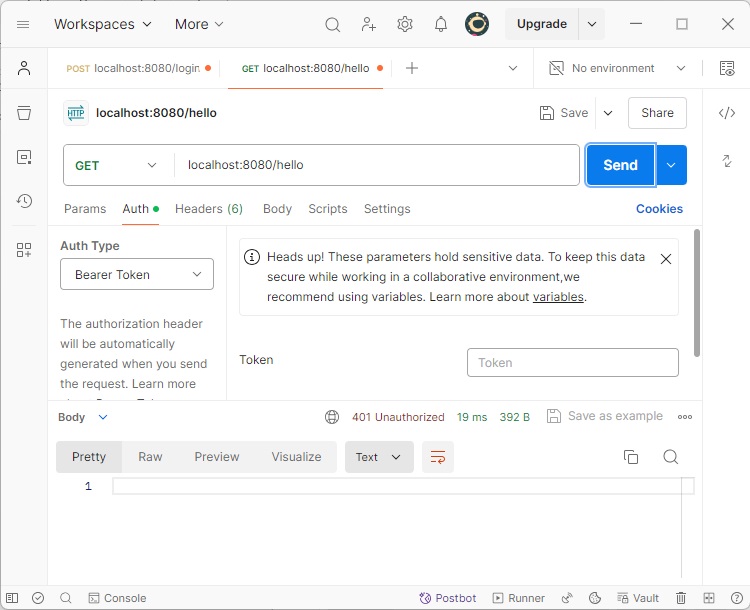
正如我们所看到的,我们已经完成了所有这些工作,现在我们的应用程序可以使用了。让我们启动应用程序并使用 postman 发出请求。
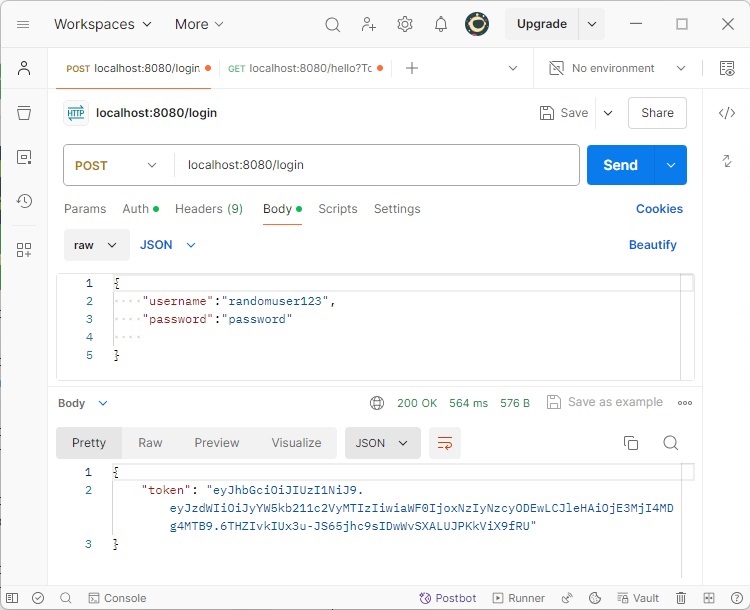
在这里,我们发出了第一个请求以获取令牌,正如我们所看到的,在提供正确的用户名/密码组合后,我们得到了令牌。
现在在我们的标头中使用该令牌,让我们调用 /hello 端点。
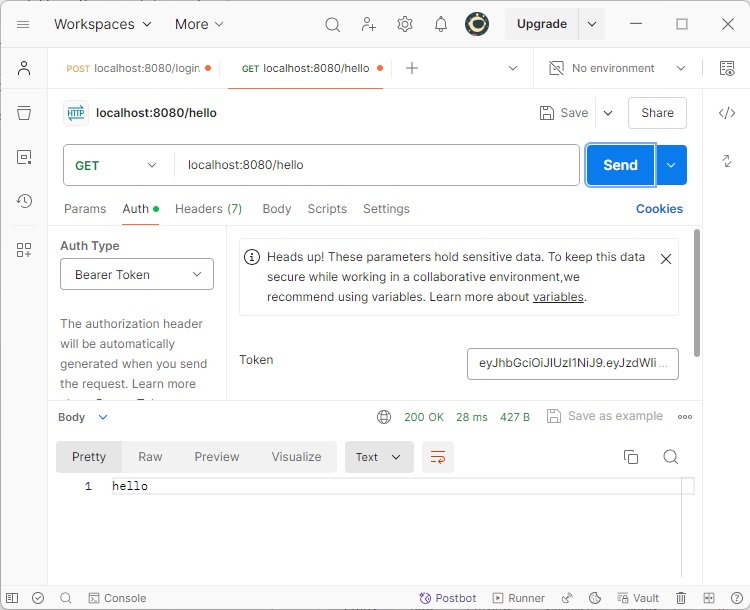
正如我们所看到的,由于请求已通过身份验证,我们获得了所需的响应。现在,如果我们篡改令牌或不发送 Authorization 标头,我们将获得 401 错误,这在我们应用程序中进行了配置。这确保了我们使用 JWT 保护请求。