
- Spring Security 教程
- Spring Security - 首页
- Spring Security - 简介
- Spring Security - 架构
- Spring Security - 项目模块
- Spring Security - 环境搭建
- Spring Security - 表单登录
- Spring Security - 自定义表单登录
- Spring Security - 注销
- Spring Security - 记住我
- Spring Security - 重定向
- Spring Security - 标签库
- Spring Security - XML 配置
- Spring Security - 认证提供程序
- Spring Security - 基本认证
- Spring Security - AuthenticationFailureHandler
- Spring Security - JWT
- Spring Security - 获取用户信息
- Spring Security - Maven
- Spring Security - 默认密码编码器
- Spring Security – 密码编码
- Spring Security - 方法级别
- Spring Security 有用资源
- Spring Security - 快速指南
- Spring Security - 有用资源
- Spring Security - 讨论
Spring Security - 密码编码
在 Spring Security 5 之前,开发人员可以使用内存中的密码作为明文,但是随着 Spring Security 中密码相关增强功能的出现,现在 Spring Security 不支持明文密码。如果我们确实需要故意实现它,则需要使用 '{noop}' 作为前缀。请考虑以下安全配置。
@Bean
protected UserDetailsService userDetailsService() {
   UserDetails user = User.builder()
      .username("user")
      .password("{noop}user123") // password stored as plain text
      .roles("USER")
      .build();
   UserDetails admin = User.builder()
      .username("admin")
      .password("{noop}admin123")
      .roles("USER", "ADMIN") // password stored as plain text
      .build();
   return new InMemoryUserDetailsManager(user, admin);
}
在这里,Spring Security 使用 NoOpPasswordEncoder 作为默认密码编码器来验证配置的用户。但是,这种方法不建议用于生产环境,因为 NoOpPasswordEncoder 已弃用且不安全。
使用密码编码器
始终建议使用良好的密码编码器来加密内存中的密码。BCryptPasswordEncoder 就是这样一个内置的密码编码器,它将密码以 BCrypt 编码格式存储在内存中。
@Bean
protected UserDetailsService userDetailsService() {
   UserDetails user = User.builder()
      .username("user")
      .password(passwordEncoder().encode("user123")) // encode the password
      .roles("USER")
      .build();
   UserDetails admin = User.builder()
      .username("admin")
      .password(passwordEncoder().encode("admin123")) // encode the password
      .roles("USER", "ADMIN")
      .build();
   return new InMemoryUserDetailsManager(user, admin);
}

// Create a new Password Encoder
@Bean
protected PasswordEncoder passwordEncoder() {
   return new BCryptPasswordEncoder();
}
对于持久性密码存储,我们应该使用密码编码器对密码进行编码,然后将其存储在数据库中。BCryptPasswordEncoder 使用随机盐并创建长度为 60 的编码密码。以下是 BCrypt 编码密码的示例
$2a$10$acaXGauv/3buNdwQWeOgu.iab3LLDclrH64xVMsSxd9Lp/otgUfMm
这里每个字段都用 $ 符号分隔。以下是每个字段的详细信息。
2a - 表示编码算法为 bcrypt
10 - 表示算法的强度
前 22 个字符 - 盐
其余 31 个字符 - 明文密码的哈希版本
让我们开始使用 Spring Security 进行实际编程。在开始使用 Spring 框架编写示例之前,您必须确保已正确设置 Spring 环境,如Spring Security - 环境搭建章节中所述。我们还假设您对 Spring Tool Suite IDE 有些了解。
现在让我们继续编写一个基于 Spring MVC 的应用程序,该应用程序由 Maven 管理,它将要求用户登录,对用户进行身份验证,然后使用 Spring Security 表单登录功能提供注销选项。
使用 Spring Initializr 创建项目
Spring Initializr 是开始 Spring Boot 项目的好方法。它提供了一个易于使用的用户界面来创建项目、添加依赖项、选择 Java 运行时等。它生成一个骨架项目结构,下载后可以在 Spring Tool Suite 中导入,然后我们可以继续使用现成的项目结构。
我们选择一个 Maven 项目,将项目命名为 formlogin,Java 版本为 21。添加以下依赖项:
Spring Web
Spring Security
Spring Boot DevTools
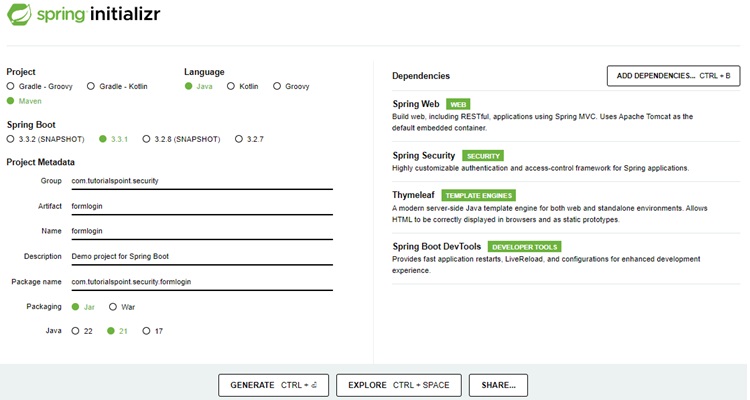
Thymeleaf 是 Java 的模板引擎。它允许我们快速开发静态或动态网页以在浏览器中呈现。它具有极高的可扩展性,允许我们详细定义和自定义模板的处理过程。此外,我们可以点击此链接了解更多关于 Thymeleaf 的信息。
让我们继续生成我们的项目并下载它。然后我们将其解压缩到我们选择的文件夹中,并使用任何 IDE 打开它。我将使用Spring Tools Suite 4。它可以从https://springframework.org.cn/tools网站免费下载,并针对 Spring 应用程序进行了优化。
包含所有相关依赖项的 pom.xml
让我们看看我们的 pom.xml 文件。它应该看起来与此类似:
pom.xml
<?xml version="1.0" encoding="UTF-8"?>
<project xmlns="http://maven.apache.org/POM/4.0.0" xmlns:xsi="http://www.w3.org/2001/XMLSchema-instance"
xsi:schemaLocation="http://maven.apache.org/POM/4.0.0 https://maven.apache.org/xsd/maven-4.0.0.xsd">
   <modelVersion>4.0.0</modelVersion>
   <parent>
      <groupId>org.springframework.boot</groupId>
      <artifactId>spring-boot-starter-parent</artifactId>
      <version>3.3.1</version>
      <relativePath/> <!-- lookup parent from repository -->
   </parent>
   <groupId>com.tutorialspoint.security</groupId>
   <artifactId>formlogin</artifactId>
   <version>0.0.1-SNAPSHOT</version>
   <name>formlogin</name>
   <description>Demo project for Spring Boot</description>
   <url/>
   <licenses>
      <license/>
   </licenses>
   <developers>
      <developer/>
   </developers>
   <scm>
      <connection/>
      <developerConnection/>
      <tag/>
      <url/>
   </scm>
   <properties>
      <java.version>21</java.version>
   </properties>
   <dependencies>
      <dependency>
         <groupId>org.springframework.boot</groupId>
         <artifactId>spring-boot-starter-security</artifactId>
      </dependency>
      <dependency>
         <groupId>org.springframework.boot</groupId>
         <artifactId>spring-boot-starter-thymeleaf</artifactId>
      </dependency>
      <dependency>
         <groupId>org.springframework.boot</groupId>
         <artifactId>spring-boot-starter-web</artifactId>
      </dependency>
      <dependency>
         <groupId>org.thymeleaf.extras</groupId>
         <artifactId>thymeleaf-extras-springsecurity6</artifactId>
      </dependency>
      <dependency>
         <groupId>org.springframework.boot</groupId>
         <artifactId>spring-boot-devtools</artifactId>
         <scope>runtime</scope>
         <optional>true</optional>
      </dependency>
      <dependency>
         <groupId>org.springframework.boot</groupId>
         <artifactId>spring-boot-starter-test</artifactId>
         <scope>test</scope>
      </dependency>
      <dependency>
         <groupId>org.springframework.security</groupId>
         <artifactId>spring-security-test</artifactId>
         <scope>test</scope>
      </dependency>
   </dependencies>
   <build>
      <plugins>
         <plugin>
            <groupId>org.springframework.boot</groupId>
            <artifactId>spring-boot-maven-plugin</artifactId>
         </plugin>
      </plugins>
   </build>
</project>
Spring Security 配置类
在我们的 config 包中,我们创建了 WebSecurityConfig 类。我们将使用此类进行我们的安全配置,因此让我们用 @Configuration 注解和 @EnableWebSecurity 注解它。结果,Spring Security 知道将此类视为配置类。正如我们所看到的,Spring 使配置应用程序变得非常容易。
WebSecurityConfig
package com.tutorialspoint.security.formlogin.config;

import org.springframework.context.annotation.Bean;
import org.springframework.context.annotation.Configuration;
import org.springframework.security.config.annotation.web.builders.HttpSecurity;
import org.springframework.security.config.annotation.web.configuration.EnableWebSecurity;
import org.springframework.security.config.annotation.web.configurers.AbstractHttpConfigurer;
import org.springframework.security.core.userdetails.User;
import org.springframework.security.core.userdetails.UserDetails;
import org.springframework.security.core.userdetails.UserDetailsService;
import org.springframework.security.crypto.bcrypt.BCryptPasswordEncoder;
import org.springframework.security.crypto.password.PasswordEncoder;
import org.springframework.security.provisioning.InMemoryUserDetailsManager;
import org.springframework.security.web.SecurityFilterChain;

@Configuration
@EnableWebSecurity
public class WebSecurityConfig  {

   @Bean
   protected UserDetailsService userDetailsService() {
      UserDetails user = User.builder()
         .username("user")
         .password(passwordEncoder().encode("user123")) // encode the password
         .roles("USER")
         .build();
      UserDetails admin = User.builder()
         .username("admin")
         .password(passwordEncoder().encode("admin123")) // encode the password
         .roles("USER", "ADMIN")
         .build();
      // print the encoded password
      System.out.println("Encoded Password for User: " + user.getPassword());
      return new InMemoryUserDetailsManager(user, admin);
   }

   // Password Encoder
   @Bean
   protected PasswordEncoder passwordEncoder() {
      return new BCryptPasswordEncoder();
   }

   // Security Configuration
   @Bean
   protected SecurityFilterChain filterChain(HttpSecurity http) throws Exception {
      return http
         .csrf(AbstractHttpConfigurer::disable)
         .authorizeHttpRequests(
            request -> request.requestMatchers("/login").permitAll()
            .requestMatchers("/**").authenticated()
         )
         .formLogin(form -> form.loginPage("/login")
            .defaultSuccessUrl("/")
            .failureUrl("/login?error=true")
            .permitAll())
         .rememberMe(config -> config.key("123456")
         .tokenValiditySeconds(3600))
         .logout(config -> config
            .logoutUrl("/logout")
            .logoutSuccessUrl("/login")
			.invalidateHttpSession(true)
            .deleteCookies("JSESSIONID"))
         .build();
   }
}
控制器类
在这个类中,我们为 "/" 端点和 "/login" 端点创建了一个映射,用于此应用程序的首页和登录页。
AuthController.java
package com.tutorialspoint.security.formlogin.controllers;

import org.springframework.stereotype.Controller;
import org.springframework.web.bind.annotation.GetMapping;

@Controller
public class AuthController {
   @GetMapping("/")
   public String home() {
      return "index";
   }
   @GetMapping("/login")
   public String login() {
      return "login";
   }
}
视图
让我们在/src/main/resources/templates文件夹中创建 index.html,其内容如下,作为主页并显示登录用户名。
index.html
<!DOCTYPE html>
<html xmlns="http://www.w3.org/1999/xhtml"
   xmlns:th="https://www.thymeleaf.org"
   xmlns:sec="https://www.thymeleaf.org/thymeleaf-extras-springsecurity3">
   <head>
      <title>
         Hello World!
      </title>
   </head>
   <body>
      <h1 th:inline="text">Hello <span sec:authentication="name"></span>!</h1>
      <form th:action="@{/logout}" method="post">
         <input type="submit" value="Sign Out"/>
      </form>
   </body>
<html>
login.html
让我们在/src/main/resources/templates文件夹中创建 login.html,其内容如下,作为登录页。我们使用默认名称username、password和remember-me作为文本字段。如果名称不同,我们也需要在 Spring Security 配置类中设置相同的名称。
<!DOCTYPE html>
<html xmlns="http://www.w3.org/1999/xhtml"
   xmlns:th="https://www.thymeleaf.org"
   xmlns:sec="https://www.thymeleaf.org/thymeleaf-extras-springsecurity3">
   <head>
      <title>Spring Security Example</title>
   </head>
   <body>
      <div th:if="${param.error}">
         <p>Bad Credentials</p>
      </div>
      <div th:if="${param.logout}">You have been logged out.</div>
      <form th:action="@{/login}" method="post">
         <h1>Please sign in</h1>
         <table>
            <tr>
               <td><label for="username"><b>Username</b></label></td>
               <td><input type="text" placeholder="Enter Username" name="username" id="username" required></td>
            </tr>
            <tr>
               <td><label for="password"><b>Password</b></label></td>
               <td><input type="password" placeholder="Enter Password" name="password" id="password" required></td>
            </tr>
            <tr>
               <td><label for="remember-me"><b>Remember Me</b></label> </td>
               <td><input type="checkbox" name="remember-me" /></td>
            </tr>
            <tr>
               <td> </td>
               <td><input type="submit"  value="Sign In" /></td>
            </tr>
         </table>
      </form>
   </body>
</html>
在登录表单中,我们使用 POST 方法登录,同时使用名称和 ID 为username、password和remember-me复选框的输入字段。如果选中复选框,则用户登录应用程序时将创建记住我的 Cookie。
运行应用程序
由于我们所有组件都已准备好,让我们运行应用程序。右键单击项目,选择Run As,然后选择Spring Boot App。
它将启动应用程序,并且应用程序启动后,我们可以在 Eclipse 控制台中看到输出。
输出
  .   ____          _            __ _ _
 /\\ / ___'_ __ _ _(_)_ __  __ _ \ \ \ \
( ( )\___ | '_ | '_| | '_ \/ _` | \ \ \ \
 \\/  ___)| |_)| | | | | || (_| |  ) ) ) )
  '  |____| .__|_| |_|_| |_\__, | / / / /
 =========|_|==============|___/=/_/_/_/

[32m :: Spring Boot :: [39m              [2m (v3.3.1)[0;39m

[2m2024-08-09T15:44:25.364+05:30[0;39m [32m INFO[0;39m [35m11300[0;39m [2m---[0;39m [2m[formlogin] [  restartedMain][0;39m [2m[0;39m[36mc.t.s.formlogin.FormloginApplication    [0;39m [2m:[0;39m Starting FormloginApplication using Java 21.0.3 with PID 11300 (E:\security\formlogin\target\classes started by Tutorialspoint in E:\security\formlogin)
[2m2024-08-09T15:44:25.364+05:30[0;39m [32m INFO[0;39m [35m11300[0;39m [2m---[0;39m [2m[formlogin] [  restartedMain][0;39m [2m[0;39m[36mc.t.s.formlogin.FormloginApplication    [0;39m [2m:[0;39m No active profile set, falling back to 1 default profile: "default"
ut[2m2024-08-09T15:44:25.598+05:30[0;39m [32m INFO[0;39m [35m11300[0;39m [2m---[0;39m [2m[formlogin] [  restartedMain][0;39m [2m[0;39m[36mo.s.b.w.embedded.tomcat.TomcatWebServer [0;39m [2m:[0;39m Tomcat initialized with port 8080 (http)
[2m2024-08-09T15:44:25.600+05:30[0;39m [32m INFO[0;39m [35m11300[0;39m [2m---[0;39m [2m[formlogin] [  restartedMain][0;39m [2m[0;39m[36mo.apache.catalina.core.StandardService  [0;39m [2m:[0;39m Starting service [Tomcat]
[2m2024-08-09T15:44:25.600+05:30[0;39m [32m INFO[0;39m [35m11300[0;39m [2m---[0;39m [2m[formlogin] [  restartedMain][0;39m [2m[0;39m[36mo.apache.catalina.core.StandardEngine   [0;39m [2m:[0;39m Starting Servlet engine: [Apache Tomcat/10.1.25]
[2m2024-08-09T15:44:25.615+05:30[0;39m [32m INFO[0;39m [35m11300[0;39m [2m---[0;39m [2m[formlogin] [  restartedMain][0;39m [2m[0;39m[36mo.a.c.c.C.[Tomcat].[localhost].[/]      [0;39m [2m:[0;39m Initializing Spring embedded WebApplicationContext
[2m2024-08-09T15:44:25.615+05:30[0;39m [32m INFO[0;39m [35m11300[0;39m [2m---[0;39m [2m[formlogin] [  restartedMain][0;39m [2m[0;39m[36mw.s.c.ServletWebServerApplicationContext[0;39m [2m:[0;39m Root WebApplicationContext: initialization completed in 249 ms
[2m2024-08-09T15:44:25.845+05:30[0;39m [32m INFO[0;39m [35m11300[0;39m [2m---[0;39m [2m[formlogin] [  restartedMain][0;39m [2m[0;39m[36mr$InitializeUserDetailsManagerConfigurer[0;39m [2m:[0;39m Global AuthenticationManager configured with UserDetailsService bean with name userDetailsService
[2m2024-08-09T15:44:25.854+05:30[0;39m [32m INFO[0;39m [35m11300[0;39m [2m---[0;39m [2m[formlogin] [  restartedMain][0;39m [2m[0;39m[36mo.s.b.a.w.s.WelcomePageHandlerMapping   [0;39m [2m:[0;39m Adding welcome page template: index
[2m2024-08-09T15:44:25.928+05:30[0;39m [32m INFO[0;39m [35m11300[0;39m [2m---[0;39m [2m[formlogin] [  restartedMain][0;39m [2m[0;39m[36mo.s.b.d.a.OptionalLiveReloadServer      [0;39m [2m:[0;39m LiveReload server is running on port 35729
[2m2024-08-09T15:44:25.937+05:30[0;39m [32m INFO[0;39m [35m11300[0;39m [2m---[0;39m [2m[formlogin] [  restartedMain][0;39m [2m[0;39m[36mo.s.b.w.embedded.tomcat.TomcatWebServer [0;39m [2m:[0;39m Tomcat started on port 8080 (http) with context path '/'
[2m2024-08-09T15:44:25.940+05:30[0;39m [32m INFO[0;39m [35m11300[0;39m [2m---[0;39m [2m[formlogin] [  restartedMain][0;39m [2m[0;39m[36mc.t.s.formlogin.FormloginApplication    [0;39m [2m:[0;39m Started FormloginApplication in 0.597 seconds (process running for 14092.035)
[2m2024-08-09T15:44:25.942+05:30[0;39m [32m INFO[0;39m [35m11300[0;39m [2m---[0;39m [2m[formlogin] [  restartedMain][0;39m [2m[0;39m[36m.ConditionEvaluationDeltaLoggingListener[0;39m [2m:[0;39m Condition evaluation unchanged
[2m2024-08-09T15:44:57.018+05:30[0;39m [32m INFO[0;39m [35m11300[0;39m [2m---[0;39m [2m[formlogin] [   File Watcher][0;39m [2m[0;39m[36mrtingClassPathChangeChangedEventListener[0;39m [2m:[0;39m Restarting due to 1 class path change (0 additions, 0 deletions, 1 modification)

  .   ____          _            __ _ _
 /\\ / ___'_ __ _ _(_)_ __  __ _ \ \ \ \
( ( )\___ | '_ | '_| | '_ \/ _` | \ \ \ \
 \\/  ___)| |_)| | | | | || (_| |  ) ) ) )
  '  |____| .__|_| |_|_| |_\__, | / / / /
 =========|_|==============|___/=/_/_/_/

[32m :: Spring Boot :: [39m              [2m (v3.3.1)[0;39m

[2m2024-08-09T15:44:57.123+05:30[0;39m [32m INFO[0;39m [35m11300[0;39m [2m---[0;39m [2m[formlogin] [  restartedMain][0;39m [2m[0;39m[36mc.t.s.formlogin.FormloginApplication    [0;39m [2m:[0;39m Starting FormloginApplication using Java 21.0.3 with PID 11300 (E:\security\formlogin\target\classes started by Tutorialspoint in E:\security\formlogin)
[2m2024-08-09T15:44:57.123+05:30[0;39m [32m INFO[0;39m [35m11300[0;39m [2m---[0;39m [2m[formlogin] [  restartedMain][0;39m [2m[0;39m[36mc.t.s.formlogin.FormloginApplication    [0;39m [2m:[0;39m No active profile set, falling back to 1 default profile: "default"
[2m2024-08-09T15:44:57.274+05:30[0;39m [32m INFO[0;39m [35m11300[0;39m [2m---[0;39m [2m[formlogin] [  restartedMain][0;39m [2m[0;39m[36mo.s.b.w.embedded.tomcat.TomcatWebServer [0;39m [2m:[0;39m Tomcat initialized with port 8080 (http)
[2m2024-08-09T15:44:57.275+05:30[0;39m [32m INFO[0;39m [35m11300[0;39m [2m---[0;39m [2m[formlogin] [  restartedMain][0;39m [2m[0;39m[36mo.apache.catalina.core.StandardService  [0;39m [2m:[0;39m Starting service [Tomcat]
[2m2024-08-09T15:44:57.275+05:30[0;39m [32m INFO[0;39m [35m11300[0;39m [2m---[0;39m [2m[formlogin] [  restartedMain][0;39m [2m[0;39m[36mo.apache.catalina.core.StandardEngine   [0;39m [2m:[0;39m Starting Servlet engine: [Apache Tomcat/10.1.25]
[2m2024-08-09T15:44:57.293+05:30[0;39m [32m INFO[0;39m [35m11300[0;39m [2m---[0;39m [2m[formlogin] [  restartedMain][0;39m [2m[0;39m[36mo.a.c.c.C.[Tomcat].[localhost].[/]      [0;39m [2m:[0;39m Initializing Spring embedded WebApplicationContext
[2m2024-08-09T15:44:57.293+05:30[0;39m [32m INFO[0;39m [35m11300[0;39m [2m---[0;39m [2m[formlogin] [  restartedMain][0;39m [2m[0;39m[36mw.s.c.ServletWebServerApplicationContext[0;39m [2m:[0;39m Root WebApplicationContext: initialization completed in 168 ms

Encoded Password for User: $2a$10$acaXGauv/3buNdwQWeOgu.iab3LLDclrH64xVMsSxd9Lp/otgUfMm

[2m2024-08-09T15:44:57.485+05:30[0;39m [32m INFO[0;39m [35m11300[0;39m [2m---[0;39m [2m[formlogin] [  restartedMain][0;39m [2m[0;39m[36mr$InitializeUserDetailsManagerConfigurer[0;39m [2m:[0;39m Global AuthenticationManager configured with UserDetailsService bean with name userDetailsService
[2m2024-08-09T15:44:57.489+05:30[0;39m [32m INFO[0;39m [35m11300[0;39m [2m---[0;39m [2m[formlogin] [  restartedMain][0;39m [2m[0;39m[36mo.s.b.a.w.s.WelcomePageHandlerMapping   [0;39m [2m:[0;39m Adding welcome page template: index
[2m2024-08-09T15:44:57.531+05:30[0;39m [32m INFO[0;39m [35m11300[0;39m [2m---[0;39m [2m[formlogin] [  restartedMain][0;39m [2m[0;39m[36mo.s.b.d.a.OptionalLiveReloadServer      [0;39m [2m:[0;39m LiveReload server is running on port 35729
[2m2024-08-09T15:44:57.539+05:30[0;39m [32m INFO[0;39m [35m11300[0;39m [2m---[0;39m [2m[formlogin] [  restartedMain][0;39m [2m[0;39m[36mo.s.b.w.embedded.tomcat.TomcatWebServer [0;39m [2m:[0;39m Tomcat started on port 8080 (http) with context path '/'
[2m2024-08-09T15:44:57.542+05:30[0;39m [32m INFO[0;39m [35m11300[0;39m [2m---[0;39m [2m[formlogin] [  restartedMain][0;39m [2m[0;39m[36mc.t.s.formlogin.FormloginApplication    [0;39m [2m:[0;39m Started FormloginApplication in 0.439 seconds (process running for 14123.637)
[2m2024-08-09T15:44:57.543+05:30[0;39m [32m INFO[0;39m [35m11300[0;39m [2m---[0;39m [2m[formlogin] [  restartedMain][0;39m [2m[0;39m[36m.ConditionEvaluationDeltaLoggingListener[0;39m [2m:[0;39m Condition evaluation unchanged