
- Struts 2 教程
- Struts2 - 首页
- Struts2 - 基本 MVC 架构
- Struts2 - 概述
- Struts2 - 环境搭建
- Struts2 - 架构
- Struts2 - 示例
- Struts2 - 配置
- Struts2 - Action
- Struts2 - 拦截器
- Struts2 - 结果类型
- Struts2 - 值栈/OGNL
- Struts2 - 文件上传
- Struts2 - 数据库访问
- Struts2 - 发送邮件
- Struts2 - 验证
- Struts2 - 国际化
- Struts2 - 类型转换
- Struts2 - 主题/模板
- Struts2 - 异常处理
- Struts2 - 注解
- Struts 2 标签
- Struts2 - 控制标签
- Struts2 - 数据标签
- Struts2 - 表单标签
- Struts2 - Ajax 标签
- Struts 2 集成
- Struts2 - Spring
- Struts2 - Tiles
- Struts2 - Hibernate
- Struts 2 有用资源
- Struts2 - 问答
- Struts2 - 快速指南
- Struts2 - 有用资源
- Struts2 - 讨论
Struts 2 和 Hibernate 集成
Hibernate 是一个高性能的对象/关系持久化和查询服务,它在开源 GNU Lesser General Public License (LGPL) 许可下发布,可以免费下载。在本章中,我们将学习如何实现 Struts 2 与 Hibernate 的集成。如果您不熟悉 Hibernate,可以查看我们的 Hibernate 教程。
数据库设置
在本教程中,我将使用名为 "struts2_tutorial" 的 MySQL 数据库。我使用用户名 "root" 和无密码连接到我机器上的此数据库。首先,您需要运行以下脚本。此脚本创建一个名为 student 的新表,并在该表中创建一些记录 -
CREATE TABLE IF NOT EXISTS `student` (
   `id` int(11) NOT NULL AUTO_INCREMENT,
   `first_name` varchar(40) NOT NULL,
   `last_name` varchar(40) NOT NULL,
   `marks` int(11) NOT NULL,
   PRIMARY KEY (`id`)
);

--
-- Dumping data for table `student`
--

INSERT INTO `student` (`id`, `first_name`, `last_name`, `marks`)
   VALUES(1, 'George', 'Kane', 20);
INSERT INTO `student` (`id`, `first_name`, `last_name`, `marks`)
   VALUES(2, 'Melissa', 'Michael', 91);
INSERT INTO `student` (`id`, `first_name`, `last_name`, `marks`)
   VALUES(3, 'Jessica', 'Drake', 21);
Hibernate 配置
接下来,让我们创建 hibernate.cfg.xml 文件,它是 Hibernate 的配置文件。
<?xml version = '1.0' encoding = 'utf-8'?>
<!DOCTYPE hibernate-configuration PUBLIC
   "-//Hibernate/Hibernate Configuration DTD//EN"
   "http://hibernate.sourceforge.net/hibernate-configuration-3.0.dtd">

<hibernate-configuration>
   <session-factory>
      <property name = "hibernate.connection.driver_class">c
         om.mysql.jdbc.Driver
      </property>

      <property name = "hibernate.connection.url">
         jdbc:mysql://tutorialspoint.com/struts_tutorial
      </property>

      <property name = "hibernate.connection.username">root</property>

      <property name = "hibernate.connection.password"></property>

      <property name = "hibernate.connection.pool_size">10</property>

      <property name = "show_sql">true</property>

      <property name = "dialect">
         org.hibernate.dialect.MySQLDialect
      </property>

      <property name = "hibernate.hbm2ddl.auto">update</property>

      <mapping class = "com.tutorialspoint.hibernate.Student" />
   </session-factory>
</hibernate-configuration>
让我们看一下 Hibernate 配置文件。首先,我们声明我们正在使用 MySQL 驱动程序。然后我们声明用于连接到数据库的 jdbc url。然后我们声明连接的用户名、密码和池大小。我们还通过将 "show_sql" 设置为 true 来指示我们希望在日志文件中看到 SQL。请阅读 Hibernate 教程以了解这些属性的含义。
最后,我们将映射类设置为 com.tutorialspoint.hibernate.Student,我们将在本章中创建它。
环境搭建
接下来,此项目需要大量 jar 包。附件是所需 JAR 文件完整列表的屏幕截图 -
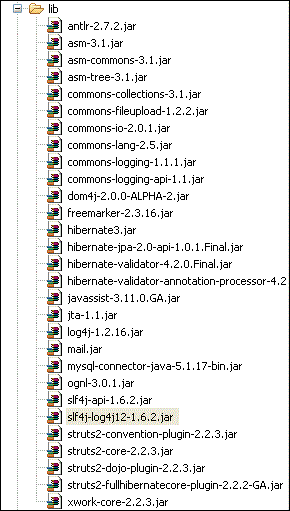
大多数 JAR 文件可以作为 Struts 发行版的一部分获得。如果您安装了 GlassFish、WebSphere 或 JBoss 等应用服务器,则可以从应用服务器的 lib 文件夹中获取大部分剩余的 jar 文件。如果没有,您可以单独下载这些文件 -
Hibernate jar 文件 - Hibernate.org
Struts Hibernate 插件 - Struts Hibernate 插件
JTA 文件 - JTA 文件
Dom4j 文件 - Dom4j
log4j 文件 - log4j
其余文件应该可以从您的 Struts2 发行版中获得。
Hibernate 类
现在让我们创建 Hibernate 集成所需的 Java 类。以下是 Student.java 的内容 -
package com.tutorialspoint.hibernate;

import javax.persistence.Column;
import javax.persistence.Entity;
import javax.persistence.GeneratedValue;
import javax.persistence.Id;
import javax.persistence.Table;

@Entity
@Table(name = "student")
public class Student {

   @Id
   @GeneratedValue
   private int id;
   @Column(name = "last_name")
   private String lastName;
   @Column(name = "first_name")
   private String firstName;
   private int marks;

   public int getId() {
    return id;
   }

   public void setId(int id) {
    this.id = id;
   }

   public String getLastName() {
      return lastName;
   }

   public void setLastName(String lastName) {
      this.lastName = lastName;
   }

   public String getFirstName() {
      return firstName;
   }

   public void setFirstName(String firstName) {
      this.firstName = firstName;
   }

   public int getMarks() {
      return marks;
   }

   public void setMarks(int marks) {
      this.marks = marks;
   }
}
这是一个 POJO 类,根据 Hibernate 规范表示 student 表。它具有属性 id、firstName 和 lastName,它们对应于 student 表的列名。接下来,让我们创建 StudentDAO.java 文件,如下所示 -
package com.tutorialspoint.hibernate;

import java.util.ArrayList;
import java.util.List;

import org.hibernate.Session;
import org.hibernate.Transaction;

import com.googlecode.s2hibernate.struts2.plugin.\
   annotations.SessionTarget;
import com.googlecode.s2hibernate.struts2.plugin.\
   annotations.TransactionTarget;

public class StudentDAO {

   @SessionTarget
   Session session;

   @TransactionTarget
   Transaction transaction;

   @SuppressWarnings("unchecked")
   public List<Student> getStudents() {
      List<Student> students = new ArrayList<Student>();

      try {
         students = session.createQuery("from Student").list();
      } catch(Exception e) {
         e.printStackTrace();
      }
      return students;
   }

   public void addStudent(Student student) {
      session.save(student);
   }
}
StudentDAO 类是 Student 类的数据库访问层。它具有列出所有学生和保存新学生记录的方法。
Action 类
以下 AddStudentAction.java 文件定义了我们的 Action 类。这里有两个 Action 方法 - execute() 和 listStudents()。execute() 方法用于添加新的学生记录。我们使用 dao 的 save() 方法来实现这一点。
另一个方法 listStudents() 用于列出学生。我们使用 dao 的 list 方法获取所有学生列表。
package com.tutorialspoint.struts2;

import java.util.ArrayList;
import java.util.List;

import com.opensymphony.xwork2.ActionSupport;
import com.opensymphony.xwork2.ModelDriven;
import com.tutorialspoint.hibernate.Student;
import com.tutorialspoint.hibernate.StudentDAO;

public class AddStudentAction extends ActionSupport implements ModelDriven<Student> {

   Student student  = new Student();
   List<Student> students = new ArrayList<Student>();
   StudentDAO dao = new StudentDAO();
   @Override

  public Student getModel() {
      return student;
   }

   public String execute() {
      dao.addStudent(student);
      return "success";
   }

   public String listStudents() {
      students = dao.getStudents();
      return "success";
   }

   public Student getStudent() {
      return student;
   }

   public void setStudent(Student student) {
      this.student = student;
   }

   public List<Student> getStudents() {
      return students;
   }

   public void setStudents(List<Student> students) {
      this.students = students;
   }

}
您会注意到我们正在实现 ModelDriven 接口。当您的 Action 类处理具体的模型类(例如 Student)而不是单个属性(例如 firstName、lastName)时,可以使用此接口。ModelAware 接口要求您实现一个方法来返回模型。在我们的例子中,我们返回 "student" 对象。
创建视图文件
现在让我们创建包含以下内容的 student.jsp 视图文件 -
<%@ page contentType = "text/html; charset = UTF-8"%>
<%@ taglib prefix = "s" uri = "/struts-tags"%>

<html>
   <head>
      <title>Hello World</title>
      <s:head />
   </head>

   <body>
      <s:form action = "addStudent">
         <s:textfield name = "firstName" label = "First Name"/>
         <s:textfield name = "lastName" label = "Last Name"/>
         <s:textfield name = "marks" label = "Marks"/>
         <s:submit/>
         <hr/>

         <table>
            <tr>
               <td>First Name</td>
               <td>Last Name</td>
               <td>Marks</td>
            </tr>

            <s:iterator value = "students">
               <tr>
                  <td><s:property value = "firstName"/></td>
                  <td><s:property value = "lastName"/></td>
                  <td><s:property value = "marks"/></td>
                 </tr>
            </s:iterator>
         </table>
      </s:form>
   </body>
</html>
student.jsp 非常简单。在顶部部分,我们有一个提交到 "addStudent.action" 的表单。它接收 firstName、lastName 和 marks。因为 addStudent action 与 ModelAware "AddSudentAction" 绑定,所以会自动创建一个 student bean,其 firstName、lastName 和 marks 值会自动填充。
在底部部分,我们遍历学生列表(参见 AddStudentAction.java)。我们迭代列表并在表格中显示名字、姓氏和分数的值。
Struts 配置
让我们使用 struts.xml 将所有内容组合在一起 -
<?xml version = "1.0" Encoding = "UTF-8"?>
<!DOCTYPE struts PUBLIC
   "-//Apache Software Foundation//DTD Struts Configuration 2.0//EN"
   "http://struts.apache.org/dtds/struts-2.0.dtd">

<struts>
   <constant name = "struts.devMode" value = "true" />
   <package name = "myhibernate" extends = "hibernate-default">

      <action name = "addStudent" method = "execute"
         class = "com.tutorialspoint.struts2.AddStudentAction">
         <result name = "success" type = "redirect">
            listStudents
         </result>
      </action>

      <action name = "listStudents" method = "listStudents"
         class = "com.tutorialspoint.struts2.AddStudentAction">
         <result name = "success">/students.jsp</result>
      </action>

   </package>
</struts>
这里需要注意的重要一点是,我们的包 "myhibernate" 扩展了名为 "hibernate-default" 的 Struts2 默认包。然后我们声明两个 action - addStudent 和 listStudents。addStudent 在 AddStudentAction 类上调用 execute(),然后在成功后,它调用 listStudents action 方法。
listStudent action 方法在 AddStudentAction 类上调用 listStudents() 并使用 student.jsp 作为视图。
现在,右键单击项目名称并单击 导出 > WAR 文件 以创建 WAR 文件。然后将此 WAR 部署到 Tomcat 的 webapps 目录中。最后,启动 Tomcat 服务器并尝试访问 URL https://:8080/HelloWorldStruts2/student.jsp。这将生成以下屏幕 -
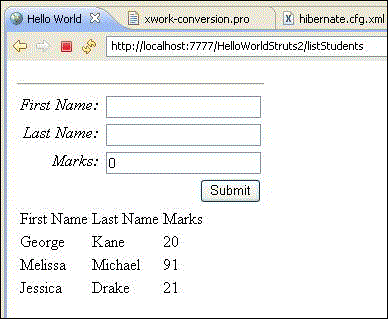
在顶部部分,我们得到一个表单,用于输入新学生记录的值,底部部分列出数据库中的学生。继续添加新的学生记录并按提交。每次单击提交时,屏幕都会刷新并显示更新的列表。