
- BabylonJS 教程
- BabylonJS - 首页
- BabylonJS - 简介
- BabylonJS - 环境设置
- BabylonJS - 概述
- BabylonJS - 基本元素
- BabylonJS - 材质
- BabylonJS - 动画
- BabylonJS - 相机
- BabylonJS - 光照
- BabylonJS - 参数化形状
- BabylonJS - 网格
- 向量位置和旋转
- BabylonJS - 贴花
- BabylonJS - Curve3
- BabylonJS - 动态纹理
- BabylonJS - 视差贴图
- BabylonJS - 镜头光晕
- BabylonJS - 创建屏幕截图
- BabylonJS - 反射探针
- 标准渲染管线
- BabylonJS - ShaderMaterial
- BabylonJS - 骨骼和骨架
- BabylonJS - 物理引擎
- BabylonJS - 播放声音和音乐
- BabylonJS 有用资源
- BabylonJS - 快速指南
- BabylonJS - 有用资源
- BabylonJS - 讨论
BabylonJS - 贴花
贴花就像贴在物体上的贴纸。贴纸图案是借助绘制在网格上的二维图像完成的(例如,游戏中的物体)。在游戏中,假设你有一支军队在发射子弹,需要在物体上看到子弹的印记。所以在 BabylonJS 中,这是使用贴花来完成的,当你点击任何物体时,你将在点击的位置绘制一个二维图像。
贴花用于在创建的网格上添加细节——例如子弹、孔洞等细节。在下面给出的演示链接中,我们使用一个图像并将其添加到导入的网格中。
要添加贴花,您可以使用以下代码:
var newDecal = BABYLON.Mesh.CreateDecal("decal", mesh, decalPosition, normal, decalSize, angle);
执行以下代码以在网格上添加贴花:
BABYLON.SceneLoader.ImportMesh("Shcroendiger'scat", "scenes/", "SSAOcat.babylon", scene, function (newMeshes) {
   var cat = newMeshes[0]; / /this is mesh shown on the screen.

   // Set the target of the camera to the first imported mesh
   camera.target = cat;

   var decalMaterial = new BABYLON.StandardMaterial("decalMat", scene);
   decalMaterial.diffuseTexture = new BABYLON.Texture("images/impact1.jpg", scene);
   decalMaterial.diffuseTexture.hasAlpha = true;
   decalMaterial.zOffset = -2;

   var onPointerDown = function (evt) {
      if (evt.button !== 0) {
         return;
      }

      // check if we are under a mesh
      var pickInfo = scene.pick(scene.pointerX, scene.pointerY, function (mesh) { return mesh === cat;
      // this will give all the meshes , but it will pick the mesh whch is same as cat and return true if it is found });
      if (pickInfo.hit) { // if true
         var decalSize = new BABYLON.Vector3(5, 5, 5); //size of decal is defined

         var newDecal = BABYLON.Mesh.CreateDecal("decal", cat, pickInfo.pickedPoint, pickInfo.getNormal(true), decalSize); //decal is created
         newDecal.material = decalMaterial; //decal material is added.
      }
   }
   var canvas = engine.getRenderingCanvas();
   canvas.addEventListener("pointerdown", onPointerDown, false);

   scene.onDispose = function () {
      canvas.removeEventListener("pointerdown", onPointerDown);
   }
});
演示
<!doctype html>
<html>
   <head>
      <meta charset = "utf-8">
      <title>BabylonJs - Basic Element-Creating Scene</title>
      <script src = "babylon.js"></script>
      <style>
         canvas {width: 100%; height: 100%;}
      </style>
   </head>

   <body>
      <canvas id = "renderCanvas"></canvas>
      <script type = "text/javascript">
         var canvas = document.getElementById("renderCanvas");
         var engine = new BABYLON.Engine(canvas, true);

         var createScene  = function() {
            var scene = new BABYLON.Scene(engine);

            //Adding a light
            var light = new BABYLON.HemisphericLight("Hemi", new BABYLON.Vector3(0, 1, 0), scene);

            //Adding an Arc Rotate Camera
            var camera = new BABYLON.ArcRotateCamera("Camera", -1.85, 1.2, 200, BABYLON.Vector3.Zero(), scene);

            camera.attachControl(canvas, true);

            // The first parameter can be used to specify which mesh to import. Here we import all meshes
            BABYLON.SceneLoader.ImportMesh("Shcroendiger'scat", "scenes/", "SSAOcat.babylon", scene, function (newMeshes) {
               var cat = newMeshes[0];

               // Set the target of the camera to the first imported mesh
               camera.target = cat;

               var decalMaterial = new BABYLON.StandardMaterial("decalMat", scene);
               decalMaterial.diffuseTexture = new BABYLON.Texture("images/impact1.jpg", scene);
               decalMaterial.diffuseTexture.hasAlpha = true;
               decalMaterial.zOffset = -2;

               var onPointerDown = function (evt) {
                  if (evt.button !== 0) {
                     return;
                  }

                  // check if we are under a mesh
                  var pickInfo = scene.pick(scene.pointerX, scene.pointerY, function (mesh) { return mesh === cat; });
                  if (pickInfo.hit) {
                     var decalSize = new BABYLON.Vector3(5, 5, 5);

                     var newDecal = BABYLON.Mesh.CreateDecal("decal", cat, pickInfo.pickedPoint, pickInfo.getNormal(true), decalSize);
                     newDecal.material = decalMaterial;
                  }
               }
               var canvas = engine.getRenderingCanvas();
               canvas.addEventListener("pointerdown", onPointerDown, false);

               scene.onDispose = function () {
                  canvas.removeEventListener("pointerdown", onPointerDown);
               }
            });
            return scene;
         };
         var scene = createScene();
         engine.runRenderLoop(function() {
            scene.render();
         });
      </script>
   </body>
</html>
在上面的演示链接中,我们使用了 SSAOcat.babylon 网格。您可以从此处下载 SSAOcat.babylon 的 json 文件:
将文件保存在 scenes/ 文件夹中。这将帮助您获得如下所示的输出。
输出
以上代码行生成以下输出:
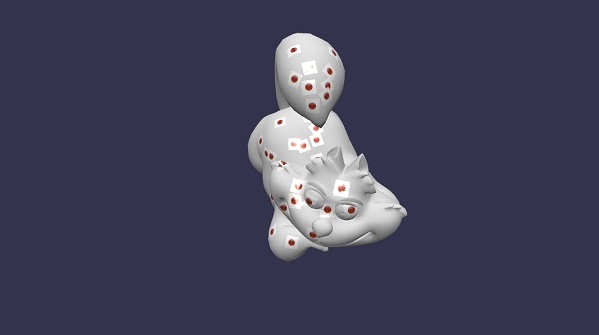
在这个演示中,我们使用了图像 **impact1.jpg**。这些图像存储在本地 images/ 文件夹中,并也在下面粘贴供参考。您可以下载任何您选择的图像并在演示链接中使用。
images/impact1.jpg
广告