
- BabylonJS 教程
- BabylonJS - 首页
- BabylonJS - 简介
- BabylonJS - 环境设置
- BabylonJS - 概述
- BabylonJS - 基本元素
- BabylonJS - 材质
- BabylonJS - 动画
- BabylonJS - 相机
- BabylonJS - 灯光
- BabylonJS - 参数化形状
- BabylonJS - 网格
- 向量位置和旋转
- BabylonJS - 贴花
- BabylonJS - Curve3
- BabylonJS - 动态纹理
- BabylonJS - 视差贴图
- BabylonJS - 镜头光晕
- BabylonJS - 创建屏幕截图
- BabylonJS - 反射探针
- 标准渲染管线
- BabylonJS - ShaderMaterial
- BabylonJS - 骨骼和骨架
- BabylonJS - 物理引擎
- BabylonJS - 播放声音和音乐
- BabylonJS 有用资源
- BabylonJS - 快速指南
- BabylonJS - 有用资源
- BabylonJS - 讨论
BabylonJS - 管道
管道是一种弯曲的圆柱体形状。它可以根据应用于它的方程式(数学函数)来生成不同的参数化形状,以获得坐标。
语法
以下是创建管道的语法:
var tube = BABYLON.Mesh.CreateTube(name, path, radius, tessellation, radiusFunction, cap, scene, updatable?, sideOrientation);
参数
考虑以下参数来创建管道:
名称 - 给管道指定的名称。
路径 - 管道将在其上构建的路径。此路径是管道的中心轴。此数组必须至少包含两个 Vector3。第一个点是管道的起点,最后一个点是管道的终点。因此,只有两个点,您将得到一个简单的圆柱体。
半径 - 这是沿管道应用的恒定半径值。仅当参数为 radiusFunction 为 null 时,才会考虑此值。
细分 - 这与径向段数有关。如果将其设置为 3,则得到一个三角形管道截面;如果将其设置为 4,则得到一个方形截面,依此类推。因此,将其设置为所需的精度级别;段数越多,网格越重。
RadiusFunction - 一个自定义的 javascript 函数。在构建管道时,将在路径的每个点调用此函数。它将采用 2 个参数,当前点的坐标以及该点距起点的距离。该函数将根据计算返回半径。
端盖 - BABYLON.Mesh.NO_CAP、BABYLON.Mesh.CAP_START、BABYLON.Mesh.CAP_END、BABYLON.Mesh.CAP_ALL。
场景 - 将显示管道的场景。
可更新 - 默认情况下,此设置为 false。如果设置为 true,则网格可以更新。
侧面方向 - 它采用默认的侧面方向。
带有 radiusFunction 的语法
var myradiusFunction = function(i, distance) {
   var radius = 3 * Math.cos(distance / 5);
   return radius;
};
var tube = BABYLON.Mesh.CreateTube("tubr", path, null, 20, myFunction, scene);
演示
<!doctype html>
<html>
   <head>
      <meta charset = "utf-8">
      <title>BabylonJs - Basic Element-Creating Scene</title>
      <script src = "babylon.js"></script>
      <style>
         canvas {width: 100%; height: 100%;}
      </style>
   </head>

   <body>
      <canvas id = "renderCanvas"></canvas>
      <script type = "text/javascript">
         var canvas = document.getElementById("renderCanvas");
         var engine = new BABYLON.Engine(canvas, true);
         var createScene  = function() {

            var scene = new BABYLON.Scene(engine);
            scene.clearColor = new BABYLON.Color3(0.8, 0.8, 0.8);
            var camera = new BABYLON.ArcRotateCamera("Camera", 3 *Math.PI / 2, Math.PI / 2, 50, BABYLON.Vector3.Zero(), scene);
            camera.attachControl(canvas, false);

            // lights
            var light = new BABYLON.HemisphericLight("hemi", new BABYLON.Vector3(0, 1, 0), scene);
            light.groundColor = new BABYLON.Color3(0.2, 0.2, 0.5);
            light.intensity = 0.6;


            var light2 = new BABYLON.PointLight("light2", new BABYLON.Vector3(-20, 0, -20), scene);
            light2.diffuse = BABYLON.Color3.White();
            light2.specular = BABYLON.Color3.Green();
            light2.intensity = 0.6;


            var mat = new BABYLON.StandardMaterial("mat1", scene);
            mat.alpha = 1.0;
            mat.diffuseColor = new BABYLON.Color3(0.5, 0.5, 0.1);
            mat.backFaceCulling = false;
            mat.wireframe = false;

            var curvePoints = function(l, t) {
               // mathematical function to calculate the curve points.
               var path = [];
               var step = l / t;
               var a = 5;
               for (var i = -l/2; i < l/2; i += step ) {
                  path.push( new BABYLON.Vector3(5 * Math.sin(i*t / 400), 5 * Math.cos(i*t / 400), 0) );
               }
               return path;
            };

            var curve = curvePoints(10, 150);

            var radiusFunction = function(i, distance) {
               // function to calculate the radiusfunction.
               var t = i / Math.PI * 2 / 8;
               var radius =  Math.sin(t) + i / 25;
               return radius;
            };

            var tube = BABYLON.Mesh.CreateTube("tube", curve, 2, 60, radiusFunction, 0, scene, false, BABYLON.Mesh.FRONTSIDE);
            tube.material = mat;
            return scene;
         };
         var scene = createScene();
         engine.runRenderLoop(function() {
            scene.render();
         });
      </script>
   </body>
</html>
输出
以上代码行生成以下输出:
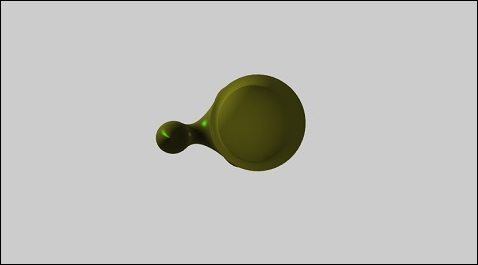
babylonjs_parametric_shapes.htm
广告