
- Flexbox 教程
- Flexbox - 首页
- Flexbox - 概述
- Flexbox - 弹性容器
- Flexbox - Flex-Direction
- Flexbox - Flex-Wrap
- Flexbox - 内容对齐
- Flexbox - 项目对齐
- Flexbox - 内容排列
- Flexbox - Flex-Order
- Flexbox - 灵活性
- Flexbox - 自对齐
- Flexbox 有用资源
- Flexbox - 快速指南
- Flexbox - 有用资源
- Flexbox - 讨论
Flexbox - 自对齐
此属性类似于align-items,但在这里,它应用于各个弹性项目。
用法 -
align-self: auto | flex-start | flex-end | center | baseline | stretch;
此属性接受以下值 -
flex-start - 弹性项目将在容器的顶部垂直对齐。
flex-end - 弹性项目将在容器的底部垂直对齐。
flex-center - 弹性项目将在容器的中心垂直对齐。
Stretch - 弹性项目将垂直对齐,使其填充容器的整个垂直空间。
baseline - 弹性项目将在横轴的基线上对齐。
flex-start
将此值传递给属性 align-self 时,特定弹性项目将在容器的顶部垂直对齐。
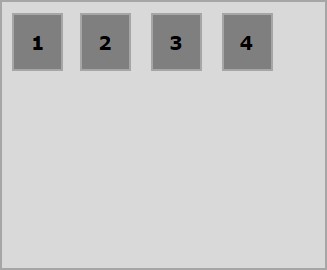
以下示例演示了将值flex-start传递给align-self属性的结果。
<!doctype html>
<html lang = "en">
   <style>
      .box1{background:green;}
      .box2{background:blue;}
      .box3{background:red;}
      .box4{background:magenta; align-self:start;}
      .box5{background:yellow;}
      .box6{background:pink;}
      .box{
         font-size:35px;
         padding:15px;
      }
      .container{
         display:flex;
         height:100vh;
         border:3px solid black;
         align-items:flex-start;
      }
   </style>

   <body>
      <div class = "container">
         <div class = "box box1">One</div>
         <div class = "box box2">two</div>
         <div class = "box box3">three</div>
         <div class = "box box4">four</div>
         <div class = "box box5">five</div>
         <div class = "box box6">six</div>
      </div>
   </body>
</html>
它将产生以下结果 -
flex-end
将此值传递给属性align-self时,特定弹性项目将在容器的底部垂直对齐。
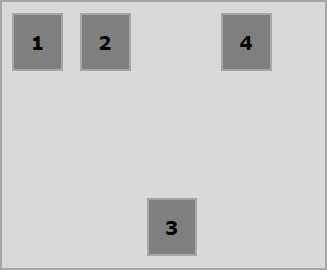
以下示例演示了将值flex-end传递给align-self属性的结果。
<!doctype html>
<html lang = "en">
   <style>
      .box1{background:green;}
      .box2{background:blue;}
      .box3{background:red;}
      .box4{background:magenta; align-self:flex-end;}
      .box5{background:yellow;}
      .box6{background:pink;}
      .box{
         font-size:35px;
         padding:15px;
      }
      .container{
         display:flex;
         height:100vh;
         border:3px solid black;
         align-items:flex-start;
      }
   </style>

   <body>
      <div class = "container">
         <div class = "box box1">One</div>
         <div class = "box box2">two</div>
         <div class = "box box3">three</div>
         <div class = "box box4">four</div>
         <div class = "box box5">five</div>
         <div class = "box box6">six</div>
      </div>
   </body>
</html>
它将产生以下结果 -
center
将值center传递给属性align-self时,特定弹性项目将在容器的中心垂直对齐。
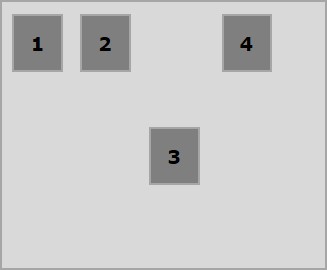
以下示例演示了将值center传递给align-self属性的结果。
<!doctype html>
<html lang = "en">
   <style>
      .box1{background:green;}
      .box2{background:blue;}
      .box3{background:red;}
      .box4{background:magenta; align-self:center;}
      .box5{background:yellow;}
      .box6{background:pink;}
      .box{
         font-size:35px;
         padding:15px;
      }
      .container{
         display:flex;
         height:100vh;
         border:3px solid black;
         align-items:flex-start;
      }
   </style>

   <body>
      <div class = "container">
         <div class = "box box1">One</div>
         <div class = "box box2">two</div>
         <div class = "box box3">three</div>
         <div class = "box box4">four</div>
         <div class = "box box5">five</div>
         <div class = "box box6">six</div>
      </div>
   </body>
</html>
它将产生以下结果 -
stretch
将此值传递给属性align-self时,特定弹性项目将垂直对齐,使其填充容器的整个垂直空间。
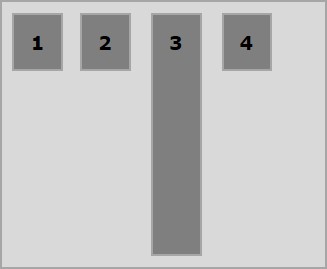
以下示例演示了将值 stretch 传递给align-self属性的结果。
<!doctype html>
<html lang = "en">
   <style>
      .box1{background:green;}
      .box2{background:blue;}
      .box3{background:red;}
      .box4{background:magenta; align-self:stretch;}
      .box5{background:yellow;}
      .box6{background:pink;}
      .box{
         font-size:35px;
         padding:15px;
      }
      .container{
         display:flex;
         height:100vh;
         border:3px solid black;
         align-items:flex-start;
      }
   </style>

   <body>
      <div class = "container">
         <div class = "box box1">One</div>
         <div class = "box box2">two</div>
         <div class = "box box3">three</div>
         <div class = "box box4">four</div>
         <div class = "box box5">five</div>
         <div class = "box box6">six</div>
      </div>
   </body>
</html>
它将产生以下结果 -
广告