
- Flexbox 教程
- Flexbox - 首页
- Flexbox - 概述
- Flexbox - Flex 容器
- Flexbox - Flex-Direction
- Flexbox - Flex-Wrap
- Flexbox - 对齐内容
- Flexbox - 对齐项目
- Flexbox - 对齐内容
- Flexbox - Flex-Order
- Flexbox - 灵活性
- Flexbox - 自对齐
- Flexbox 有用资源
- Flexbox - 快速指南
- Flexbox - 有用资源
- Flexbox - 讨论
Flexbox - Flex-Wrap
通常,如果容器空间不足,其余的弹性项目将被隐藏,如下所示。
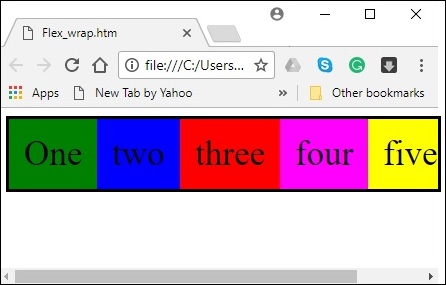
flex-wrap 属性用于指定弹性容器是单行还是多行。
用法 -
flex-wrap: nowrap | wrap | wrap-reverse
flex-direction: column | column-reverse
此属性接受以下值 -
wrap - 如果空间不足,容器的元素(弹性项目)将从上到下换行到额外的弹性行。
wrap-reverse - 如果空间不足,容器的元素(弹性项目)将从下到上换行到额外的弹性行。
现在,我们将通过示例了解如何使用wrap 属性。
wrap
将值wrap 传递给flex-wrap 属性时,容器的元素将从左到右水平排列,如下所示。
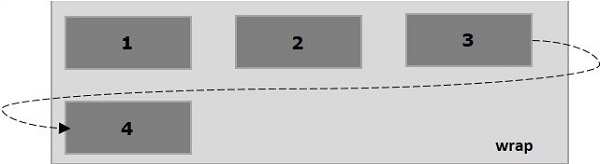
以下示例演示了将值wrap 传递给flex-wrap 属性的结果。在这里,我们使用flex-direction 值row 创建了六个不同颜色的盒子。
<!doctype html>
<html lang = "en">
   <style>
      .box1{background:green;}
      .box2{background:blue;}
      .box3{background:red;}
      .box4{background:magenta;}
      .box5{background:yellow;}
      .box6{background:pink;}

      .box{
         font-size:35px;
         padding:15px;
         width:100px;
      }
      .container{
         display:flex;
         border:3px solid black;
         flex-direction:row;
         flex-wrap:wrap;
      }
   </style>

   <body>
      <div class = "container">
         <div class = "box box1">One</div>
         <div class = "box box2">two</div>
         <div class = "box box3">three</div>
         <div class = "box box4">four</div>
         <div class = "box box5">five</div>
         <div class = "box box6">six</div>
      </div>
   </body>
</html>
它将产生以下结果 -
wrap-reverse
将值wrap-reverse 传递给flex-wrap 属性时,容器的元素将从左到右水平排列,如下所示。
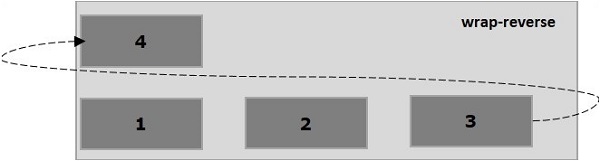
以下示例演示了将值wrap-reverse 传递给flex-wrap 属性的结果。在这里,我们使用flex-direction 值row 创建了六个不同颜色的盒子。
<!doctype html>
<html lang = "en">
   <style>
      .box1{background:green;}
      .box2{background:blue;}
      .box3{background:red;}
      .box4{background:magenta;}
      .box5{background:yellow;}
      .box6{background:pink;}

      .box{
         font-size:35px;
         padding:15px;
         width:100px;
      }
      .container{
         display:flex;
         border:3px solid black;
         flex-direction:row;
         flex-wrap:wrap-reverse;
      }
   </style>
   <body>
      <div class = "container">
         <div class = "box box1">One</div>
         <div class = "box box2">two</div>
         <div class = "box box3">three</div>
         <div class = "box box4">four</div>
         <div class = "box box5">five</div>
         <div class = "box box6">six</div>
      </div>
   </body>
</html>
它将产生以下结果 -
wrap(列)
将值wrap 传递给flex-wrap 属性并将值column 传递给flex-direction 属性时,容器的元素将从左到右水平排列,如下所示。
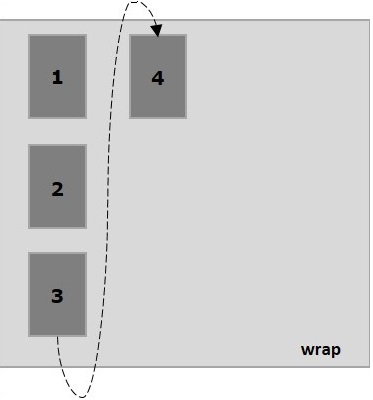
以下示例演示了将值wrap 传递给flex-wrap 属性的结果。在这里,我们使用flex-direction 值column 创建了六个不同颜色的盒子。
<!doctype html>
<html lang = "en">
   <style>
      .box1{background:green;}
      .box2{background:blue;}
      .box3{background:red;}
      .box4{background:magenta;}
      .box5{background:yellow;}
      .box6{background:pink;}

      .box{
         font-size:35px;
         padding:15px;
         width:100px;
      }
      .container{
         display:flex;
         border:3px solid black;
         flex-direction:column;
         flex-wrap:wrap;
         height:100vh;
      }
   </style>

   <body>
      <div class = "container">
         <div class = "box box1">One</div>
         <div class = "box box2">two</div>
         <div class = "box box3">three</div>
         <div class = "box box4">four</div>
         <div class = "box box5">five</div>
         <div class = "box box6">six</div>
      </div>
   </body>
</html>
它将产生以下结果 -
wrap-reverse(列)
将值wrap-reverse 传递给flex-wrap 属性并将值column 传递给flex-direction 属性时,容器的元素将从左到右水平排列,如下所示。
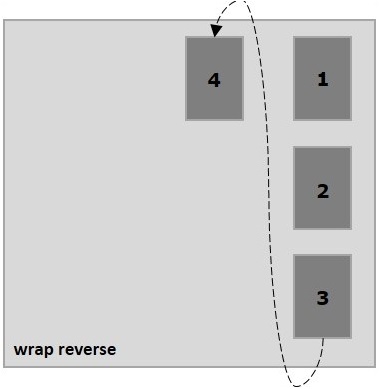
以下示例演示了将值wrap-reverse 传递给flex-wrap 属性的结果。在这里,我们创建了六个不同颜色的盒子,并使用flex-direction 值column。
<!doctype html>
<html lang = "en">
   <style>
      .box1{background:green;}
      .box2{background:blue;}
      .box3{background:red;}
      .box4{background:magenta;}
      .box5{background:yellow;}
      .box6{background:pink;}

      .box{
         font-size:35px;
         padding:15px;
         width:100px;
      }
      .container{
         display:flex;
         border:3px solid black;
         flex-direction:column;
         flex-wrap:wrap-reverse;
         height:100vh;
      }
   </style>

   <body>
      <div class = "container">
         <div class = "box box1">One</div>
         <div class = "box box2">two</div>
         <div class = "box box3">three</div>
         <div class = "box box4">four</div>
         <div class = "box box5">five</div>
         <div class = "box box6">six</div>
      </div>
   </body>
</html>
它将产生以下结果 -