- GraphQL 教程
- GraphQL - 首页
- GraphQL - 简介
- GraphQL - 环境搭建
- GraphQL - 架构
- GraphQL - 应用组件
- GraphQL - 示例
- GraphQL - 类型系统
- GraphQL - 模式 (Schema)
- GraphQL - 解析器 (Resolver)
- GraphQL - 查询
- GraphQL - 变异 (Mutation)
- GraphQL - 验证
- GraphQL - JQuery 集成
- GraphQL - React 集成
- GraphQL - Apollo Client
- GraphQL - 客户端身份验证
- GraphQL - 缓存
- GraphQL 有用资源
- GraphQL - 快速指南
- GraphQL - 有用资源
- GraphQL - 讨论
GraphQL - 查询
GraphQL 操作可以是读取或写入操作。GraphQL 查询用于读取或获取值,而变异 (Mutation) 用于写入或发布值。无论哪种情况,操作都是一个简单的字符串,GraphQL 服务器可以解析该字符串,并以特定格式的数据进行响应。通常用于移动和 Web 应用程序的流行响应格式是 JSON。
定义查询的语法如下:
//syntax 1
query query_name{ someField }

//syntax 2
{ someField }
以下是一个查询示例:
//query with name myQuery
query myQuery{
   greeting
}

// query without any name
{
   greeting
}
从上面的例子可以看出,query 关键字是可选的。
GraphQL 查询有助于减少数据过度获取。与 RESTful API 不同,GraphQL 允许用户限制应从服务器获取的字段。这意味着查询更小,网络流量更少;从而减少响应时间。
图示 1 - 使用自定义字段查询学生模型
在这个例子中,我们有一组存储在 json 文件中的学生。每个学生模型都有 firstName、lastName 和 id 等字段,但没有 fullName。在这里,我们将讨论如何进行查询以检索所有学生的 fullName。为此,我们需要在模式解析器中创建 fullName 字段。
让我们看看如何使用以下步骤完成此图示:
步骤 1 - 下载并安装项目所需的依赖项
创建一个名为 **query-app** 的文件夹。从终端将目录更改为 **query-app**。稍后,按照“环境搭建”章节中说明的步骤 3 到 5 进行操作。
步骤 2 - 创建模式 (Schema)
在项目文件夹 query-app 中添加 **schema.graphql** 文件,并添加以下代码:
type Query {
   greeting:String
   students:[Student]
   studentById(id:ID!):Student
}

type Student {
   id:ID!
   firstName:String
   lastName:String
   fullName:String
}
请注意,**students.json** 文件中没有 *fullName* 字段。但是,我们需要通过查询来获取学生的 *fullName*。在这种情况下,*fullName* 将是一个数据源中不存在的自定义字段。
步骤 3 - 创建解析器 (Resolver)
在项目文件夹中创建一个 **resolvers.js** 文件,并添加以下代码:
const db = require('./db')
const Query = {
   //resolver function for greeting
   greeting:() => {
      return "hello from  TutorialsPoint !!!"
   },

   //resolver function for students returns list
   students:() => db.students.list(),

   //resolver function for studentbyId
   studentById:(root,args,context,info) => {
      //args will contain parameter passed in query
      return db.students.get(args.id);
   }
}

//for each single student object returned,resolver is invoked

const Student = {
   fullName:(root,args,context,info) => {
      return root.firstName+":"+root.lastName
   }
}

module.exports = {Query,Student}
步骤 4 - 运行应用程序
创建一个 **server.js** 文件。参考“环境搭建”章节中的步骤 8。在终端中执行命令 *npm* start。服务器将在 9000 端口启动并运行。在这里,我们使用 GraphiQL 作为客户端来测试应用程序。
打开浏览器并输入 URL **https://:9000/graphiql**。在编辑器中键入以下查询:
{
   students{
      id
      fullName
   }
}
查询的响应如下:
{
   "data": {
      "students": [
         {
            "id": "S1001",
            "fullName": "Mohtashim:Mohammad"
         },

         {
            "id": "S1002",
            "fullName": "Kannan:Sudhakaran"
         },

         {
            "id": "S1003",
            "fullName": "Kiran:Panigrahi"
         }
      ]
   }
}
创建一个 **server.js** 文件并添加以下代码:
const bodyParser = require('body-parser');
const cors = require('cors');
const express = require('express');

const db = require('./db');
const port = 9000;
const app = express();

//loading type definitions from schema file
const fs = require('fs')
const typeDefs = fs.readFileSync('./schema.graphql',{encoding:'utf-8'})

//loading resolvers
const resolvers = require('./resolvers')

//binding schema and resolver
const {makeExecutableSchema} = require('graphql-tools')
const schema = makeExecutableSchema({typeDefs, resolvers})

//enabling cross domain calls and form post
app.use(cors(), bodyParser.json());

//enabling routes
const  {graphiqlExpress,graphqlExpress} = require('apollo-server-express')
app.use('/graphql',graphqlExpress({schema}))
app.use('/graphiql',graphiqlExpress({endpointURL:'/graphql'}))

//registering port
app.listen(port, () => console.info(`Server started on port ${port}`));
在终端中执行命令 npm start。服务器将在 9000 端口启动并运行。在这里,我们使用 GraphiQL 作为客户端来测试应用程序。
打开浏览器并输入 URL **https://:9000/graphiql**。在编辑器中键入以下查询:
{
   students{
      id
      fullName
   }
}
查询的响应如下:
{
   "data": {
      "students": [
         {
            "id": "S1001",
            "fullName": "Mohtashim:Mohammad"
         },
         {
            "id": "S1002",
            "fullName": "Kannan:Sudhakaran"
         },
         {
            "id": "S1003",
            "fullName": "Kiran:Panigrahi"
         }
      ]
   }
}
图示 2 - 嵌套查询
让我们创建一个嵌套查询来获取学生详细信息及其大学详细信息。我们将使用同一个项目文件夹。
步骤 1 - 编辑模式 (Schema)
模式文件已经有了 *student* 字段。让我们添加一个 college 字段并定义其类型。
type College {
   id:ID!
   name:String
   location:String
   rating:Float
}

type Student {
   id:ID!
   firstName:String
   lastName:String
   fullName:String
   college:College
}
步骤 2 - 修改 resolvers.js
我们需要添加如下所示的 college 解析器函数。在这种情况下,将为返回的每个学生对象执行 college 解析器函数。此处的解析器的 root 参数将包含 *student*。
const Student = {
   fullName:(root,args,context,info) => {
      return root.firstName+":"+root.lastName
   },
   college:(root) => {
      return db.colleges.get(root.collegeId);
   }
}
module.exports = {Query,Student}
解析器通过调用 college 集合的 get 方法并传递 *collegeId* 来返回每个学生的 college。我们通过 *collegeId* 在学生和大学之间建立了关联关系。
步骤 3 - 测试应用程序
打开终端窗口并导航到项目文件夹。键入命令 -npm start。启动浏览器并输入 URL **https://:9000/graphiql**。
在 GraphiQL 窗口中输入以下查询:
{
   students{
      id
      firstName
      college {
         id
         name
         location
         rating
      }
   }
}
查询的响应如下:
{
   "data": {
      "students": [
         {
            "id": "S1001",
            "firstName": "Mohtashim",
            "college": {
               "id": "col-102",
               "name": "CUSAT",
               "location": "Kerala",
               "rating": 4.5
            }
         },

         {
            "id": "S1002",
            "firstName": "Kannan",
            "college": {
               "id": "col-101",
               "name": "AMU",
               "location": "Uttar Pradesh",
               "rating": 5
            }
         },

         {
            "id": "S1003",
            "firstName": "Kiran",
            "college": {
               "id": "col-101",
               "name": "AMU",
               "location": "Uttar Pradesh",
               "rating": 5
            }
         }
      ]
   }
}
什么是查询变量?
如果查询有一些要传递的动态值,则使用变量来表示这些动态值。因此,客户端应用程序可以重用该查询。
图示
让我们创建一个简单的应用程序来理解查询变量。
步骤 1 - 编辑 Schema 文件
添加一个 *sayHello* 字段,该字段接受一个字符串参数并返回一个字符串。name 值将在客户端应用程序中动态变化。
type Query {
   sayHello(name:String!):String
}
步骤 2 - 编辑 resolver.js 文件
添加一个 *sayHello* 解析器,该解析器接受如下参数:
sayHello:(root,args,context,info) => `Hi ${args.name} GraphQL server says Hello to you!!`
步骤 3 - 在 GraphiQL 中声明查询变量
变量声明以 $ 加上变量名称开头。例如:$myname_Variable。
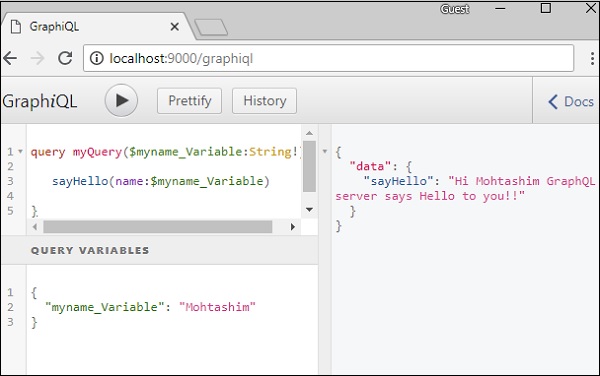
一旦声明了 $myname_Variable,就必须与命名查询语法一起使用。查询 myQuery 获取字符串值并将其传递给 sayHello,如下所示:
query myQuery($myname_Variable:String!) {
   sayHello(name:$myname_Variable)
}
在 GraphiQL 客户端的“查询变量”部分中,将值设置为 $myname_Variable 的 JSON 对象。
{
   "myname_Variable": "Mohtashim"
}
以上代码的输出如下:
{
   "data": {
      "sayHello": "Hi Mohtashim GraphQL server says Hello to you!!"
   }
}
如何将查询变量与枚举一起使用
让我们看看当字段参数为 **枚举类型** 时如何使用查询变量。
步骤 1 - 编辑 schema.graphql 文件
enum ColorType {
   RED
   BLUE
   GREEN
}

type Query {
   setFavouriteColor(color:ColorType):String
}
*setFavouriteColor* 函数以枚举作为输入并返回一个字符串值。
步骤 2 - 编辑 resolvers.js 文件
解析器函数 *setFavouriteColor* 接受 *root* 和 *args*。运行时传递给函数的枚举值可以通过 args 参数访问。
setFavouriteColor:(root,args) => {
   return  "Your Fav Color is :"+args.color;
}
步骤 3 - 在 GraphiQL 中声明查询变量
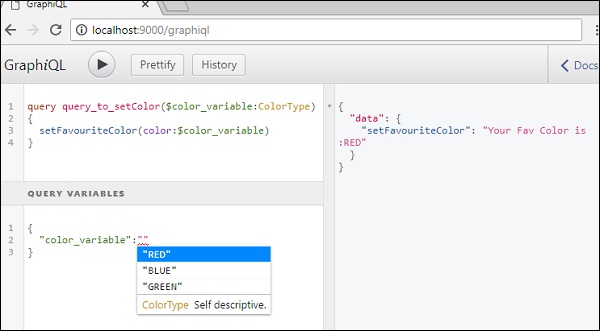
查询名为 **query_to_setColor**,它获取名为 color_variable 的 ColorType 变量。此变量将传递给 setFavouriteColor 方法。
query query_to_setColor($color_variable:ColorType) {
   setFavouriteColor(color:$color_variable)
}
在 GraphiQL 的查询变量部分,键入以下代码:
{
   "color_variable":"RED"
}
响应如下所示:
{
   "data": {
      "setFavouriteColor": "Your Fav Color is: RED"
   }
}