
 数据结构
数据结构 网络
网络 关系数据库管理系统 (RDBMS)
 操作系统
操作系统 Java
Java MS Excel
 iOS
iOS HTML
HTML CSS
CSS Android
 Python
 C语言编程
C语言编程 C++
C++ C#
C# MongoDB
 MySQL
MySQL Javascript
 PHP
PHP 物理学
物理学 化学
化学 生物学
生物学 数学
数学 英语
英语 经济学
经济学 心理学
心理学 社会学
社会学 服装设计
服装设计 法学
法学如何在Python Plotly中将多个图表添加到Plotly Dash应用程序的单个浏览器页面上?
Plotly 是一个 Python 中的开源绘图库,可以生成多种不同类型的图表。Python 用户可以使用 Plotly 创建交互式的基于 Web 的可视化效果,这些可视化效果可以显示在 Jupyter Notebook 中,保存到独立的 HTML 文件中,或者作为使用 Dash 的 Web 应用程序的一部分进行服务。Plotly 也可以用于静态文档发布和桌面编辑器,例如 PyCharm 和 Spyder。
Dash 是一个 Python 框架,用于创建交互式的基于 Web 的仪表板应用程序。Dash 库为基于 Web 的仪表板应用程序添加了所有必需的库。
在本教程中,我们将演示如何在单个浏览器页面上将多个图表添加到 Plotly Dash 应用程序。请按照以下步骤在单个页面上生成多个 Dash 应用程序。
步骤 1
导入 Dash 库。
import dash
步骤 2
导入 Dash 核心组件,**dcc** 和 **html**。
from dash import dcc,html
步骤 3
导入以下 Dash 依赖项。
from dash.dependencies import Input, Output
步骤 4
导入 **plotly.express** 模块并将其别名为 **px**。
import plotly.express as px
步骤 5
使用 Pandas 模块生成数据集
import pandas as pd
df_bar = pd.DataFrame({
   "Season": ["Summer", "Winter", "Autumn", "Spring"],
   "Rating": [3,2,1,4]
})
步骤 6
使用以下值生成条形图,并将其存储在“fig”变量中。
fig = px.bar(df_bar, x="Season", y="Rating", barmode="group")
步骤 7
创建 **main** 函数,使用以下命令运行 App 服务器:
app = dash.Dash(__name__)
if __name__ == '__main__':
   app.run_server(debug=True)
步骤 8
为两个不同的 HTML 子元素在两个“div”部分中生成 App 布局。
app.layout = html.Div(children=[
   # elements from the top of the page
   html.Div([html.H1(children='Dash app1'),
   html.Div(children='''Dash: First graph.'''),
   dcc.Graph(id='graph1',figure=fig),]),

   # New Div for all elements in the new 'row' of the page
   html.Div([
      html.H1(children='Dash app2'),
      html.Div(children='''Dash: Second graph.'''),
      dcc.Graph(id='graph2',figure=fig),
   ]),
])
示例
以下是用于在 Dash 中的单个网页上创建多个图表的完整代码:
import dash
from dash import dcc,html
from dash.dependencies import Input, Output

import pandas as pd
import plotly.express as px
app = dash.Dash(__name__)
df_bar = pd.DataFrame({
   "Season": ["Summer", "Winter", "Autumn", "Spring"],
   "Rating": [3,2,1,4]
})

fig = px.bar(df_bar, x="Season", y="Rating", barmode="group")
app.layout = html.Div(children=[
   # elements from the top of the page
   html.Div([
      html.H1(children='Dash app1'),
      html.Div(children='''
      Dash: First graph.'''),

      dcc.Graph(
         id='graph1',
         figure=fig
      ),
   ]),
   # New Div for all elements in the new 'row' of the page
   html.Div([
      html.H1(children='Dash app2'),
      html.Div(children='''
      Dash: Second graph. '''),

      dcc.Graph(
         id='graph2',
         figure=fig
      ),
   ]),
])

if __name__ == '__main__':
app.run_server(debug=True)
输出
执行上述程序后,您将在控制台中获得以下输出:
Dash is running on http://127.0.0.1:8050/
* Serving Flask app 'main'
* Debug mode: on
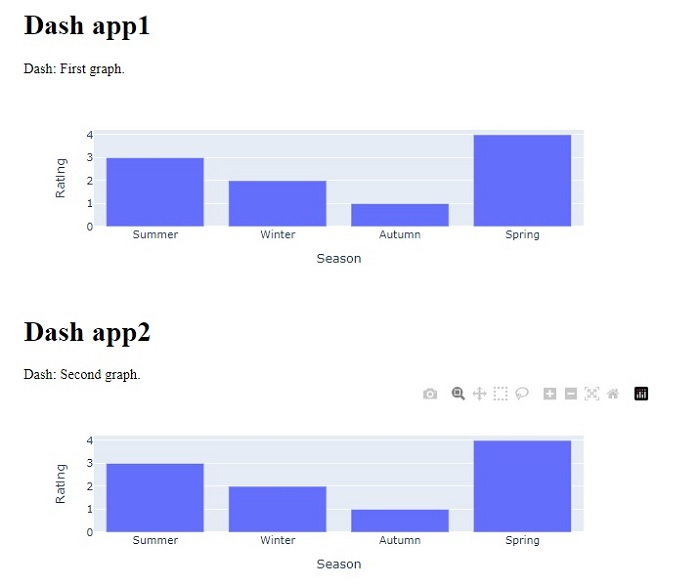
单击 URL 后,您将被重定向到浏览器,该浏览器将显示以下输出:

更新于:2022年10月21日
5000+ 浏览量

广告