
 数据结构
数据结构 网络
网络 关系数据库管理系统
 操作系统
操作系统 Java
Java MS Excel
 iOS
iOS HTML
HTML CSS
CSS Android
 Python
 C 编程
C 编程 C++
C++ C#
C# MongoDB
 MySQL
MySQL Javascript
 PHP
PHP 物理
物理 化学
化学 生物
生物 数学
数学 英语
英语 经济学
经济学 心理学
心理学 社会学
社会学 服装设计
服装设计 法律研究
法律研究如何在 JavaFX XY 图表中移除刻度标签?
javafx.scene.XYChart 类是所有在 x-y 平面中绘制的图表的基类。通过实例化此类的子类,您可以创建各种 XY 图表,例如 - 线形图、面积图、条形图、饼图、气泡图、散点图等。
在 XY 图表中,给定的数据点绘制在 XY 平面上。在 x 和 y 轴上,您将有刻度标记和标签。标签指定值的名称(或数字)。
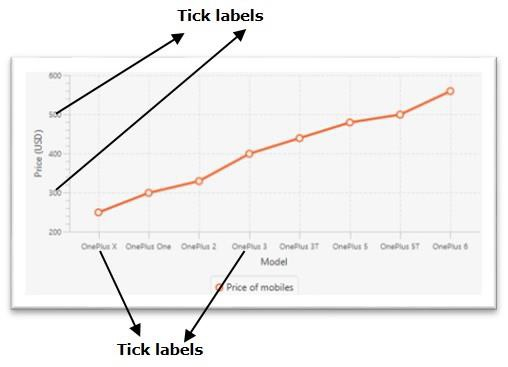
更改刻度标记的颜色
javafx.scene.chart.Axis 类(抽象)是 XY 图表中所有轴的基类。要创建 X 和 Y 轴,您需要实例化这些类的子类。
NumberAxis 类用于创建数值轴,而 CategoryAxis 类用于创建字符串类别的轴。
此类有一个名为 tickLabelVisible(布尔型)的属性,它指定是否显示刻度标记。您可以使用 setTickLabelVisible() 方法设置此属性的值。
要移除 XY 图表的刻度标签,请通过传递布尔值 false 调用此方法。
示例
import javafx.application.Application;
import javafx.geometry.Insets;
import javafx.scene.Scene;
import javafx.stage.Stage;
import javafx.scene.chart.CategoryAxis;
import javafx.scene.chart.LineChart;
import javafx.scene.chart.NumberAxis;
import javafx.scene.chart.XYChart;
import javafx.scene.layout.StackPane;
public class RemovingTickLabels extends Application {
   public void start(Stage stage) {
      //Defining the x an y axes
      CategoryAxis xAxis = new CategoryAxis();
      NumberAxis yAxis = new NumberAxis(200, 600, 100);
      //Setting labels for the axes
      xAxis.setLabel("Model");
      yAxis.setLabel("Price (USD)");
      //Creating a line chart
      LineChart linechart = new LineChart(xAxis, yAxis);
      //Preparing the data points for the line
      XYChart.Series series = new XYChart.Series();
      series.getData().add(new XYChart.Data("OnePlus X", 249));
      series.getData().add(new XYChart.Data("OnePlus One", 299));
      series.getData().add(new XYChart.Data("OnePlus 2", 329));
      series.getData().add(new XYChart.Data("OnePlus 3", 399));
      series.getData().add(new XYChart.Data("OnePlus 3T", 439));
      series.getData().add(new XYChart.Data("OnePlus 5", 479));
      series.getData().add(new XYChart.Data("OnePlus 5T", 499));
      series.getData().add(new XYChart.Data("OnePlus 6", 559));
      //Setting the name to the line (series)
      series.setName("Price of mobiles");
      //Setting the data to Line chart
      linechart.getData().add(series);
      //Removing the tick labels
      xAxis.setTickLabelsVisible(false);
      yAxis.setTickLabelsVisible(false);
      //Creating a stack pane to hold the chart
      StackPane pane = new StackPane(linechart);
      pane.setPadding(new Insets(15, 15, 15, 15));
      pane.setStyle("-fx-background-color: BEIGE");
      //Setting the Scene
      Scene scene = new Scene(pane, 595, 300);
      stage.setTitle("JavaFX Example");
      stage.setScene(scene);
      stage.show();
   }
   public static void main(String args[]){
      launch(args);
   }
}
输出


更新于: 2020年5月20日
555 次查看

广告