
 数据结构
数据结构 网络
网络 关系数据库管理系统
 操作系统
操作系统 Java
Java MS Excel
 iOS
iOS HTML
HTML CSS
CSS Android
 Python
 C 编程
C 编程 C++
C++ C#
C# MongoDB
 MySQL
MySQL Javascript
 PHP
PHP 物理学
物理学 化学
化学 生物学
生物学 数学
数学 英语
英语 经济学
经济学 心理学
心理学 社会学
社会学 时尚研究
时尚研究 法律研究
法律研究如何在 React Native 中使用 Redux?
Redux 是一个用于 JavaScript 程序的状态管理库。它提供了一个中心位置来存储应用程序的所有状态信息,并提供了一种可预测的方式来使用 action 和 reducer 来更改状态。
React Native 是一个使用 React 构建原生移动应用程序的框架。为了将 Redux 与 React Native 结合使用,用户必须将其 Redux 存储与 React Native 组件集成。要将 Redux 与 ReactNative 一起使用,我们将按照简要描述的几个步骤进行操作,稍后我们将更详细地讨论此过程。
首先,安装 Redux 和 React-Redux 库。
要构建存储,请使用 Redux 库的 createStore 方法。存储包含应用程序的状态。
使用 react-redux 包中的 Provider 组件来授予 React Native 组件访问存储的权限。
要将组件连接到存储,请使用 reactredux 包中的 connect 函数。来自存储的状态将可供这些组件访问,然后这些组件可以发出 action 来更新状态。
使用存储的 dispatch 方法发出 action 来更新状态。
要响应存储更改来更新组件,请使用存储的 subscribe 方法。
在 React Native 中使用 Redux 的步骤
首先安装 React-Redux 和 Redux 库 - 为了使 Redux 与 React Native 兼容,必须安装 React-Redux 和 Redux 库。为此,我们可以使用 yarn 或 npm 包管理器。
以下是安装 redux 和 react-redux 需要运行的命令。
npm install redux
npm install react-redux
创建存储 - 存储应用程序的状态。使用 Redux 库的 createStore 函数创建存储。然后,createStore 方法根据 action 更新状态,并接收 reducer 函数作为参数。
将用户的 React Native 组件连接到存储 - 使用 react-redux 包中的 Provider 组件向用户的组件提供存储。此组件为所有其他关联组件提供了访问存储的权限。
将用户的组件连接到存储 - 使用 reactredux 包中的 connect 方法将组件连接到存储。通过将状态从存储映射到 props 并将 action 分派到 props,用户可以使用 connect 函数分派 action 来更新状态。
发送 action 以修改状态 - 我们可以通过存储的 dispatch 函数来做到这一点。
注册存储更改 - 使用存储的 subscribe 函数订阅更改。然后对用户的组件进行任何必要的更新。
示例
在此示例中,我们将创建一个 redux 存储并在我们的 React-Native 应用程序中使用它。我们将创建一个存储来存储计数器的值。需要创建不同的文件和文件夹来实现 redux。首先,我们需要创建一个名为 Redux 的文件夹,以下是我们需要在该文件夹中创建的文件。
redux 的文件夹结构 -
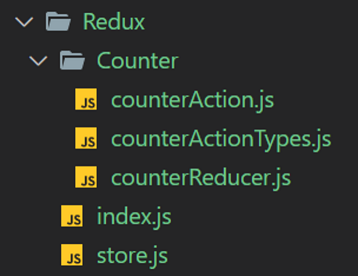
让我们逐个了解每个文件并理解代码
counterActionTypes.js - 存储所有 action 类型
// All Action Types
export const INCREMENT_COUNTER = 'INCREMENT_COUNTER';
export const DECREMENT_COUNTER = 'DECREMENT_COUNTER';
counterAction.js − 存储所有 action
import { INCREMENT_COUNTER, DECREMENT_COUNTER } from
'./counterActionTypes';
export const incrementCounterAction = (parameter) => {
   return {
      type: INCREMENT_COUNTER,
      payload: parameter
   }
}
export const decrementCounterAction = () => {
   return {
      type: DECREMENT_COUNTER
   }
}
counterReducer.js - 存储初始状态和 reducer。
import { INCREMENT_COUNTER, DECREMENT_COUNTER } from './counterActionTypes';

//initializing state
const initialState = {
   counter: 0
}
const counterReducer = (state = initialState, action) => {
   switch (action.type) {
      case INCREMENT_COUNTER: return {
         ...state,
         counter: state.counter + action.payload
      }
      case DECREMENT_COUNTER: return {
         ...state,
         counter: state.counter - 1
      }
      default: return state
   }
}
export default counterReducer;
index.js − 存储所有 action
// All Actions
import { incrementCounterAction } from './Counter/counterAction';
import { decrementCounterAction } from './Counter/counterAction';
store.js − redux 的存储
import { createStore } from 'redux';
import counterReducer from './Counter/counterReducer';

// Passing counterReducer to createStore
const store = createStore(counterReducer);
export default store;
App.js − 应用程序的主要组件
import React from 'react';
import { Provider } from 'react-redux';
import store from './Redux/store';
import MyComponent from './MyComponent';
const App = () => {
   return (
      <Provider store={store}>
         <MyComponent />
      </Provider>
   );
};
export default App;
MyComponent.js − 我们使用 redux 状态的组件
import React, { Component } from 'react'
import { Text, View, Button } from 'react-native'
import { connect } from 'react-redux'
import { incrementCounterAction, decrementCounterAction } from
'./Redux/Counter/counterAction';
class MyComponent extends Component {
   render() {
      return (
         <View style={{ justifyContent: 'center', alignItems: 'center' }}>
            <View style={{ marginVertical: 50 }}>
               <Text style = {{ fontSize: 25, fontWeight: 'bold' }}> Counter Value = {this.props.counter} </Text>
            </View>
            <View style = {{ marginVertical: 5 }}>
               <Button title = "Increment +1" style = {{ marginVertical: 50 }} onPress={() => { this.props.increaseCounter(1) }} />
            </View>
            <View style = {{ marginVertical: 5 }}>
               <Button title = "Increment +5" style = {{ marginVertical: 50 }} onPress={() => { this.props.increaseCounter(5) }} />
            </View>
            <View style = {{ marginVertical: 50 }}>
               <Button title = "Decrement -1" onPress={() => { this.props.decreaseCounter() }} />
            </View>
         </View>
      )
   }
}
const mapStateToProps = (state) => {
   return {
      counter: state.counter
   }
}
const mapDispatchToProps = (dispatch) => {
   return {
      increaseCounter: (parameter) => {
         dispatch(incrementCounterAction(parameter))
      },
      decreaseCounter: () => {
         dispatch(decrementCounterAction())
      }
   }
}
export default connect(mapStateToProps, mapDispatchToProps)(MyComponent);
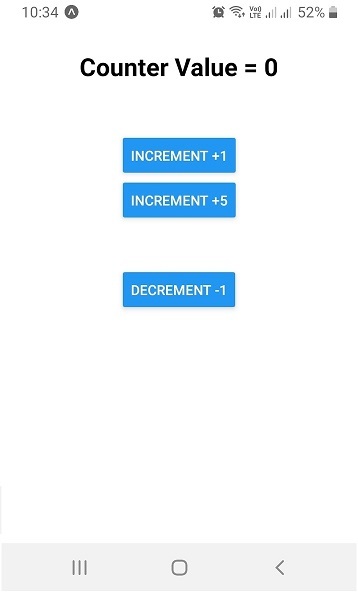
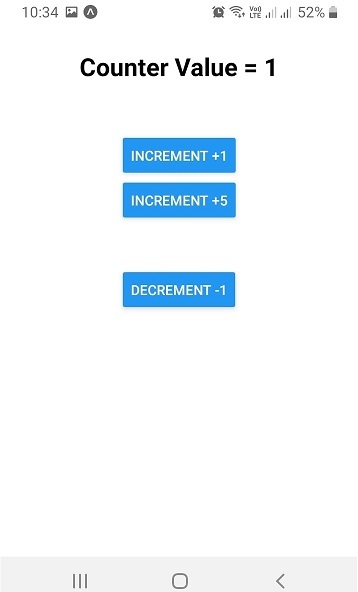
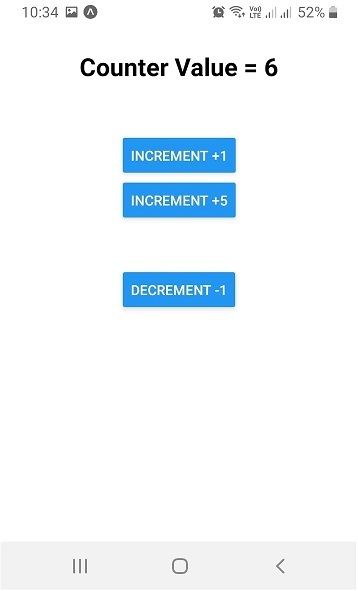
输出
初始状态
单击“INCREMENT +1”按钮后。
单击“INCREMENT +5”按钮后。
单击“DECREMENT -1”按钮后。
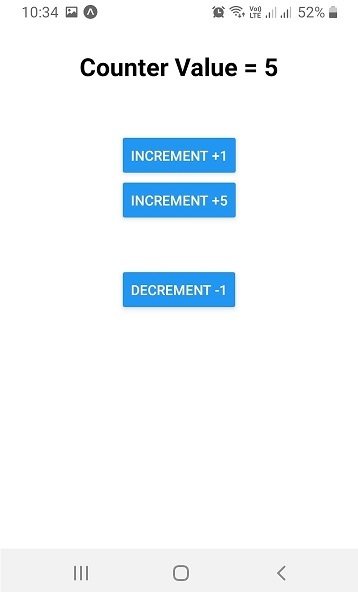
这演示了如何在 React Native 中使用 Redux。虽然在实际应用程序中,与存储相关的 action、reducer 和组件会更多,但基本概念仍然适用。

7K+ 浏览量
