
 数据结构
数据结构 网络
网络 关系型数据库管理系统
 操作系统
操作系统 Java
Java MS Excel
 iOS
iOS HTML
HTML CSS
CSS Android
 Python
 C 编程
C 编程 C++
C++ C#
C# MongoDB
 MySQL
MySQL Javascript
 PHP
PHP 物理
物理 化学
化学 生物
生物 数学
数学 英语
英语 经济学
经济学 心理学
心理学 社会学
社会学 时尚研究
时尚研究 法律研究
法律研究什么是 SectionList 组件,如何在 React Native 中使用它?
一个帮助渲染分段列表的接口。SectionList 的一些重要功能包括:
- 列表的头部/底部支持
- 分段的头部/底部支持
- 滚动加载
- 下拉刷新
- 完全跨平台
基本的 SectionList 组件如下所示:
<SectionList sections={DataContainer} keyExtractor={yourkeyextractor} renderItem={yourenderItem} renderSectionHeader={yoursectionheader} />要使用 SectionList,请按如下所示导入组件:
import { SectionList } from "react-native";以下是 SectionList 上可用的重要属性列表:
| 属性 | 描述 |
|---|---|
| renderItem | 渲染分段中项目的默认函数。它返回一个 React 元素。 渲染函数将作为包含以下键的对象传递给 sectionlist: 'item'(对象) - 项目对象 'index' (数字) - 分段内赋予项目的索引。 'section' (对象) - 分段对象。 'separators' (对象) - 是一个包含以下键的对象:
|
| sections | 要渲染的数据。 |
| renderSectionHeader | 内容渲染在顶部。在 iOS 中,您会看到内容停靠在顶部。 |
| renderSectionFooter | 内容渲染在底部。 |
| refreshing | 刷新时,如果要渲染新数据,请将此属性设置为 true。 |
| ListEmptyComponent | 当列表为空时将调用的组件类、渲染函数或渲染元素。如果您想在列表为空时执行某些操作,此组件将很有用。 |
| ListFooterComponent | 将在所有项目底部渲染的组件类、渲染函数或渲染元素。 |
| ListFooterComponentStyle | 此处可以完成页脚组件所需的样式。 |
| ListHeaderComponent | 将在所有项目顶部渲染的组件类、渲染函数或渲染元素。 |
| ListHeaderComponentStyle | 此处可以完成标题组件所需的样式。 |
| keyExtractor | 为给定索引提取唯一的键。该键用于缓存,也用于跟踪项目的重新排序。 |
示例 1:使用 SectionList 显示数据
要使用 SectionList,我们首先需要导入它,如下所示:
import { SectionList , Text, View, StyleSheet} from "react-native";导入完成后,我需要在 SectionList 中显示数据。数据存储在 this.state.data 中,如下所示:
this.state = {
   data: [
      {
         title: "Javascript Frameworks",
         data: ["Angular", "ReactJS", "VueJS", "ReactNative"]
      },
      {
         title: "PHP Frameworks",
         data: ["Laravel", "CodeIgniter", "CakePHP", "Symfony"]
      }
   ]
};
实现 renderItem 函数
下面的函数负责获取项目并在 Text 组件中显示它,如下所示:
renderItem = ({ item }) => {
   return (
      <View style={styles.item}>
         <Text >
            {item}
         </Text>
      </View>
   );
};
Text 组件显示项目,并包装在 View 组件中。
实现 SectionList
这是 SectionList 的实现,它具有 data、renderItem、keyExtractor 和 renderSectionHeader 属性。
<View style={styles.container}>
   <SectionList
      sections={this.state.data}
      renderItem={this.renderItem}
      keyExtractor={(item, index) => index}
      renderSectionHeader={({ section: { title } }) => (
         <Text style={styles.header}>{title}</Text>
      )}
   />
</View>
this.state.data 传递给 data 属性,this.renderItem 函数分配给 renderItem 属性。
根据您的数据,您可以指定键属性,该属性将是数据数组中的唯一属性,并且应将其传递给 keyExtractor 属性。如果未指定,它将使用数组索引作为 key 值。
因此,此处唯一的键是 item+index,并且将其分配给 keyExtractor。
keyExtractor={(item, index) => item + index}renderSectionHeader 属性负责显示标题。
import React from "react";
import { SectionList , Text, View, StyleSheet} from "react-native";
export default class App extends React.Component {
   constructor() {
      super();
      this.state = {
      data: [
         {
            title: "Javascript Frameworks",
            data: ["Angular", "ReactJS", "VueJS", "ReactNative"]
         },
         {
            title: "PHP Frameworks",
            data: ["Laravel", "CodeIgniter", "CakePHP", "Symfony"]
         }
      ]
   };
}
renderItem = ({ item }) => {
   return (
      <View style={styles.item}>
         <Text >
            {item}
         </Text>
      </View>
   );
};
render() {
   return (
      <View style={styles.container}>
         <SectionList
            sections={this.state.data}
            renderItem={this.renderItem}
            keyExtractor={(item, index) => index}
            renderSectionHeader={({ section: { title } }) => (
                  <Text style={styles.header}>{title}</Text>
               )}
            />
         </View>
      );
   }
}
const styles = StyleSheet.create({
   container: {
      flex: 1,
      marginTop:20,
      marginHorizontal: 16
   },
   item: {
      backgroundColor: "#ccc2ff",
      padding: 20,
      marginVertical: 8
   },
   header: {
      fontSize: 32,
      backgroundColor: "#fff"
   }
});
输出
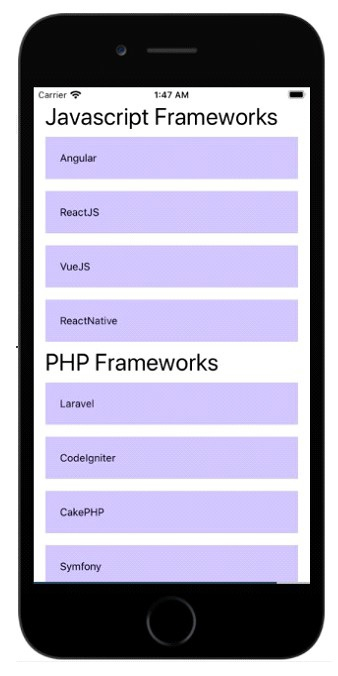
示例 2
在 SectionList 中启用 stickySectionHeadersEnabled 属性
stickySectionHeadersEnabled 属性可帮助您将 sectionList 的标题粘贴到顶部。用户滚动时,如果下一个标题进入视野并到达顶部,它将粘贴在顶部,并且对所有标题都将继续这样做。
import React from "react";
import { SectionList , Text, View, StyleSheet} from "react-native";
export default class App extends React.Component {
   constructor() {
      super();
      this.state = {
         data: [
            {
               title: "Javascript Frameworks",
               data: ["Angular", "ReactJS", "VueJS", "ReactNative"]
            },
            {
               title: "PHP Frameworks",
               data: ["Laravel", "CodeIgniter", "CakePHP", "Symfony"]
            },
            {
               title: "Apache Frameworks",
               data: ["Apache Flex", "Apache Crunch", "Apache CouchDB", "Apache Crail"]
            }
         ]
      };
   }
   renderItem = ({ item }) => {
      return (
         <View style={styles.item}>
            <Text >
               {item}
            </Text>
         </View>
      );
   };
   render() {
      return (
         <View style={styles.container}>
            <SectionList
               stickySectionHeadersEnabled={true}
               sections={this.state.data}
               renderItem={this.renderItem}
               keyExtractor={(item, index) => index}
               renderSectionHeader={({ section: { title } }) => (
                  <Text style={styles.header}>{title}</Text>
               )}
            />
         </View>
      );
   }
}
const styles = StyleSheet.create({
   container: {
      flex: 1,
      marginTop:20,
      marginHorizontal: 16
   },
   item: {
      backgroundColor: "#ccc2ff",
      padding: 20,
      marginVertical: 8
   },
   header: {
      fontSize: 32,
      backgroundColor: "#fff"
   }
});
输出
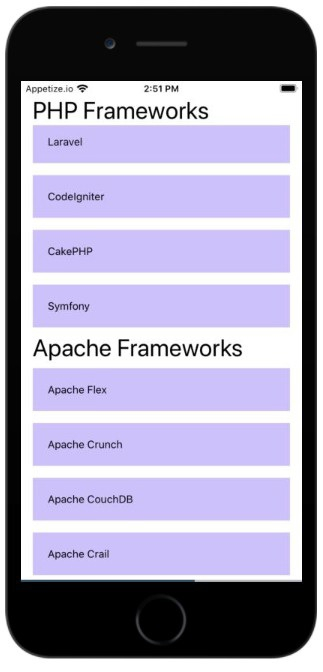

更新于:2021-07-01
1K+ 次查看

广告