
 数据结构
数据结构 网络
网络 关系数据库管理系统 (RDBMS)
 操作系统
操作系统 Java
Java MS Excel
 iOS
iOS HTML
HTML CSS
CSS Android
 Python
 C语言编程
C语言编程 C++
C++ C#
C# MongoDB
 MySQL
MySQL Javascript
 PHP
PHP 物理学
物理学 化学
化学 生物学
生物学 数学
数学 英语
英语 经济学
经济学 心理学
心理学 社会学
社会学 时尚研究
时尚研究 法学研究
法学研究HTML DOM 输入URL对象
HTML DOM 输入URL对象代表一个类型为url的输入HTML元素。
语法
以下是语法:
创建类型为url的<input>元素。
var urlObject = document.createElement(“input”);
urlObject.type = “url”;
属性
这里,“urlObject”可以具有以下属性:
| 属性 | 描述 |
|---|---|
| autocomplete | 如果设置为“ON”,则提供基于先前输入文本的建议。 |
| autofocus | 如果设置为true,则在页面初始加载时URL字段将获得焦点。 |
| defaultValue | 设置/返回URL字段的默认值。 |
| disabled | 定义URL字段是否被禁用/启用。 |
| form | 返回包含URL字段的封闭表单的引用。 |
| maxLength | 返回/设置URL字段的maxLength属性的值。 |
| name | 定义URL字段的name属性的值。 |
| pattern | 返回/设置URL字段的pattern属性的值。 |
| placeholder | 设置/返回一个字符串,通常用于提示用户输入文本的外观。 |
| readOnly | 定义URL字段是否可更改。 |
| required | 定义是否必须填写URL字段才能提交表单。 |
| size | 定义URL字段的size属性的值。 |
| type | 返回URL字段的表单元素类型。 |
| value | 定义URL字段的value属性的值。 |
示例
让我们来看一个输入URL表单属性的示例:
<!DOCTYPE html>
<html>
<head>
<title>Input URL form</title>
<style>
   form {
      width:70%;
      margin: 0 auto;
      text-align: center;
   }
   * {
      padding: 2px;
      margin:5px;
   }
   input[type="button"] {
      border-radius: 10px;
   }
</style>
</head>
<body>
<form id="Larry Page">
<fieldset>
<legend>URL-form</legend>
<label for="URLSelect">URL :
<input type="URL" id="URLSelect" size="25">
</label>
<input type="button" onclick="getform()" value="Get Co-founder">
<div id="divDisplay"></div>
</fieldset>
</form>
<script>
   var divDisplay = document.getElementById("divDisplay");
   var inputURL = document.getElementById("URLSelect");
   function getform() {
      if(inputURL.value !== '')
         divDisplay.textContent = 'Co-founder: '+inputURL.form.id;
      else
         divDisplay.textContent = 'Please enter valid URL';
   }
</script>
</body>
</html>
输出
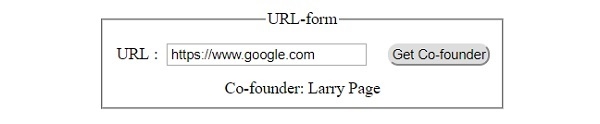
这将产生以下输出:
单击“获取联合创始人”按钮之前:

单击“获取联合创始人”按钮之后:

更新于:2019年7月30日
143 次浏览

广告