- iText 教程
- iText - 首页
- iText 画布
- iText - 绘制圆弧
- iText - 绘制线条
- iText - 绘制圆形
- iText 有用资源
- iText - 快速指南
- iText - 有用资源
- iText - 讨论
iText - 向表格添加图像
在本章中,我们将了解如何使用 iText 库将图像添加到 PDF 文档中的表格。
向表格添加图像
您可以通过实例化 **Document** 类来创建一个空的 PDF 文档。在实例化此类时,您需要将 **PdfDocument** 对象作为参数传递给它的构造函数。然后,要向文档添加表格,您需要实例化 **Table** 类并将此对象使用 **add()** 方法添加到文档中。
要向此表格添加图像,您需要实例化 **Cell** 类,创建要添加的图像对象,并使用 **Cell** 类的 **add()** 方法将图像添加到 **cell** 对象中。
以下是将图像插入表格单元格的步骤。
步骤 1:创建 PdfWriter 对象
**PdfWriter** 类表示 PDF 的文档写入器,此类属于 **com.itextpdf.kernel.pdf** 包。此类的构造函数接受一个字符串,表示要创建 PDF 文件的路径。
通过将表示您需要创建 PDF 的路径的字符串值作为参数传递给其构造函数,实例化 PdfWriter 类,如下所示。
// Creating a PdfWriter
String dest = "C:/itextExamples/addingImage.pdf";
PdfWriter writer = new PdfWriter(dest);
当此类型的对象传递给 PdfDocument(类)时,添加到此文档的每个元素都将写入指定的文件。
步骤 2:创建 PdfDocument 对象
**PdfDocument** 类是表示 iText 中 PDF 文档的类。此类属于 **com.itextpdf.kernel.pdf** 包。要实例化此类(以写入模式),您需要将 **PdfWriter** 类的对象传递给它的构造函数。
通过将上面创建的 PdfWriter 对象传递给其构造函数,实例化 **PdfDocument** 类,如下所示。
// Creating a PdfDocument
PdfDocument pdfDoc = new PdfDocument(writer);
创建 PdfDocument 对象后,您可以使用其类提供的相应方法添加各种元素,例如页面、字体、文件附件和事件处理程序。
步骤 3:创建 Document 对象
**com.itextpdf.layout** 包的 **Document** 类是在创建自包含 PDF 时使用的根元素。此类的一个构造函数接受 **PdfDocument** 类的对象。
通过将前面步骤中创建的 **PdfDocument** 类的对象作为参数传递给其构造函数,实例化 **Document** 类,如下所示。
// Creating a Document
Document document = new Document(pdfDoc);
步骤 4:创建 Table 对象
**Table** 类表示一个由单元格填充的二维网格,按行和列排序。它属于 **com.itextpdf.layout.element** 包。
如下所示实例化 **Table** 类。
// Creating a table
float [] pointColumnWidths = {200F, 200F};
Table table = new Table(pointColumnWidths);
步骤 5:创建单元格
通过实例化 **com.itextpdf.layout** 包的 **Cell** 类创建 **cell** 对象,如下所示。
// Adding cell to the table
Cell cell = new Cell();  // Creating a cell
步骤 6:创建图像
要创建 **image** 对象,首先使用 **ImageDataFactory** 类的 **create()** 方法创建一个 **ImageData** 对象。作为此方法的参数,传递一个表示图像路径的字符串参数,如下所示。
// Creating an ImageData object
String imageFile = "C:/itextExamples/javafxLogo.jpg";
ImageData data = ImageDataFactory.create(imageFile);
现在,实例化 **com.itextpdf.layout.element** 包的 **Image** 类。在实例化时,将上面创建的 **ImageData** 对象作为参数传递给它的构造函数,如下所示。
// Creating an Image object
Image img = new Image(data);
使用单元格类的 **add()** 方法将 **image** 对象添加到单元格中,如下所示。
// Adding image to the cell
cell.add(img.setAutoScale(true));
步骤 7:将单元格添加到表格
最后,要将此单元格添加到表格中,请调用 **Table** 类的 **addCell()** 方法并将 **cell** 对象作为参数传递给此方法,如下所示。
table.addCell(cell);
步骤 8:将表格添加到文档
使用 **Document** 类的 **add()** 方法添加前面步骤中创建的 **table** 对象,如下所示。
// Adding list to the document
document.add(table);
步骤 9:关闭文档
使用 **Document** 类的 **close()** 方法关闭文档,如下所示。
// Closing the document
document.close();
示例
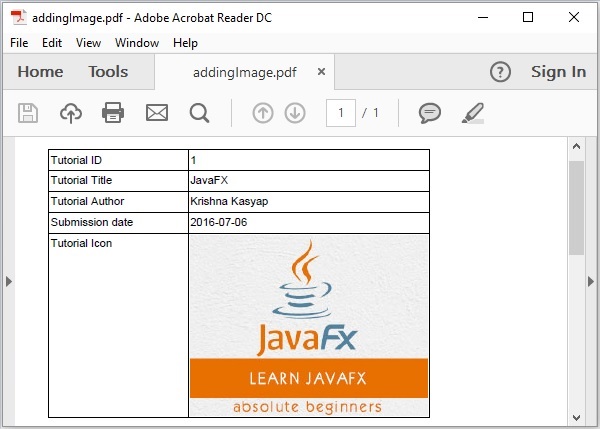
以下 Java 程序演示了如何使用 iText 库将图像添加到 PDF 文档的表格单元格中。它创建一个名为 **addingImage.pdf** 的 PDF 文档,向其中添加一个表格,将一个图像 (javafxLogo.jpg) 插入到其单元格之一,并将其保存到路径 **C:/itextExamples/** 中。
将此代码保存在名为 **AddingImageToTable.java** 的文件中。
import com.itextpdf.io.image.ImageData;
import com.itextpdf.io.image.ImageDataFactory;

import com.itextpdf.kernel.pdf.PdfDocument;
import com.itextpdf.kernel.pdf.PdfWriter;

import com.itextpdf.layout.Document;
import com.itextpdf.layout.element.Cell;
import com.itextpdf.layout.element.Image;
import com.itextpdf.layout.element.Table;

public class a3AddingImageToTable {
   public static void main(String args[]) throws Exception {
      // Creating a PdfWriter object
      String dest = "C:/itextExamples/addingImage.pdf";
      PdfWriter writer = new PdfWriter(dest);

      // Creating a PdfDocument object
      PdfDocument pdfDoc = new PdfDocument(writer);

      // Creating a Document object
      Document doc = new Document(pdfDoc);

      // Creating a table
      float [] pointColumnWidths = {150f, 150f};
      Table table = new Table(pointColumnWidths);

      // Populating row 1 and adding it to the table
      Cell cell1 = new Cell();
      cell1.add("Tutorial ID");
      table.addCell(cell1);

      Cell cell2 = new Cell();
      cell2.add("1");
      table.addCell(cell2);

      // Populating row 2 and adding it to the table
      Cell cell3 = new Cell();
      cell3.add("Tutorial Title");
      table.addCell(cell3);

      Cell cell4 = new Cell();
      cell4.add("JavaFX");
      table.addCell(cell4);

      // Populating row 3 and adding it to the table
      Cell cell5 = new Cell();
      cell5.add("Tutorial Author");
      table.addCell(cell5);

      Cell cell6 = new Cell();
      cell6.add("Krishna Kasyap");
      table.addCell(cell6);

      // Populating row 4 and adding it to the table
      Cell cell7 = new Cell();
      cell7.add("Submission date");
      table.addCell(cell7);

      Cell cell8 = new Cell();
      cell8.add("2016-07-06");
      table.addCell(cell8);

      // Populating row 5 and adding it to the table
      Cell cell9 = new Cell();
      cell9.add("Tutorial Icon");
      table.addCell(cell9);

      // Creating the cell10
      Cell cell10 = new Cell();

      // Creating an ImageData object
      String imageFile = "C:/itextExamples/javafxLogo.jpg";
      ImageData data = ImageDataFactory.create(imageFile);

      // Creating the image
      Image img = new Image(data);

      // Adding image to the cell10
      cell10.add(img.setAutoScale(true));

      // Adding cell110 to the table
      table.addCell(cell10);

      // Adding Table to document
      doc.add(table);

      // Closing the document
      doc.close();

      System.out.println("Image added to table successfully..");
   }
}
使用以下命令从命令提示符编译并执行保存的 Java 文件:
javac AddingImageToTable.java
java AddingImageToTable
执行后,上述程序将创建一个 PDF 文档,并显示以下消息。
Image added to table successfully..
如果您验证指定的路径,则可以找到创建的 PDF 文档,如下所示。