
- JasperReports 教程
- JasperReports - 首页
- JasperReports - 入门
- JasperReports - 环境设置
- JasperReports - 生命周期
- JasperReports - 设计
- JasperReports - 编译设计
- JasperReports - 填充
- JasperReports - 查看和打印
- JasperReports - 导出
- JasperReports - 参数
- JasperReports - 数据源
- JasperReports - 字段
- JasperReports - 表达式
- JasperReports - 变量
- JasperReports - 节
- JasperReports - 分组
- JasperReports - 字体
- JasperReports - Unicode 支持
- JasperReports - 样式
- JasperReports - 脚本
- JasperReports - 创建子报表
- JasperReports - 创建图表
- JasperReports - 交叉表
- JasperReports - 国际化
- JasperReports 资源
- JasperReports - 快速指南
- JasperReports - 有用资源
- JasperReports - 讨论
创建子报表
子报表是 JasperReports 的一项不错的功能。此功能允许在另一个报表中包含一个报表,也就是说,一个报表可以是另一个报表的子报表。子报表有助于我们保持报表设计的简单性,因为我们可以创建许多简单的报表并将它们封装到主报表中。子报表的编译和填充方式与普通报表相同。任何报表模板在包含到另一个报表模板中时都可以用作子报表,而无需在内部进行任何更改(报表模板)。
子报表就像普通的报表模板。实际上,它们是 net.sf.jasperreports.engine.JasperReport 对象,这些对象是在编译 net.sf.jasperreports.engine.design.JasperDesign 对象 后获得的。
<subreport> 元素
在将子报表引入主报表时,使用 <subreport> 元素。以下是 <subreport> JRXML 元素中的子元素列表。
<reportElement>
<parametersMapExpression> - 用于传递包含报表参数的映射到子报表。该映射通常从主报表中的参数获取,或者使用内置的 REPORTS_PARAMETERS_MAP 参数将父报表的参数传递到子报表。此表达式应始终返回一个 java.util.Map 对象,其中键是参数名称。
<subreportParameter> - 此元素用于将参数传递到子报表。它有一个属性 name,这是必需的。
<connectionExpression > - 用于将 java.sql.Connection 传递到子报表。仅当子报表模板在报表填充阶段需要数据库连接时才使用它。
<dataSourceExpression> - 用于将数据源传递到子报表。此数据源通常从主报表中的参数获取,或者使用内置的 REPORT_DATA_SOURCE 参数将父报表的参数传递到子报表。
元素(connectionExpression 和 dataSourceExpression)不能同时出现在 <subreport> 元素声明中。这是因为我们不能同时为子报表提供数据源和连接。我们必须选择其中之一并坚持使用它。
<returnValue> - 用于将子报表变量之一的值分配给主报表变量之一。此子元素具有以下属性 -
subreportVariable - 此属性指定要返回其值的子报表变量的名称。
toVariable - 此属性指定要复制/递增其值的父报表变量的名称。
calculation - 此属性可以取值:Nothing、Count、DistinctCount、Sum、Average、Lowest、Highest、StandardDeviation、Variance。属性 calculation 的默认值为“Nothing”。
incrementerFactoryClass - 此属性指定用于创建递增器实例的工厂类。
<subreportExpression> - 指示在何处查找子报表的已编译报表模板。此元素具有一个 class 属性。class 属性可以取以下任何值:java.lang.String、java.io.File、java.net.URL、java.io.InputStream、net.sf.jasperreports.engine.JasperReport。默认值为 java.lang.String。
isUsingCache - 这是 <subreport> 元素的一个属性。这是一个布尔值,当设置为 true 时,报表引擎将尝试识别以前加载的子报表模板对象,使用它们指定的源。此缓存功能仅适用于表达式返回 java.lang.String 对象作为子报表模板源的子报表元素,表示文件名、URL 或类路径资源。
示例
让我们举一个简单的例子来演示使用 JRDataSource 创建子报表。让我们首先编写两个新的报表模板,一个作为子报表,另一个作为主报表。子报表(address_report_template.jrxml)模板的内容如下所示。将其保存到 C:\tools\jasperreports-5.0.1\test 目录。
<?xml version = "1.0" encoding = "UTF-8"?>
<jasperReport
   xmlns = "http://jasperreports.sourceforge.net/jasperreports"
   xmlns:xsi = "http://www.w3.org/2001/XMLSchema-instance"
   xsi:schemaLocation = "http://jasperreports.sourceforge.net/jasperreports
   http://jasperreports.sourceforge.net/xsd/jasperreport.xsd"
   name = "address_report_template" pageWidth = "175" pageHeight = "842"
   columnWidth = "175" leftMargin = "0" rightMargin = "0"
   topMargin = "0" bottomMargin = "0">

   <field name = "city" class = "java.lang.String"/>
   <field name = "street" class = "java.lang.String"/>

   <background>
      <band splitType = "Stretch"/>
   </background>

   <title>
      <band height = "20" splitType = "Stretch">

         <staticText>
            <reportElement x = "0" y = "0" width = "100" height = "20"/>

            <textElement>
               <font size = "14" isBold = "true"/>
            </textElement>

            <text><![CDATA[Addresses]]></text>
         </staticText>

      </band>
   </title>

   <pageHeader>
      <band height = "12" splitType = "Stretch"/>
   </pageHeader>

   <columnHeader>
      <band height = "12" splitType = "Stretch"/>
   </columnHeader>

   <detail>
      <band height = "27" splitType = "Stretch">

         <textField>
            <reportElement x = "0" y = "0" width = "120" height = "20"/>

            <textElement>
               <font size = "12" isBold = "true"/>
            </textElement>

            <textFieldExpression class = "java.lang.String">
               <![CDATA[$F{city}+" Address:"]]>
            </textFieldExpression>
         </textField>

         <textField isStretchWithOverflow = "true">
            <reportElement x = "120" y = "0" width = "435" height = "20"/>

            <textElement>
               <font size = "12"/>
            </textElement>

            <textFieldExpression class = "java.lang.String">
               <![CDATA[$F{street}]]>
            </textFieldExpression>
         </textField>

      </band>
   </detail>

   <columnFooter>
      <band height = "8" splitType = "Stretch"/>
   </columnFooter>

   <pageFooter>
      <band height = "11" splitType = "Stretch"/>
   </pageFooter>

   <summary>
      <band height = "9" splitType = "Stretch"/>
   </summary>

</jasperReport>
由于我们使用数据源,因此我们需要编写一个相应的 POJO 文件 SubReportBean.java,如下所示。将其保存到目录 C:\tools\jasperreports-5.0.1\test\src\com\tutorialspoint -
package com.tutorialspoint;

public class SubReportBean {
   private String city;
   private String street;

   public String getCity() {
      return city;
   }

   public void setCity(String city) {
      this.city = city;
   }

   public String getStreet() {
      return street;
   }

   public void setStreet(String street) {
      this.street = street;
   }
}
在这里,我们声明了两个字段 'city' 和 'street',并定义了相应的 getter 和 setter 方法。
现在,让我们更新现有的 DataBean 文件。我们将添加一个新字段 subReportBeanList,它是一个 java.util.List。此字段将保存 SubReportBean 对象的列表。DataBean 文件的内容如下所示。将其保存到目录 C:\tools\jasperreports-5.0.1\test\src\com\tutorialspoint。
package com.tutorialspoint;

import java.util.List;

public class DataBean {
   private String name;
   private String country;
   private List<SubReportBean> subReportBeanList;

   public String getName() {
      return name;
   }

   public void setName(String name) {
      this.name = name;
   }

   public String getCountry() {
      return country;
   }

   public void setCountry(String country) {
      this.country = country;
   }

   public List<SubReportBean> getSubReportBeanList() {
      return subReportBeanList;
   }

   public void setSubReportBeanList(List<SubReportBean> subReportBeanList) {
      this.subReportBeanList = subReportBeanList;
   }
}
现在,让我们更新文件 C:\tools\jasperreports-5.0.1\test\src\com\tutorialspoint\DataBeanList.java。此文件的内容如下 -
package com.tutorialspoint;

import java.util.ArrayList;
import java.util.Arrays;
import java.util.List;

public class DataBeanList {
   public ArrayList<DataBean> getDataBeanList() {

      // Create sub report data
      SubReportBean subBean1 = new SubReportBean();
      subBean1.setCity("Mumbai");
      subBean1.setStreet("M.G.Road");
      SubReportBean subBean2 = new SubReportBean();
      subBean2.setCity("New York");
      subBean2.setStreet("Park Street");
      SubReportBean subBean3 = new SubReportBean();
      subBean3.setCity("San Fransisco");
      subBean3.setStreet("King Street");

      ArrayList<DataBean> dataBeanList = new ArrayList<DataBean>();

      // Create master report data
      dataBeanList.add(produce("Manisha", "India",
         Arrays.asList(subBean1)));
      dataBeanList.add(produce("Dennis Ritchie", "USA",
         Arrays.asList(subBean2)));
      dataBeanList.add(produce("V.Anand", "India",
         Arrays.asList(subBean1)));
      dataBeanList.add(produce("Shrinath", "California",
         Arrays.asList(subBean3)));

      return dataBeanList;
   }

   /*
    * This method returns a DataBean object,
    * with name, country and sub report
    * bean data set in it.
    */
   private DataBean produce(String name, String country,
      List<SubReportBean> subBean) {
      DataBean dataBean = new DataBean();

      dataBean.setName(name);
      dataBean.setCountry(country);
      dataBean.setSubReportBeanList(subBean);

      return dataBean;
   }
}
在上面的文件中,我们在 produce() 方法中设置了 SubReportBean 的列表。
现在,让我们编写一个新的主报表模板 (jasper_report_template.jrxml)。将此文件保存到目录 C:\tools\jasperreports-5.0.1\test。此文件的内容如下 -
<?xml version = "1.0" encoding = "UTF-8"?>
<jasperReport xmlns = "http://jasperreports.sourceforge.net/jasperreports"
   xmlns:xsi = "http://www.w3.org/2001/XMLSchema-instance"
   xsi:schemaLocation = "http://jasperreports.sourceforge.net/jasperreports
   http://jasperreports.sourceforge.net/xsd/jasperreport.xsd"
   name = "jasper_report_template" language = "groovy" pageWidth = "595"
   pageHeight = "842" columnWidth ="555" leftMargin = "20" rightMargin = "20"
   topMargin = "20" bottomMargin = "20">

   <parameter name = "SUBREPORT_DIR" class = "java.lang.String" isForPrompting = "false">
      <defaultValueExpression>
         <![CDATA["C:\\tools\\jasperreports-5.0.1\\test\\"]]>
      </defaultValueExpression>
   </parameter>

   <field name = "country" class = "java.lang.String"/>
   <field name = "name" class = "java.lang.String"/>
   <field name = "subReportBeanList" class = "java.util.List"/>

   <background>
      <band splitType = "Stretch"/>
   </background>

   <title>
      <band height = "35" splitType = "Stretch">

         <staticText>
            <reportElement x = "0" y = "0" width = "204" height = "34"/>

            <textElement>
               <font size = "26" isBold = "true"/>
            </textElement>

            <text><![CDATA[Contact Report]]></text>
         </staticText>

      </band>
   </title>

   <pageHeader>
      <band height = "17" splitType = "Stretch"/>
   </pageHeader>

   <columnHeader>
      <band height = "21" splitType = "Stretch"/>
   </columnHeader>

   <detail>
      <band height = "112" splitType = "Stretch">

         <staticText>
            <reportElement x = "0" y = "0" width = "100" height = "20"/>

            <textElement>
               <font size = "12" isBold = "true"/>
            </textElement>

            <text><![CDATA[Name:]]></text>
         </staticText>

         <staticText>
            <reportElement x = "0" y = "20" width = "100" height = "20"/>

            <textElement>
               <font size = "12" isBold = "true"/>
            </textElement>

            <text><![CDATA[Country:]]></text>
         </staticText>

         <textField>
            <reportElement x = "104" y = "0" width = "277" height = "20"/>

            <textElement>
               <font size = "12"/>
            </textElement>

            <textFieldExpression class = "java.lang.String">
               <![CDATA[$F{name}]]>
            </textFieldExpression>
         </textField>

         <textField>
            <reportElement x = "104" y = "20" width = "277" height = "20"/>

            <textElement>
               <font size = "12"/>
            </textElement>

            <textFieldExpression class = "java.lang.String">
               <![CDATA[$F{country}]]>
            </textFieldExpression>
         </textField>

         <subreport>
            <reportElement positionType = "Float" x = "335" y = "25" width = "175"
               height = "20" isRemoveLineWhenBlank = "true" backcolor = "#99ccff"/>

            <dataSourceExpression>
               new net.sf.jasperreports.engine.data.JRBeanCollectionDataSource
                  ($F{subReportBeanList})
            </dataSourceExpression>

            <subreportExpression class = "java.lang.String">
               <![CDATA[$P{SUBREPORT_DIR} + "address_report_template.jasper"]]>
            </subreportExpression>
         </subreport>

         <line>
            <reportElement x = "0" y = "50" width = "550" height = "1"/>
         </line>

      </band>
   </detail>

   <columnFooter>
      <band height = "19" splitType = "Stretch"/>
   </columnFooter>

   <pageFooter>
      <band height = "18" splitType = "Stretch"/>
   </pageFooter>

   <summary>
      <band height = "14" splitType = "Stretch"/>
   </summary>

</jasperReport>
在上面的模板中,我们定义了一个新的参数“SUBREPORT_DIR”,它定义了子报表的路径。我们定义了一个类型为 java.util.List 的字段 subReportBeanList,它对应于 DataBean 文件中的属性。元素 <subreport> 具有子元素 <dataSourceExpression>。我们将列表 subReportBeanList 放入 JRBeanCollectionDataSource 的实例中。在子元素 <subreportExpression/> 中,我们给出了子报表名称 (AddressReport.jasper)。
现在,让我们编写一个新类 CreateReport 来编译和执行我们的报表模板。文件 C:\tools\jasperreports-5.0.1\test\src\com\tutorialspoint\CreateReport.java 的内容如下所示 -
package com.tutorialspoint;

import java.util.ArrayList;
import java.util.HashMap;
import java.util.Map;

import net.sf.jasperreports.engine.JRException;
import net.sf.jasperreports.engine.JasperCompileManager;
import net.sf.jasperreports.engine.JasperFillManager;
import net.sf.jasperreports.engine.JasperReport;
import net.sf.jasperreports.engine.data.JRBeanCollectionDataSource;

public class CreateReport {

   public static void main(String[] args) {
      String masterReportFileName = "C://tools/jasperreports-5.0.1/test"
         + "/jasper_report_template.jrxml";
      String subReportFileName = "C://tools/jasperreports-5.0.1/test"
         + "/AddressReport.jrxml";
      String destFileName = "C://tools/jasperreports-5.0.1/test"
         + "/jasper_report_template.JRprint";

      DataBeanList DataBeanList = new DataBeanList();
      ArrayList<DataBean> dataList = DataBeanList.getDataBeanList();
      JRBeanCollectionDataSource beanColDataSource = new
         JRBeanCollectionDataSource(dataList);

      try {
         /* Compile the master and sub report */
         JasperReport jasperMasterReport = JasperCompileManager
            .compileReport(masterReportFileName);
         JasperReport jasperSubReport = JasperCompileManager
            .compileReport(subReportFileName);

         Map<String, Object> parameters = new HashMap<String, Object>();
         parameters.put("subreportParameter", jasperSubReport);
         JasperFillManager.fillReportToFile(jasperMasterReport,
            destFileName, parameters, beanColDataSource);

      } catch (JRException e) {

         e.printStackTrace();
      }
      System.out.println("Done filling!!! ...");
   }
}
在这里,我们看到我们正在编译主报表和子报表模板,并将主报表 (.jasper) 文件传递给报表填充。
报表生成
现在,我们所有的文件都准备好了,让我们使用我们常规的 ANT 构建过程来编译和执行它们。文件 build.xml(保存在目录 C:\tools\jasperreports-5.0.1\test 下)的内容如下所示。
导入文件 - baseBuild.xml 从章节 环境设置 中获取,应放置在与 build.xml 相同的目录中。
<?xml version = "1.0" encoding = "UTF-8"?>
<project name = "JasperReportTest" default = "viewFillReport" basedir = ".">
   <import file = "baseBuild.xml" />

   <target name = "viewFillReport" depends = "compile,compilereportdesing,run"
      description = "Launches the report viewer to preview the
      report stored in the .JRprint file.">

      <java classname = "net.sf.jasperreports.view.JasperViewer" fork = "true">
         <arg value = "-F${file.name}.JRprint" />
         <classpath refid = "classpath" />
      </java>
   </target>

   <target name = "compilereportdesing" description = "Compiles the JXML file and
      produces the .jasper file.">

      <taskdef name = "jrc" classname = "net.sf.jasperreports.ant.JRAntCompileTask">
         <classpath refid = "classpath" />
      </taskdef>

      <jrc destdir = ".">
         <src>
            <fileset dir = ".">
               <include name = "*.jrxml" />
            </fileset>
         </src>
         <classpath refid = "classpath" />
      </jrc>

   </target>

</project>
接下来,让我们打开命令行窗口并转到放置 build.xml 的目录。最后,执行命令 ant -Dmain-class=com.tutorialspoint.CreateReport(viewFullReport 是默认目标)如下所示 -
Buildfile: C:\tools\jasperreports-5.0.1\test\build.xml

clean-sample:
   [delete] Deleting directory C:\tools\jasperreports-5.0.1\test\classes

compile:
   [mkdir] Created dir: C:\tools\jasperreports-5.0.1\test\classes
   [javac] C:\tools\jasperreports-5.0.1\test\baseBuild.xml:28:
      warning: 'includeantruntime' was not set, defaulting to
   [javac] Compiling 7 source files to C:\tools\jasperreports-5.0.1\test\classes

compilereportdesing:
   [jrc] Compiling 1 report design files.
   [jrc] log4j:WARN No appenders could be found for logger
   (net.sf.jasperreports.engine.xml.JRXmlDigesterFactory).
   [jrc] log4j:WARN Please initialize the log4j system properly.
   [jrc] log4j:WARN See https://logging.apache.org/log4j/1.2/faq.html#noconfig
      for more info.
   [jrc] File : C:\tools\jasperreports-5.0.1\test\
      jasper_report_template.jrxml ... OK.

run:
   [echo] Runnin class : com.tutorialspoint.CreateReport
   [java] Compiling Report Design ...
   [java] log4j:WARN No appenders could be found for logger
   (net.sf.jasperreports.engine.xml.JRXmlDigesterFactory).
   [java] log4j:WARN Please initialize the log4j system properly.
   [java] Done filling!!! ...

viewFillReport:
   [java] log4j:WARN No appenders could be found for logger
   (net.sf.jasperreports.extensions.ExtensionsEnvironment).
   [java] log4j:WARN Please initialize the log4j system properly.

BUILD SUCCESSFUL
Total time: 72 minutes 13 seconds
上述编译的结果是弹出一个 JasperViewer 窗口,如下面的屏幕截图所示 -
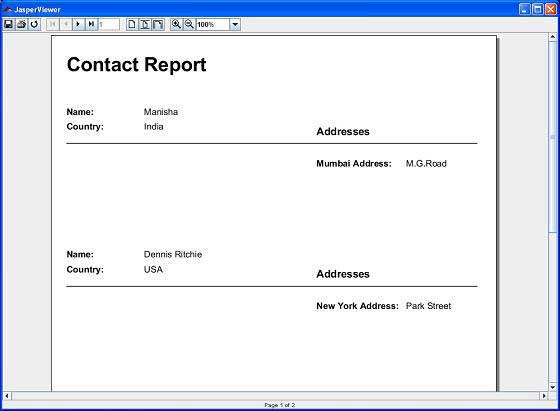
在这里,我们可以看到 Name、Country 和 Address 属性都显示出来了。