
- JasperReports 教程
- JasperReports - 首页
- JasperReports - 快速入门
- JasperReports - 环境搭建
- JasperReports - 生命周期
- JasperReports - 设计
- JasperReports - 编译设计
- JasperReports - 填充
- JasperReports - 查看和打印
- JasperReports - 导出
- JasperReports - 参数
- JasperReports - 数据源
- JasperReports - 字段
- JasperReports - 表达式
- JasperReports - 变量
- JasperReports - 节区
- JasperReports - 分组
- JasperReports - 字体
- JasperReports - Unicode 支持
- JasperReports - 风格
- JasperReports - 脚本
- JasperReports - 创建子报表
- JasperReports - 创建图表
- JasperReports - 交叉表
- JasperReports - 国际化
- JasperReports 资源
- JasperReports - 快速指南
- JasperReports - 有用资源
- JasperReports - 讨论
报表分组
JasperReports 中的分组有助于以逻辑方式组织报表中的数据。报表分组表示数据源中连续记录的序列,这些记录具有某些共同点,例如特定报表字段的值。报表分组由<group>元素定义。一个报表可以包含任意数量的分组。一旦声明,分组可以在整个报表中引用。
报表分组具有三个元素:
分组表达式 - 指示必须更改以启动新数据分组的数据。
分组头节区 - 帮助在分组数据的开头放置标签。
分组尾节区 - 帮助在分组数据的结尾放置标签。
在报表填充期间迭代数据源时,如果分组表达式的值发生变化,则会发生分组中断,并且相应的<groupFooter>和<groupHeader>节区将被插入到生成的文档中。
报表分组机制不会对数据源提供的数据进行任何排序。只有当数据源中的记录已根据报表中使用的分组表达式排序时,数据分组才能按预期工作。
分组属性
<group> 元素包含允许我们控制分组数据布局方式的属性。这些属性在下表中进行了总结:
| 序号 | 属性和描述 |
|---|---|
| 1 | name 这是必须的。它通过名称在报表表达式中引用分组。它遵循我们前面提到的报表参数、字段和报表变量的命名约定。当您想引用特定报表分组时,它可以在其他 JRXML 属性中使用。 |
| 2 | isStartNewColumn 设置为true时,每个数据分组将从新列开始。默认值为false。 |
| 3 | isStartNewPage 设置为true时,每个数据分组将从新页开始。默认值为false。 |
| 4 | isResetPageNumber 设置为true时,每次开始新分组时,报表页码将被重置。默认值为false。 |
| 5 | isReprintHeaderOnEachPage 设置为true时,分组头将在每一页上重新打印。默认值为false。 |
| 6 | minHeightToStartNewPage 定义在列底部需要放置分组头在当前列的最小垂直空间量。该数量以报表单位指定。 |
| 7 | footerPosition 呈现分组尾在页面上的位置,以及它与后续报表节区的关系。它的值可以是:Normal、StackAtBottom、ForceAtBottom 和 CollateAtBottom。默认值为 Normal。 |
| 8 | keepTogether 设置为true时,可防止分组在其第一次中断尝试时拆分。 |
示例
让我们向现有的报表模板(第 报表设计 章)添加一个分组(CountryGroup)。计算每个国家/地区的出现次数,并将计数显示为分组页脚。在分组页眉中,每个记录的计数前面都会加上前缀。修改后的报表模板 (jasper_report_template.jrxml) 如下所示。将其保存到 C:\tools\jasperreports-5.0.1\test 目录:
<?xml version = "1.0"?>
<!DOCTYPE jasperReport PUBLIC
   "//JasperReports//DTD Report Design//EN"
   "http://jasperreports.sourceforge.net/dtds/jasperreport.dtd">

<jasperReport xmlns = "http://jasperreports.sourceforge.net/jasperreports"
   xmlns:xsi = "http://www.w3.org/2001/XMLSchema-instance"
   xsi:schemaLocation = "http://jasperreports.sourceforge.net/jasperreports
   http://jasperreports.sourceforge.net/xsd/jasperreport.xsd"
   name = "jasper_report_template" pageWidth = "595"
   pageHeight = "842" columnWidth = "515"
   leftMargin = "40" rightMargin = "40" topMargin = "50" bottomMargin = "50">

   <parameter name = "ReportTitle" class = "java.lang.String"/>
   <parameter name = "Author" class = "java.lang.String"/>

   <queryString>
      <![CDATA[]]>
   </queryString>

   <field name = "country" class = "java.lang.String">
      <fieldDescription><![CDATA[country]]></fieldDescription>
   </field>

   <field name = "name" class = "java.lang.String">
      <fieldDescription><![CDATA[name]]></fieldDescription>
   </field>

   <sortField name = "country" order = "Descending"/>
   <sortField name = "name"/>

   <variable name = "CountryNumber" class = "java.lang.Integer"
      incrementType = "Group" incrementGroup = "CountryGroup"
      calculation = "Count">
      <variableExpression><![CDATA[Boolean.TRUE]]></variableExpression>
   </variable>

   <group name = "CountryGroup" minHeightToStartNewPage = "60">
      <groupExpression><![CDATA[$F{country}]]></groupExpression>

      <groupHeader>
         <band height = "20">

            <textField evaluationTime = "Group" evaluationGroup = "CountryGroup"
               bookmarkLevel = "1">
               <reportElement mode = "Opaque" x = "0" y = "5" width = "515"
                  height = "15" backcolor = "#C0C0C0"/>

               <box leftPadding = "10">
                  <bottomPen lineWidth = "1.0"/>
               </box>
               <textElement/>

               <textFieldExpression class = "java.lang.String">
                  <![CDATA["  " + String.valueOf($V{CountryNumber}) + ". "
                  + String.valueOf($F{country})]]>
               </textFieldExpression>

               <anchorNameExpression>
                  <![CDATA[String.valueOf($F{country})]]>
               </anchorNameExpression>
            </textField>

         </band>
      </groupHeader>

      <groupFooter>
         <band height = "20">

            <staticText>
               <reportElement x = "400" y = "1" width = "60" height = "15"/>
               <textElement textAlignment = "Right"/>
               <text><![CDATA[Count :]]></text>
            </staticText>

            <textField>
               <reportElement x = "460" y = "1" width = "30" height = "15"/>
               <textElement textAlignment = "Right"/>

               <textFieldExpression class = "java.lang.Integer">
                  <![CDATA[$V{CountryGroup_COUNT}]]>
               </textFieldExpression>
            </textField>

         </band>
      </groupFooter>

   </group>

   <title>
      <band height = "70">

         <line>
            <reportElement x = "0" y = "0" width = "515" height = "1"/>
         </line>

         <textField isBlankWhenNull = "true" bookmarkLevel = "1">
            <reportElement x = "0" y = "10" width = "515" height = "30"/>

            <textElement textAlignment = "Center">
               <font size = "22"/>
            </textElement>

            <textFieldExpression class = "java.lang.String">
               <![CDATA[$P{ReportTitle}]]>
            </textFieldExpression>

            <anchorNameExpression>
               <![CDATA["Title"]]>
            </anchorNameExpression>
         </textField>

         <textField isBlankWhenNull = "true">
            <reportElement  x = "0" y = "40" width = "515" height = "20"/>

            <textElement textAlignment = "Center">
               <font size = "10"/>
            </textElement>

            <textFieldExpression class = "java.lang.String">
               <![CDATA[$P{Author}]]>
            </textFieldExpression>
         </textField>

      </band>
   </title>

   <columnHeader>
      <band height = "23">

         <staticText>
            <reportElement mode = "Opaque" x = "0" y = "3" width = "535" height = "15"
               backcolor = "#70A9A9" />

            <box>
               <bottomPen lineWidth = "1.0" lineColor = "#CCCCCC" />
            </box>

            <textElement />

            <text>
               <![CDATA[]]>
            </text>
         </staticText>

         <staticText>
            <reportElement x = "414" y = "3" width = "121" height = "15" />

            <textElement textAlignment = "Center" verticalAlignment = "Middle">
               <font isBold = "true" />
            </textElement>

            <text><![CDATA[Country]]></text>
         </staticText>

         <staticText>
            <reportElement x = "0" y = "3" width = "136" height = "15" />

            <textElement textAlignment = "Center" verticalAlignment = "Middle">
               <font isBold = "true" />
            </textElement>

            <text><![CDATA[Name]]></text>
         </staticText>

      </band>
   </columnHeader>

   <detail>
      <band height = "16">

         <staticText>
            <reportElement mode = "Opaque" x = "0" y = "0" width = "535" height = "14"
               backcolor = "#E5ECF9" />

            <box>
               <bottomPen lineWidth = "0.25" lineColor = "#CCCCCC" />
            </box>

            <textElement />

            <text>
               <![CDATA[]]>
            </text>
         </staticText>

         <textField>
            <reportElement x = "414" y = "0" width = "121" height = "15" />

            <textElement textAlignment = "Center" verticalAlignment = "Middle">
               <font size = "9" />
            </textElement>

            <textFieldExpression class = "java.lang.String">
               <![CDATA[$F{country}]]>
            </textFieldExpression>
         </textField>

         <textField>
            <reportElement x = "0" y = "0" width = "136" height = "15" />
            <textElement textAlignment = "Center" verticalAlignment = "Middle" />

            <textFieldExpression class = "java.lang.String">
               <![CDATA[$F{name}]]>
            </textFieldExpression>
         </textField>

      </band>
   </detail>

</jasperReport>
报表填充的 Java 代码保持不变。文件 C:\tools\jasperreports-5.0.1\test\src\com\tutorialspoint\JasperReportFill.java 的内容如下所示:
package com.tutorialspoint;

import java.util.ArrayList;
import java.util.HashMap;
import java.util.Map;

import net.sf.jasperreports.engine.JRException;
import net.sf.jasperreports.engine.JasperFillManager;
import net.sf.jasperreports.engine.data.JRBeanCollectionDataSource;

public class JasperReportFill {
   @SuppressWarnings("unchecked")
   public static void main(String[] args) {
      String sourceFileName =
      "C://tools/jasperreports-5.0.1/test/jasper_report_template.jasper";

      DataBeanList DataBeanList = new DataBeanList();
      ArrayList<DataBean> dataList = DataBeanList.getDataBeanList();

      JRBeanCollectionDataSource beanColDataSource =
      new JRBeanCollectionDataSource(dataList);

      Map parameters = new HashMap();
      /**
       * Passing ReportTitle and Author as parameters
       */
      parameters.put("ReportTitle", "List of Contacts");
      parameters.put("Author", "Prepared By Manisha");

      try {
         JasperFillManager.fillReportToFile(
         sourceFileName, parameters, beanColDataSource);
      } catch (JRException e) {
         e.printStackTrace();
      }
   }
}
POJO 文件 C:\tools\jasperreports-5.0.1\test\src\com\tutorialspoint\DataBean.java 的内容如下:
package com.tutorialspoint;

public class DataBean {
   private String name;
   private String country;

   public String getName() {
      return name;
   }

   public void setName(String name) {
      this.name = name;
   }

   public String getCountry() {
      return country;
   }

   public void setCountry(String country) {
      this.country = country;
   }
}
文件 C:\tools\jasperreports-5.0.1\test\src\com\tutorialspoint\DataBeanList.java 的内容如下所示:
package com.tutorialspoint;

import java.util.ArrayList;

public class DataBeanList {
   public ArrayList<DataBean> getDataBeanList() {
      ArrayList<DataBean> dataBeanList = new ArrayList<DataBean>();

      dataBeanList.add(produce("Manisha", "India"));
      dataBeanList.add(produce("Dennis Ritchie", "USA"));
      dataBeanList.add(produce("V.Anand", "India"));
      dataBeanList.add(produce("Shrinath", "California"));

      return dataBeanList;
   }

   /**
    * This method returns a DataBean object,
    * with name and country set in it.
    */
   private DataBean produce(String name, String country) {
      DataBean dataBean = new DataBean();
      dataBean.setName(name);
      dataBean.setCountry(country);

      return dataBean;
   }
}
报表生成
我们将使用我们常规的 ANT 构建过程来编译和执行上述文件。文件 build.xml(保存在目录 C:\tools\jasperreports-5.0.1\test 下)的内容如下。
导入文件 - baseBuild.xml 从第 环境搭建 章中获取,应该放在与 build.xml 相同的目录下。
<?xml version = "1.0" encoding = "UTF-8"?>
<project name = "JasperReportTest" default = "viewFillReport" basedir = ".">
   <import file = "baseBuild.xml" />

   <target name = "viewFillReport" depends = "compile,compilereportdesing,run"
      description = "Launches the report viewer to preview
      the report stored in the .JRprint file.">

      <java classname = "net.sf.jasperreports.view.JasperViewer" fork = "true">
         <arg value = "-F${file.name}.JRprint" />
         <classpath refid = "classpath" />
      </java>
   </target>

   <target name = "compilereportdesing" description = "Compiles the JXML file and
      produces the .jasper file.">

      <taskdef name = "jrc" classname = "net.sf.jasperreports.ant.JRAntCompileTask">
         <classpath refid = "classpath" />
      </taskdef>

      <jrc destdir = ".">
         <src>
            <fileset dir = ".">
               <include name = "*.jrxml" />
            </fileset>
         </src>
         <classpath refid = "classpath" />
      </jrc>

   </target>

</project>
接下来,让我们打开命令行窗口并转到放置 build.xml 的目录。最后,执行命令 ant -Dmain-class=com.tutorialspoint.JasperReportFill(viewFullReport 是默认目标)如下:
C:\tools\jasperreports-5.0.1\test>ant -Dmain-class=com.tutorialspoint.JasperReportFill
Buildfile: C:\tools\jasperreports-5.0.1\test\build.xml

clean-sample:
   [delete] Deleting directory C:\tools\jasperreports-5.0.1\test\classes
   [delete] Deleting: C:\tools\jasperreports-5.0.1\test\jasper_report_template.jasper
   [delete] Deleting: C:\tools\jasperreports-5.0.1\test\jasper_report_template.jrprint

compile:
   [mkdir] Created dir: C:\tools\jasperreports-5.0.1\test\classes
   [javac] C:\tools\jasperreports-5.0.1\test\baseBuild.xml:28: warning:
   'includeantruntime' was not set, defaulting to build.sysclasspath=last;
   set to false for repeatable builds
   [javac] Compiling 7 source files to C:\tools\jasperreports-5.0.1\test\classes

compilereportdesing:
   [jrc] Compiling 1 report design files.
   [jrc] log4j:WARN No appenders could be found for logger
   (net.sf.jasperreports.engine.xml.JRXmlDigesterFactory).
   [jrc] log4j:WARN Please initialize the log4j system properly.
   [jrc] log4j:WARN See https://logging.apache.org/log4j/1.2/faq.html#noconfig
   for more info.
   [jrc] File : C:\tools\jasperreports-5.0.1\test\jasper_report_template.jrxml ... OK.

run:
   [echo] Runnin class : com.tutorialspoint.JasperReportFill
   [java] log4j:WARN No appenders could be found for logger
   (net.sf.jasperreports.extensions.ExtensionsEnvironment).
   [java] log4j:WARN Please initialize the log4j system properly.

viewFillReport:
   [java] log4j:WARN No appenders could be found for logger
   (net.sf.jasperreports.extensions.ExtensionsEnvironment).
   [java] log4j:WARN Please initialize the log4j system properly.

BUILD SUCCESSFUL
Total time: 18 seconds
作为上述编译的结果,将打开一个 JasperViewer 窗口,如下面的屏幕所示:
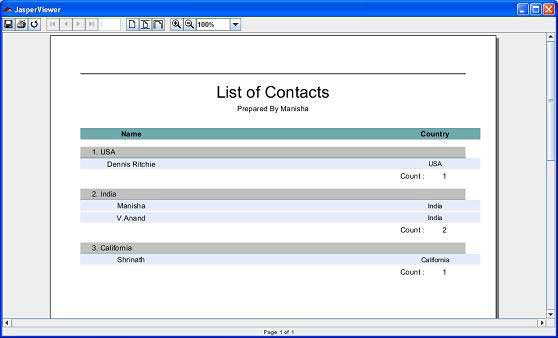
在这里,我们看到每个国家/地区都被分组,并且每个分组的页脚都会显示每个国家/地区的出现次数。