
- JasperReports 教程
- JasperReports - 首页
- JasperReports - 入门
- JasperReports - 环境设置
- JasperReports - 生命周期
- JasperReports - 设计
- JasperReports - 编译设计
- JasperReports - 填充
- JasperReports - 查看和打印
- JasperReports - 导出
- JasperReports - 参数
- JasperReports - 数据源
- JasperReports - 字段
- JasperReports - 表达式
- JasperReports - 变量
- JasperReports - 节
- JasperReports - 分组
- JasperReports - 字体
- JasperReports - Unicode 支持
- JasperReports - 样式
- JasperReports - 脚本
- JasperReports - 创建子报表
- JasperReports - 创建图表
- JasperReports - 交叉表
- JasperReports - 国际化
- JasperReports 资源
- JasperReports - 快速指南
- JasperReports - 有用资源
- JasperReports - 讨论
报表部分
我们在章节入门中讨论了一个简单报表模板的结构。类似地,JasperReports 将报表模板构建成多个部分。部分是报表中具有指定高度的部分,可以包含报表对象,如线条、矩形、图像或文本字段。
在报表填充时,报表引擎会遍历提供的报表数据源的虚拟记录。根据每个部分定义的行为,引擎会在适当的时候渲染每个报表部分。例如,详细部分会为数据源中的每个记录渲染。当发生页面中断时,页面页眉和页面页脚部分会根据需要渲染。
在 JasperReports 中,术语和报表部分也称为报表带。部分由一个或多个带组成。这些部分在报表生成时重复填充,并准备最终文档。
主要部分
JasperReports 中的报表模板具有以下主要部分:
<title></title>

<pageheader></pageheader>

<columnheader></columnheader>

<groupheader></groupheader>

<detail></detail>

<groupfooter></groupfooter>

<columnfooter></columnfooter>

<pagefooter></pagefooter>

<lastpagefooter></lastpagefooter>

<summary></summary>

<nodata></nodata>

<background></background>
下表总结了每个部分:
| 序号 | 部分和描述 |
|---|---|
| 1 | 标题 此部分仅在报表开头出现一次。 |
| 2 | 页面页眉 此部分出现在生成文档的每个页面开头。 |
| 3 | 列页眉 此部分出现在生成文档的每列开头。如果报表仅定义了一列,则列页眉和页脚部分将被忽略。 |
| 4 | 组页眉 此部分由报表组引入(章节分组)。每当分组表达式更改其值时,组页眉部分都会打印在详细部分上方。如果定义了多个组,则组页眉将按照组定义的顺序打印。 |
| 5 | 详细 此部分针对报表数据源提供的每一行数据重复。详细部分可以由多个带组成。 |
| 6 | 组页脚 此部分由报表组引入(章节分组)。组页脚部分打印在详细部分下方,在分组表达式的值更改之前。组页脚始终打印数据源的最后一行数据。如果定义了多个组,则组页脚将按照组定义的反向顺序打印。 |
| 7 | 列页脚 此部分出现在每列底部。如果报表的列数为 1,则列页眉和页脚部分将被忽略。 |
| 8 | 页面页脚 此部分出现在每个页面的底部。 |
| 9 | 最后一页页脚 此部分替换报表最后一页上的常规页面页脚。如果也存在摘要部分,则这可能不是文档的最后一页。当需要在最后一页底部显示摘要信息时,此部分有时很有用。 |
| 10 | 摘要 此部分仅在报表末尾出现一次。 |
| 11 | 无数据 当无数据时打印报表属性设置为无数据部分时,将打印此部分。如果报表模板中定义了<noData>部分,并且数据源为空,则在填充时只会考虑<noData>部分,其内容将生成报表输出。 |
| 12 | 背景 背景部分显示在每个页面上,并且不能溢出到下一页。放置在此部分的元素在页面初始化时进行评估,并在背景中显示。所有其他页面对象都显示在背景对象之上。此部分可用于创建页面水印。 |
部分、元素和属性关系
下图显示了报表部分中的元素和属性关系。
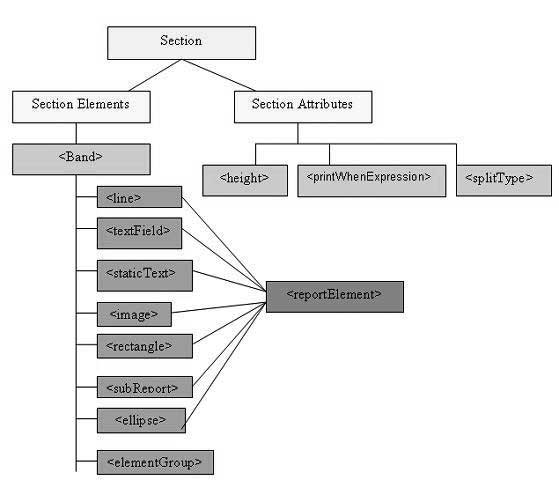
部分元素
所有上述报表部分都是可选的。但任何报表模板都将至少包含一个这样的部分。这些部分中的每一个都包含一个单一的<band>元素作为其唯一的子元素。<band>可以包含零个或多个以下子元素:
<line>、<rectangle>、<ellipse>、<image>、<staticText>、<textField>、<subReport>或<elementGroup>
这些元素中的每一个都必须包含一个单一的<reportElement>作为其第一个元素(elementGroup 除外)。<reportElement>确定如何为该特定元素布局数据。与变量和参数不同,报表元素不需要名称,因为通常您不需要在报表模板中获取任何单个元素。
下表总结了<reportElement>的属性:
| 属性 | 描述 | 有效值 |
|---|---|---|
| x | 指定带元素的 x 坐标。 | 表示元素以像素为单位的 x 坐标的整数值。此属性是必需的。 |
| y | 指定带元素的 y 坐标。 | 表示元素以像素为单位的 y 坐标的整数值。此属性是必需的。 |
| width | 指定带元素的宽度。 | 表示元素以像素为单位的宽度的整数值。此属性是必需的。 |
| height | 指定带元素的高度。 | 表示元素以像素为单位的高度的整数值。此属性是必需的。 |
| key | 带元素的唯一标识符。 | 唯一的字符串值。 |
| stretchType | 指定包含带拉伸时元素如何拉伸 | NoStretch(默认) - 元素不会拉伸。 RelativeToTallestObject - 元素将拉伸以适应其组中最高的物体。 RelativeToBand - 元素将拉伸以适应带的高度。 |
| positionType | 指定带拉伸时元素的位置。 | Float - 元素将根据周围元素的大小移动。 FixRelativeToTop(默认) - 元素将相对于带的顶部保持固定位置。 FixRelativeToBottom - 元素将相对于带的底部保持固定位置。 |
| isPrintRepeatedValues | 指定是否打印重复值。 | true(默认) - 将打印重复值。 false - 不会打印重复值。 |
| mode | 指定元素的背景模式 | Opaque, Transparent |
| isRemoveLineWhenBlank | 指定当元素为空且同一水平空间中没有其他元素时是否应删除元素。 | true, false |
| isPrintInFirstWholeBand | 指定元素是否必须打印在整个带中,即未在报表页面或列之间分割的带。 | true, false |
| isPrintWhenDetailOverFlows | 指定当带溢出到新页面或列时是否打印元素。 | true, false |
| printWhenGroupChanges | 指定当指定的组发生更改时打印元素。 | 字符串值。 |
| forecolor | 指定元素的前景色。 | 十六进制 RGB 值(以 # 字符开头),或以下预定义值之一:black、blue、cyan、darkGray、gray、green、lightGray、magenta、orange、pink、red、yellow、white。 |
| backcolor | 指定元素的背景色。 | 与forecolor的有效值相同 |
部分属性
以下是报表部分的属性:
高度
部分的高度指定该特定部分以像素为单位的高度,在整体报表设计中非常重要。
打印时表达式
确定是否应打印部分的布尔表达式。
允许拆分
一个标志,指示是否允许在部分不适合当前页面时拆分。如果为 true,则部分将转移到下一页。请注意,如果部分不适合下一页,则无论标志的值如何,部分都将被拆分。splitType可以采用以下值:
splitType="Stretch:" 拆分拉伸内容。如果部分在当前页面上拉伸(如果可用空间小于声明的高度),则添加到原始高度的区域允许拆分到下一页。
splitType="Prevent:" 在第一次尝试时阻止拆分。如果部分不适合下一页,则拆分将正常发生,因为带拆分阻止仅在第一次拆分尝试时有效。
splitType="Immediate:" 立即拆分。允许带在任何位置拆分,但其最顶部的元素除外。
示例
为了演示每个部分,让我们编写报表模板(jasper_report_template.jrxml)。将此文件保存到**C:\tools\jasperreports-5.0.1\test**目录。在此文件中,我们将显示每个部分(我们在上面讨论过)中的文本。文件内容如下所示:
<?xml version = "1.0" encoding = "UTF-8"?>

<jasperReport xmlns = "http://jasperreports.sourceforge.net/jasperreports"
   xmlns:xsi = "http://www.w3.org/2001/XMLSchema-instance"
   xsi:schemaLocation = "http://jasperreports.sourceforge.net/jasperreports
   http://jasperreports.sourceforge.net/xsd/jasperreport.xsd"
   name = "jasper_report_template" pageWidth = "300" pageHeight = "300"
   columnWidth = "300" leftMargin = "0" rightMargin = "0"
   topMargin = "0" bottomMargin = "0" >

   <title>
      <band height = "50">

         <textField>
            <reportElement x = "100" y = "16" width = "100" height = "20"/>
            <textElement/>

            <textFieldExpression>
               <![CDATA["Title"]]>
            </textFieldExpression>

         </textField>

      </band>
   </title>

   <pageHeader>
      <band height = "40">

         <textField>
            <reportElement  mode = "Opaque" x = "100" y = "10"
               width = "90" height = "20"/>

            <textElement>
               <font isBold = "true"/>
            </textElement>

            <textFieldExpression>
               <![CDATA["Page Header"]]>
            </textFieldExpression>
         </textField>

      </band>
   </pageHeader>

   <columnHeader>
      <band height = "40">

         <textField>
            <reportElement  x = "100" y = "10" width = "90" height = "20"/>

            <textElement>
               <font isItalic = "true"/>
            </textElement>

            <textFieldExpression>
               <![CDATA["Column Header"]]>
            </textFieldExpression>
         </textField>

      </band>
   </columnHeader>

   <detail>
      <band height ="40">

         <textField>
            <reportElement mode = "Opaque" x = "100" y = "10"
               width = "90" height = "20" backcolor = "#99CCFF"/>
            <textElement/>

            <textFieldExpression>
               <![CDATA["Report Details"]]>
            </textFieldExpression>
         </textField>

      </band>
   </detail>

   <columnFooter>
      <band height = "40">

         <textField>
            <reportElement  x = "100" y = "10" width = "90" height = "20"/>
            <textElement/>

            <textFieldExpression>
               <![CDATA["Column Footer"]]>
            </textFieldExpression>
         </textField>

      </band>
   </columnFooter>

   <pageFooter>
      <band height = "40">

         <textField>
            <reportElement  x = "100" y = "10" width = "90" height = "20"/>
            <textElement/>

            <textFieldExpression>
               <![CDATA["Page Footer"]]>
            </textFieldExpression>
         </textField>

      </band>
   </pageFooter>

   <lastPageFooter>
      <band height = "40">

         <textField>
            <reportElement  x = "100" y = "10" width = "90" height = "20"/>
            <textElement/>

            <textFieldExpression>
               <![CDATA["Last Page Footer"]]>
            </textFieldExpression>
         </textField>

      </band>
   </lastPageFooter>

   <summary>
      <band height = "40">

         <textField>
            <reportElement  x = "100" y = "10" width = "90" height = "20"/>
            <textElement/>

            <textFieldExpression>
               <![CDATA["Summary"]]>
            </textFieldExpression>
         </textField>

      </band>
   </summary>

</jasperReport>
用于填充和生成报表的 Java 代码如下所示。让我们将此文件**JasperReportFill.java**保存到 C:\tools\jasperreports-5.0.1\test\src\com\tutorialspoint 目录。
package com.tutorialspoint;

import net.sf.jasperreports.engine.JREmptyDataSource;
import net.sf.jasperreports.engine.JRException;
import net.sf.jasperreports.engine.JasperFillManager;

public class JasperReportFill {
   public static void main(String[] args) {
      String sourceFileName = "C://tools/jasperreports-5.0.1/test/" +
         "jasper_report_template.jasper";

      try {
         JasperFillManager.fillReportToFile(sourceFileName, null,
            new JREmptyDataSource());
      } catch (JRException e) {
         // TODO Auto-generated catch block
         e.printStackTrace();
      }

   }
}
在这里,我们在填充报表时使用 JREmptyDataSource 的实例来模拟一个包含一条记录的数据源,但此单条记录中的所有字段都为空。
报表生成
我们将使用我们常规的 ANT 构建过程来编译和执行上述文件。文件 build.xml(保存在目录 C:\tools\jasperreports-5.0.1\test 下)的内容如下所示。
导入文件 - baseBuild.xml 来自章节环境设置,应放置在与 build.xml 相同的目录中。
<?xml version = "1.0" encoding = "UTF-8"?>
<project name = "JasperReportTest" default = "viewFillReport" basedir = ".">

   <import file = "baseBuild.xml" />
   <target name = "viewFillReport" depends = "compile,compilereportdesing,run"
      description = "Launches the report viewer to preview
      the report stored in the .JRprint file.">

      <java classname = "net.sf.jasperreports.view.JasperViewer" fork = "true">
         <arg value = "-F${file.name}.JRprint" />
         <classpath refid = "classpath" />
      </java>

   </target>

   <target name = "compilereportdesing" description = "Compiles the JXML file and
      produces the .jasper file.">

      <taskdef name = "jrc"
         classname = "net.sf.jasperreports.ant.JRAntCompileTask">
         <classpath refid = "classpath" />
      </taskdef>

      <jrc destdir = ".">
         <src>
            <fileset dir = ".">
               <include name = "*.jrxml" />
            </fileset>
         </src>
         <classpath refid = "classpath" />
      </jrc>

   </target>

</project>
接下来,让我们打开命令行窗口并转到放置 build.xml 的目录。最后,执行命令**ant -Dmain-class=com.tutorialspoint.JasperReportFill**(viewFullReport 是默认目标)如下所示:
C:\tools\jasperreports-5.0.1\test>ant -Dmain-class=com.tutorialspoint.JasperReportFill
Buildfile: C:\tools\jasperreports-5.0.1\test\build.xml

clean-sample:
   [delete] Deleting directory C:\tools\jasperreports-5.0.1\test\classes
   [delete] Deleting: C:\tools\jasperreports-5.0.1\test\jasper_report_template.jasper
   [delete] Deleting: C:\tools\jasperreports-5.0.1\test\jasper_report_template.jrprint

compile:
   [mkdir] Created dir: C:\tools\jasperreports-5.0.1\test\classes
   [javac] C:\tools\jasperreports-5.0.1\test\baseBuild.xml:28:
   warning: 'includeantruntime' was not set, defau
   [javac] Compiling 1 source file to C:\tools\jasperreports-5.0.1\test\classes

compilereportdesing:
   [jrc] Compiling 1 report design files.
   [jrc] log4j:WARN No appenders could be found for logger
   (net.sf.jasperreports.engine.xml.JRXmlDigesterFac
   [jrc] log4j:WARN Please initialize the log4j system properly.
   [jrc] log4j:WARN See https://logging.apache.org/log4j/1.2/faq.html#noconfig for more info.
   [jrc] File : C:\tools\jasperreports-5.0.1\test\jasper_report_template.jrxml ... OK.

run:
   [echo] Runnin class : com.tutorialspoint.JasperReportFill
   [java] log4j:WARN No appenders could be found for logger
   (net.sf.jasperreports.extensions.ExtensionsEnviro
   [java] log4j:WARN Please initialize the log4j system properly.

viewFillReport:
   [java] log4j:WARN No appenders could be found for logger
   (net.sf.jasperreports.extensions.ExtensionsEnviro
   [java] log4j:WARN Please initialize the log4j system properly.

BUILD SUCCESSFUL
Total time: 18 minutes 22 seconds
作为上述编译的结果,将打开一个 JasperViewer 窗口,如下面的屏幕截图所示:
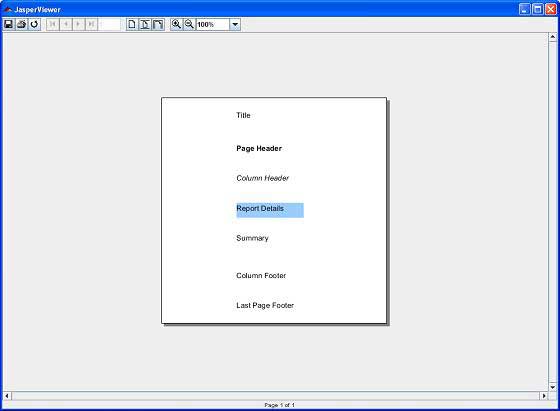
在这里,我们可以看到每个部分都打印了一段文本。需要注意的是,由于 JRXML 包含一个<lastPageFooter>元素,它将显示在报表的最后一页,而不是显示<pageFooter>元素。<columnHeader> 和 <columnFooter> 元素仅在报表有多列时才会显示。