
- JasperReports 教程
- JasperReports - 首页
- JasperReports - 快速入门
- JasperReports - 环境设置
- JasperReports - 生命周期
- JasperReports - 设计
- JasperReports - 编译设计
- JasperReports - 填充
- JasperReports - 查看和打印
- JasperReports - 导出
- JasperReports - 参数
- JasperReports - 数据源
- JasperReports - 字段
- JasperReports - 表达式
- JasperReports - 变量
- JasperReports - 节
- JasperReports - 分组
- JasperReports - 字体
- JasperReports - Unicode支持
- JasperReports - 样式
- JasperReports - 脚本
- JasperReports - 创建子报表
- JasperReports - 创建图表
- JasperReports - 交叉表
- JasperReports - 国际化
- JasperReports 资源
- JasperReports - 快速指南
- JasperReports - 有用资源
- JasperReports - 讨论
Jasper报表 - 查看和打印报表
报表填充过程的输出(JasperPrint 对象)可以使用内置的查看器组件进行查看,也可以打印,或者导出到更流行的文档格式,例如PDF、HTML、RTF、XLS、ODT、CSV或XML。本章将讨论Jasper文档的查看和打印,下一章(即'导出报表')将讨论导出。
查看报表
JasperReport提供了一个内置的查看器,用于以其原始格式查看生成的报表。它是一个基于Swing的组件,其他Java应用程序可以集成此组件,而无需将文档导出到其他格式即可进行查看或打印。net.sf.jasperreports.view.JRViewer类表示此可视组件。此类也可以根据应用程序需要通过子类化进行自定义。
JasperReports还有一个Swing应用程序,它使用可视组件来查看报表。此应用程序有助于以与生成*.jrprint相同的格式查看报表。此Swing应用程序在net.sf.jasperreports.view.JasperViewer类中实现。要使用此类查看报表,我们需要将其包装到ANT目标中。
查看生成的报表
以下示例演示了如何使用JasperViewer类查看报表:
让我们编写一个报表模板。JRXML文件(C:\tools\jasperreports-5.0.1\test\jasper_report_template.jrxml)的内容如下所示:
<?xml version = "1.0" encoding = "UTF-8"?>
<!DOCTYPE jasperReport PUBLIC "//JasperReports//DTD Report Design//EN"
   "http://jasperreports.sourceforge.net/dtds/jasperreport.dtd">

<jasperReport xmlns = "http://jasperreports.sourceforge.net/jasperreports"
   xmlns:xsi = "http://www.w3.org/2001/XMLSchema-instance"
   xsi:schemaLocation = "http://jasperreports.sourceforge.net/jasperreports
   http://jasperreports.sourceforge.net/xsd/jasperreport.xsd"
   name = "jasper_report_template" language = "groovy" pageWidth = "595"
   pageHeight = "842" columnWidth = "555" leftMargin = "20" rightMargin = "20"
   topMargin = "20" bottomMargin = "20">

   <queryString>
      <![CDATA[]]>
   </queryString>

   <field name = "country" class = "java.lang.String">
      <fieldDescription><![CDATA[country]]></fieldDescription>
   </field>

   <field name = "name" class = "java.lang.String">
      <fieldDescription><![CDATA[name]]></fieldDescription>
   </field>

   <columnHeader>
      <band height = "23">

         <staticText>
            <reportElement mode = "Opaque" x = "0" y = "3"
               width = "535" height = "15" backcolor = "#70A9A9" />

            <box>
               <bottomPen lineWidth = "1.0" lineColor = "#CCCCCC" />
            </box>

            <textElement />
            <text><![CDATA[]]> </text>
         </staticText>

         <staticText>
            <reportElement x = "414" y = "3" width = "121" height = "15" />

            <textElement textAlignment = "Center" verticalAlignment = "Middle">
               <font isBold = "true" />
            </textElement>
            <text><![CDATA[Country]]></text>
         </staticText>

         <staticText>
            <reportElement x = "0" y = "3" width = "136" height = "15" />

            <textElement textAlignment = "Center" verticalAlignment = "Middle">
               <font isBold = "true" />
            </textElement>
            <text><![CDATA[Name]]></text>
         </staticText>

      </band>
   </columnHeader>

   <detail>
      <band height = "16">

         <staticText>
            <reportElement mode = "Opaque" x = "0" y = "0"
               width = "535" height = "14" backcolor = "#E5ECF9" />

            <box>
               <bottomPen lineWidth = "0.25" lineColor = "#CCCCCC" />
            </box>

            <textElement />
            <text><![CDATA[]]> </text>
         </staticText>

         <textField>
            <reportElement x = "414" y = "0" width = "121" height = "15" />

            <textElement textAlignment = "Center" verticalAlignment = "Middle">
               <font size = "9" />
            </textElement>

            <textFieldExpression class = "java.lang.String">
               <![CDATA[$F{country}]]>
            </textFieldExpression>
         </textField>

         <textField>
            <reportElement x = "0" y = "0" width = "136" height = "15" />
            <textElement textAlignment = "Center" verticalAlignment = "Middle" />

            <textFieldExpression class = "java.lang.String">
               <![CDATA[$F{name}]]>
            </textFieldExpression>
         </textField>

      </band>
   </detail>

</jasperReport>
接下来,让我们将Java数据对象(Java Bean)的集合传递给JasperReports引擎,以填充此已编译的报表。
编写一个POJO DataBean.java,它表示数据对象(Java Bean)。此类定义了两个String对象,即'name'和'country'。将其保存到目录C:\tools\jasperreports-5.0.1\test\src\com\tutorialspoint。
package com.tutorialspoint;

public class DataBean {
   private String name;
   private String country;

   public String getName() {
      return name;
   }

   public void setName(String name) {
      this.name = name;
   }

   public String getCountry() {
      return country;
   }

   public void setCountry(String country) {
      this.country = country;
   }
}
编写一个类DataBeanList.java,它具有生成Java Bean对象集合的业务逻辑。这将进一步传递给JasperReports引擎以生成报表。在这里,我们向列表中添加了4个DataBean对象。将其保存到目录C:\tools\jasperreports-5.0.1\test\src\com\tutorialspoint。
package com.tutorialspoint;

import java.util.ArrayList;

public class DataBeanList {
   public ArrayList<DataBean> getDataBeanList() {
      ArrayList<DataBean> dataBeanList = new ArrayList<DataBean>();

      dataBeanList.add(produce("Manisha", "India"));
      dataBeanList.add(produce("Dennis Ritchie", "USA"));
      dataBeanList.add(produce("V.Anand", "India"));
      dataBeanList.add(produce("Shrinath", "California"));

      return dataBeanList;
   }

   /**
    * This method returns a DataBean object,
    * with name and country set in it.
    */
   private DataBean produce(String name, String country) {
      DataBean dataBean = new DataBean();
      dataBean.setName(name);
      dataBean.setCountry(country);

      return dataBean;
   }
}
编写一个主类文件JasperReportFill.java,它从类(DataBeanList)获取Java Bean集合,并将其传递给JasperReports引擎以填充报表模板。将其保存到目录C:\tools\jasperreports-5.0.1\test\src\com\tutorialspoint。
package com.tutorialspoint;

import java.util.ArrayList;
import java.util.HashMap;
import java.util.Map;

import net.sf.jasperreports.engine.JRException;
import net.sf.jasperreports.engine.JasperFillManager;
import net.sf.jasperreports.engine.data.JRBeanCollectionDataSource;

public class JasperReportFill {
   @SuppressWarnings("unchecked")
   public static void main(String[] args) {
      String sourceFileName =
         "c://tools/jasperreports-5.0.1/test/jasper_report_template.jasper";
      DataBeanList DataBeanList = new DataBeanList();
      ArrayList<DataBean> dataList = DataBeanList.getDataBeanList();

      JRBeanCollectionDataSource beanColDataSource = new
         JRBeanCollectionDataSource(dataList);

      Map parameters = new HashMap();
      try {
         JasperFillManager.fillReportToFile(
            sourceFileName, parameters, beanColDataSource);
      } catch (JRException e) {
         e.printStackTrace();
      }
   }
}
让我们向build.xml文件编写一个目标viewFillReport。build.xml文件如下所示:
导入文件-baseBuild.xml是从章节环境设置中选择的,应将其放置在与build.xml相同的目录中。
<?xml version = "1.0" encoding = "UTF-8"?>
<project name = "JasperReportTest" default = "viewFillReport" basedir = ".">
   <import file = "baseBuild.xml"/>

   <target name = "viewFillReport" depends = "compile,compilereportdesing,run"
      description = "Launches the report viewer
      to preview the report stored in the .JRprint file.">

      <java classname = "net.sf.jasperreports.view.JasperViewer" fork = "true">
         <arg value = "-F${file.name}.JRprint" />
         <classpath refid = "classpath" />
      </java>
   </target>

   <target name = "compilereportdesing" description = "Compiles the JXML file and
      produces the .jasper file.">

      <taskdef name = "jrc"
         classname = "net.sf.jasperreports.ant.JRAntCompileTask">
         <classpath refid = "classpath" />
      </taskdef>

      <jrc destdir = ".">
         <src>
            <fileset dir = ".">
               <include name = "*.jrxml" />
            </fileset>
         </src>
         <classpath refid = "classpath" />
      </jrc>

   </target>

</project>
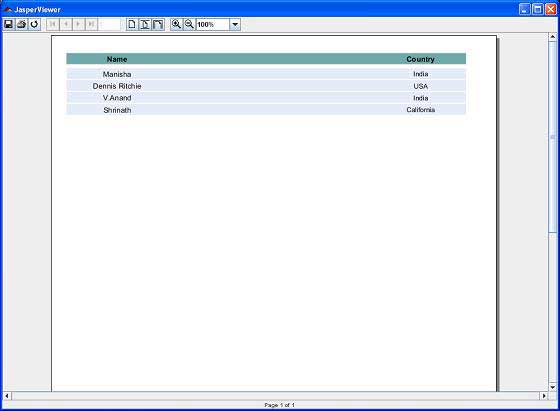
接下来,让我们打开命令行窗口并转到放置build.xml的目录。最后,执行命令ant -Dmain-class=com.tutorialspoint.JasperReportFill(viewFillReport是默认目标)。结果,我们将看到如下屏幕所示的JasperViewer窗口:
打印报表
我们可以使用net.sf.jasperreports.engine.JasperPrintManager类打印JasperReports库生成的文档(以其专有格式,即JasperPrint对象)。这是一个依赖于Java 2打印API的facade类。在将JasperReport文档导出到其他格式(如HTML或PDF)后,我们也可以打印文档。
打印生成的报表
以下代码演示了报表的打印。让我们更新现有的类JasperReportFill。我们将使用JasperPrintManager.printReport()方法。此方法将源文件名(此处我们传递.jrprint文件,我们在之前的步骤中使用方法JasperFillManager.fillReportToFile()生成)作为第一个参数。第二个参数是显示标准打印对话框的布尔值(此处我们将其设置为true)。
package com.tutorialspoint;

import java.util.ArrayList;
import java.util.HashMap;
import java.util.Map;

import net.sf.jasperreports.engine.JRException;
import net.sf.jasperreports.engine.JasperFillManager;
import net.sf.jasperreports.engine.JasperPrintManager;
import net.sf.jasperreports.engine.data.JRBeanCollectionDataSource;

public class JasperReportFill {
   @SuppressWarnings("unchecked")
   public static void main(String[] args) {
      String sourceFileName = "c://tools/jasperreports-5.0.1/" +
         "test/jasper_report_template.jasper";
      String printFileName = null;
      DataBeanList DataBeanList = new DataBeanList();
      ArrayList<DataBean> dataList = DataBeanList.getDataBeanList();

      JRBeanCollectionDataSource beanColDataSource = new
         JRBeanCollectionDataSource(dataList);

      Map parameters = new HashMap();
      try {
    	   printFileName = JasperFillManager.fillReportToFile(
            sourceFileName, parameters, beanColDataSource);
         if(printFileName != null){
            JasperPrintManager.printReport( printFileName, true);
         }
      } catch (JRException e) {
         e.printStackTrace();
      }
   }
}
现在,让我们将此文件保存到目录C:\tools\jasperreports-5.0.1\test\src\com\tutorialspoint。我们将使用ANT编译和执行此文件。build.xml的内容如下所示:
<?xml version = "1.0" encoding = "UTF-8"?>
<project name = "JasperReportTest" default = "executereport" basedir = ".">
   <import file = "baseBuild.xml"/>

   <target name = "executereport" depends = "compile,compilereportdesing,run">
      <echo message = "Im here"/>
   </target>

   <target name = "compilereportdesing" description = "Compiles the JXML file and
      produces the .jasper file.">

      <taskdef name = "jrc"
         classname = "net.sf.jasperreports.ant.JRAntCompileTask">
         <classpath refid = "classpath" />
      </taskdef>

      <jrc destdir = ".">
         <src>
            <fileset dir = ".">
               <include name = "*.jrxml" />
            </fileset>
         </src>
         <classpath refid = "classpath" />
      </jrc>

   </target>

</project>
接下来,让我们打开命令提示符并转到放置build.xml的目录。最后,执行命令ant -Dmain-class=com.tutorialspoint.JasperReportPrint。结果,将出现一个打印对话框。单击确定打印文档。