
- JasperReports 教程
- JasperReports - 首页
- JasperReports - 入门
- JasperReports - 环境设置
- JasperReports - 生命周期
- JasperReports - 设计
- JasperReports - 编译设计
- JasperReports - 填充
- JasperReports - 查看和打印
- JasperReports - 导出
- JasperReports - 参数
- JasperReports - 数据源
- JasperReports - 字段
- JasperReports - 表达式
- JasperReports - 变量
- JasperReports - 节
- JasperReports - 分组
- JasperReports - 字体
- JasperReports - Unicode 支持
- JasperReports - 样式
- JasperReports - 脚本
- JasperReports - 创建子报表
- JasperReports - 创建图表
- JasperReports - 交叉表
- JasperReports - 国际化
- JasperReports 资源
- JasperReports - 快速指南
- JasperReports - 有用资源
- JasperReports - 讨论
报表字体
报表包含文本元素,并且每个文本元素都可以拥有自己的字体设置。这些设置可以使用<font>标签在<textElement>标签中指定。报表可以定义多个字体。一旦定义,它们就可以用作整个报表中其他字体定义的默认或基本字体设置。
报表字体
报表字体是在报表级别声明的一组字体设置。在设置文本元素的字体属性时,可以在整个报表模板中重复使用报表字体。
报表字体现已弃用。不要使用在文档本身中声明的<reportFont/>元素。请改用<style/>元素。
字体属性
下表总结了<font>元素的主要属性:
| 序号 | 属性和描述 |
|---|---|
| 1 | fontName 字体名称,可以是物理字体的名称、逻辑字体的名称或已注册的 JasperReports 字体扩展中的字体系列的名称。 |
| 2 | size 字体的尺寸,以磅为单位。默认为 10。 |
| 3 | isBold 指定是否需要粗体字体的标志。默认为 false。 |
| 4 | isItalic 指定是否需要斜体字体的标志。默认为 false。 |
| 5 | isUnderline 指定是否需要下划线文本装饰的标志。默认为 false。 |
| 6 | isStrikeThrough 指定是否需要删除线文本装饰的标志。默认为 false。 |
| 7 | pdfFontName 将文档导出为 PDF 格式时,iText 库所需的等效 PDF 字体名称。 |
| 8 | pdfEncoding 等效的 PDF 字符编码,iText 库也需要。 |
| 9 | isPdfEmbedded 指定字体是否应嵌入文档本身的标志。默认为 false。如果设置为 true,则有助于在没有任何问题的情况下查看 PDF 文档。 |
字体类型
在 JasperReports 中,字体可以分类为:
逻辑字体 - 自 Java 平台 1.0 版以来一直被 Java 平台识别的五种字体类型称为逻辑字体。它们是:Serif、SansSerif、Monospaced、Dialog 和 DialogInput。这些逻辑字体不是安装在系统任何位置的实际字体库。它们只是 Java 运行时识别的字体类型名称。它们必须映射到安装在系统上的某些物理字体。
物理字体 - 这些字体是实际的字体库,例如 TrueType 或 PostScript Type 1 字体。物理字体可以是 Arial、Time、Helvetica、Courier 或任何数量的其他字体,包括国际字体。
字体扩展 - JasperReports 库可以通过其对字体扩展的内置支持,在运行时动态利用注册的字体。可以使用字体扩展向 JasperReports 提供字体系列列表。这些字体由外观相似的字体面组成,并支持特定的语言环境。
如上表所述,我们需要在 fontName 属性中指定物理字体的名称、逻辑字体的名称或已注册的 JasperReports 字体扩展中的字体系列的名称。
PDF 字体名称
当将报表导出为 PDF(便携式文档格式)时,JasperReports 库使用 iText 库。PDF 文件可以在各种平台上查看,并且外观始终相同。这部分是因为在此格式中,有一种特殊的方法来处理字体。fontName 属性在导出到 PDF 时不起作用。pdfFontName 属性存在于我们需要指定字体设置的地方。
iText 库知道如何处理内置字体和 TTF 文件,并识别以下内置字体名称:
- Courier
- Courier-Bold
- Courier-BoldOblique
- Courier-Oblique
- Helvetica
- Helvetica-Bold
- Helvetica-BoldOblique
- Helvetica-Oblique
- Symbol
- Times-Roman
- Times-Bold
- Times-BoldItalic
- Times-Italic
- ZapfDingbats
根据 iText 库的先决条件,要使用字体,我们需要指定以下内容之一作为字体名称:
上述列表中的内置字体名称。
TTF(True Type Font)文件的名称,它可以在磁盘上找到。
字体的真实名称,前提是包含该字体的 TTF 文件已事先在 iText 中注册,或者在注册字体时已定义别名。
基于上述先决条件,pdfFontName 属性可以包含以下值之一:
上述列表中的内置 PDF 字体名称。
TTF 文件的名称,该文件在导出到 PDF 时可以在运行时在磁盘上找到。
已注册字体的真实名称。
已在 iText 中注册为字体文件的字体的键的后缀(net.sf.jasperreports.export.pdf.font 之后的部分)。
默认字体和继承
每个文本元素都继承其父元素的字体和样式属性,而父元素又继承其父元素的这些属性。如果未为元素定义任何样式和/或字体,则将应用在<jasperReport/>根元素中声明的默认样式(和/或字体 - 但此功能现已弃用)。
在 JasperReports 中定义默认样式或字体不是强制性的。如果未为给定元素定义字体,则引擎会查找继承的字体属性,或者,如果未在此方式找到任何属性,则会查找/src/default.jasperreports.properties文件中net.sf.jasperreports.default.font.name属性。其值定义了在未为文本元素显式定义字体属性或从其父元素继承时要使用的字体系列的名称。
/src/default.jasperreports.properties文件中定义的主要默认字体属性及其值如下表所示:
| 属性 | 描述 |
|---|---|
| net.sf.jasperreports.default.font.name=SansSerif | 默认字体名称。 |
| net.sf.jasperreports.default.font.size=10 | 默认字体大小。 |
| net.sf.jasperreports.default.pdf.font.name=Helvetica | 默认 PDF 字体。 |
| net.sf.jasperreports.default.pdf.encoding=Cp1252 | 默认 PDF 字符编码。 |
| net.sf.jasperreports.default.pdf.embedded=false | 默认情况下,PDF 字体不会嵌入。 |
示例
为了演示如何使用字体和字体属性来获得特定的文本外观,让我们编写新的报表模板 (jasper_report_template.jrxml)。JRXML 的内容如下所示。将其保存到 C:\tools\jasperreports-5.0.1\test 目录中。在这里,我们将以各种字体格式显示报表标题中的文本。
<?xml version = "1.0" encoding = "UTF-8"?>

<jasperReport xmlns = "http://jasperreports.sourceforge.net/jasperreports"
   xmlns:xsi = "http://www.w3.org/2001/XMLSchema-instance"
   xsi:schemaLocation = "http://jasperreports.sourceforge.net/jasperreports
   http://jasperreports.sourceforge.net/xsd/jasperreport.xsd"
   name = "jasper_report_template" pageWidth = "595" pageHeight = "842"
   columnWidth = "555" leftMargin = "20" rightMargin = "20" topMargin = "30"
   bottomMargin = "30">

   <title>
      <band height = "682">

      <staticText>
         <reportElement x = "0" y = "50" width = "150" height = "40"/>
         <textElement/>

         <text>
            <![CDATA[Welcome to TutorialsPoint!]]>
         </text>
      </staticText>

      <staticText>
         <reportElement x = "160" y = "50" width = "390" height = "40"/>
         <textElement/>

         <text>
           <![CDATA[<staticText>
           <reportElement x = "0" y = "50" width = "150" height = "40"/>
           <text>Welcome to TutorialsPoint!</text></staticText>]]>
         </text>
      </staticText>

      <staticText>
         <reportElement x = "0" y = "100" width = "150" height = "40"/>

         <textElement>
            <font size = "12"/>
         </textElement>

         <text><![CDATA[Welcome to TutorialsPoint!]]></text>
      </staticText>

      <staticText>
         <reportElement x = "160" y = "100" width = "390" height = "40"/>
         <textElement/>

         <text>
            <![CDATA[<staticText>
            <reportElement x = "0" y = "100" width = "150" height = "40"/>

            <textElement>
               <font size = "14"/>
            </textElement>

            <text> Welcome to TutorialsPoint!</text></staticText>]]>
         </text>
      </staticText>

      <staticText>
         <reportElement x = "0" y = "150" width = "150" height = "40"/>

         <textElement>
            <font fontName = "DejaVu Serif" size = "12" isBold = "false"/>
         </textElement>

         <text><![CDATA[Welcome to TutorialsPoint!]]></text>
      </staticText>

      <staticText>
         <reportElement x = "160" y = "150" width = "390" height = "40"/>
         <textElement/>

         <text>
            <![CDATA[<staticText>
            <reportElement x = "0" y = "250" width = "150" height = "40"/>

            <textElement>
               <font fontName = "DejaVu Serif" size = "12" isBold = "false"/>
            </textElement>

            <text>Welcome to TutorialsPoint!</text></staticText>]]>
         </text>
      </staticText>

      <staticText>
         <reportElement x = "0" y = "200" width = "150" height = "40"/>

         <textElement>
            <font fontName = "DejaVu Serif" size = "12" isBold = "true"/>
         </textElement>

         <text><![CDATA[Welcome to TutorialsPoint!]]></text>
      </staticText>

      <staticText>
         <reportElement x = "160" y = "200" width = "390" height = "40"/>
         <textElement/>

         <text>
            <![CDATA[<staticText>
            <reportElement x = "0" y = "300" width = "150" height = "40"/>

            <textElement>
               <font fontName = "DejaVu Serif" size = "12" isBold = "true"/>
            </textElement>

            <text>Welcome to TutorialsPoint!</text></staticText>]]>
         </text>
      </staticText>

      <staticText>
         <reportElement x = "0" y = "250" width = "150" height = "40"/>

         <textElement>
            <font fontName = "Monospaced" size = "12" isItalic = "true"
               isUnderline = "true" pdfFontName = "Courier-Oblique"/>
         </textElement>

         <text><![CDATA[Welcome to TutorialsPoint!]]></text>
      </staticText>

      <staticText>
         <reportElement x = "160" y = "250" width = "390" height = "40"/>
         <textElement/>

         <text>
            <![CDATA[<staticText>
            <reportElement x = "0" y = "350" width = "150" height = "40"/>

            <textElement>
               <font fontName = "Monospaced" size = "12" isItalic = "true"
                  isUnderline = "true" pdfFontName = "Courier-Oblique"/>
            </textElement>

            <text>Welcome to TutorialsPoint!</text></staticText>]]>
         </text>
      </staticText>

      <staticText>
         <reportElement x = "0" y = "300" width = "150" height = "40"/>

         <textElement>
            <font fontName = "Monospaced" size = "12" isBold = "true"
               isStrikeThrough = "true" pdfFontName = "Courier-Bold"/>
         </textElement>
         <text><![CDATA[Welcome to TutorialsPoint!]]></text>
      </staticText>

      <staticText>
         <reportElement x = "160" y = "300" width = "390" height = "40"/>
         <textElement/>

         <text>
            <![CDATA[<staticText>
            <reportElement x = "0" y = "400" width = "150" height = "40"/>

            <textElement>
               <font fontName = "Monospaced" size = "12" isBold = "true"
                  isStrikeThrough = "true" pdfFontName = "Courier-Bold"/>
            </textElement>

            <text>Welcome to TutorialsPoint!</text></staticText>]]>
         </text>
      </staticText>

      <staticText>
         <reportElement x = "0" y = "350" width = "150" height = "40"
            forecolor = "#FF0000"/>

         <textElement>
            <font size = "14"/>
         </textElement>

         <text><![CDATA[Welcome to TutorialsPoint!]]></text>
      </staticText>

      <staticText>
         <reportElement x = "160" y = "350" width = "390" height = "40"/>
         <textElement/>

         <text>
            <![CDATA[<staticText>
            <reportElement x = "0" y = "450" width = "150" height = "40"
               forecolor = "red"/>

            <textElement><font size = "14"/></textElement>
            <text>Welcome to TutorialsPoint!</text></staticText>]]>
         </text>
      </staticText>

      <staticText>
         <reportElement x = "0" y = "400" width = "150" height = "40" mode = "Opaque"
            forecolor = "#00FF00" backcolor = "#FFFF00"/>

         <textElement>
            <font fontName = "Serif" size = "12" isBold = "true"
               pdfFontName = "Times-Bold"/>
         </textElement>

         <text><![CDATA[Welcome to TutorialsPoint!]]></text>
      </staticText>

      <staticText>
         <reportElement x = "160" y = "400" width = "390" height = "40"/>
         <textElement/>

         <text>
            <![CDATA[<staticText>
            <reportElement x = "0" y = "500" width = "150" height = "40"
               forecolor = "green" backcolor = "#FFFF00" mode = "Opaque"/>

            <textElement>
               <font fontName = "Serif" size = "12" isBold = "true"
                  pdfFontName = "Times-Bold"/>
            </textElement>

            <text>Welcome to TutorialsPoint!</text></staticText>]]>
         </text>
      </staticText>

      <staticText>
         <reportElement x = "0" y = "450" width = "150" height = "40" mode = "Opaque"
            forecolor = "#0000FF" backcolor = "#FFDD99"/>

         <textElement textAlignment = "Center" verticalAlignment = "Middle">
            <font fontName = "SansSerif" size = "12" isBold = "false"
            isItalic = "true" pdfFontName = "Sans.Slanted" isPdfEmbedded = "true"/>
         </textElement>

         <text><![CDATA[Welcome to TutorialsPoint!]]></text>
      </staticText>

      <staticText>
         <reportElement x = "160" y = "450" width = "390" height = "40"/>
         <textElement/>

         <text>
            <![CDATA[<staticText>
            <reportElement x = "0" y = "550" width = "150" height = "90"
               forecolor = "blue" backcolor = "#FFDD99" mode = "Opaque"/>

            <textElement textAlignment = "Center" verticalAlignment = "Middle">
               <font fontName = "SansSerif" size = "12" isBold = "false"
                  pdfFontName = "Sans.Slanted" isPdfEmbedded = "true"/>
            </textElement>

            <text>Welcome to TutorialsPoint!</text></staticText>]]>
         </text>
      </staticText>

      <staticText>
         <reportElement mode = "Opaque" x = "0" y = "500" width = "150" height = "40"
            forecolor = "#FF0000" backcolor = "#99DDFF"/>

         <textElement textAlignment = "Right" verticalAlignment = "Bottom">
            <font fontName = "SansSerif" size = "12" isBold = "true"
               pdfFontName = "DejaVu Sans Bold" isPdfEmbedded = "true"/>
         </textElement>

         <text><![CDATA[Welcome to TutorialsPoint!]]></text>
      </staticText>

      <staticText>
         <reportElement x = "160" y = "500" width = "390" height = "40"/>
         <textElement/>

         <text>
            <![CDATA[<staticText>
            <reportElement x = "0" y = "650" width = "150" height = "90"    forecolor = "red"
               backcolor = "#99DDFF" mode = "Opaque"/>

            <textElement textAlignment = "Right" verticalAlignment = "Bottom">
               <font fontName = "SansSerif" size = "12" isBold = "true"
                  pdfFontName = "DejaVu Sans Bold" isPdfEmbedded = "true"/>
            </textElement>

            <text>Welcome to TutorialsPoint!</text></staticText>]]>
         </text>

      </staticText>

   </band>
</title>

</jasperReport>
填充和生成报表的 Java 代码如下所示。让我们将此文件JasperFontsReportFill.java保存到 C:\tools\jasperreports-5.0.1\test\src\com\tutorialspoint 目录中。
package com.tutorialspoint;

import net.sf.jasperreports.engine.JREmptyDataSource;
import net.sf.jasperreports.engine.JRException;
import net.sf.jasperreports.engine.JasperFillManager;

public class JasperFontsReportFill {
   public static void main(String[] args) {
      String sourceFileName = "C://tools/jasperreports-5.0.1/test/" +
         "jasper_report_template.jasper";

      try {
         JasperFillManager.fillReportToFile(sourceFileName, null,
            new JREmptyDataSource());
      } catch (JRException e) {
         // TODO Auto-generated catch block
         e.printStackTrace();
      }

   }
}
在这里,我们在填充报表时使用JREmptyDataSource的实例来模拟具有一个记录的数据源,但所有字段都为null。
报表生成
我们将使用常规的 ANT 构建过程编译并执行上述文件。build.xml 文件的内容(保存在 C:\tools\jasperreports-5.0.1\test 目录下)如下所示。
导入文件 - baseBuild.xml 从章节环境设置中获取,应放置在与 build.xml 相同的目录中。
<?xml version = "1.0" encoding = "UTF-8"?>
<project name = "JasperReportTest" default = "viewFillReport" basedir = ".">
   <import file = "baseBuild.xml" />

   <target name = "viewFillReport" depends = "compile,compilereportdesing,run"
      description = "Launches the report viewer to preview the report
      stored in the .JRprint file.">

      <java classname = "net.sf.jasperreports.view.JasperViewer" fork = "true">
         <arg value = "-F${file.name}.JRprint" />
         <classpath refid = "classpath" />
      </java>

   </target>

   <target name = "compilereportdesing" description = "Compiles the JXML file and
      produces the .jasper file.">

      <taskdef name = "jrc" classname = "net.sf.jasperreports.ant.JRAntCompileTask">
         <classpath refid = "classpath" />
      </taskdef>

      <jrc destdir = ".">
         <src>
            <fileset dir = ".">
               <include name = "*.jrxml" />
            </fileset>
         </src>
         <classpath refid = "classpath" />
      </jrc>

   </target>

</project>
接下来,让我们打开命令行窗口并转到放置 build.xml 的目录。最后,执行命令ant -Dmain-class=com.tutorialspoint.JasperFontsReportFill(viewFullReport 是默认目标)如下所示:
C:\tools\jasperreports-5.0.1\test>ant -Dmain-class=com.tutorialspoint.JasperFontsReportFill
Buildfile: C:\tools\jasperreports-5.0.1\test\build.xml

clean-sample:
   [delete] Deleting directory C:\tools\jasperreports-5.0.1\test\classes
   [delete] Deleting: C:\tools\jasperreports-5.0.1\test\jasper_report_template.jasper
   [delete] Deleting: C:\tools\jasperreports-5.0.1\test\jasper_report_template.jrprint

compile:
   [mkdir] Created dir: C:\tools\jasperreports-5.0.1\test\classes
   [javac] C:\tools\jasperreports-5.0.1\test\baseBuild.xml:28:
   warning: 'includeantruntime' was not set, defaulting to build.
   [javac] Compiling 5 source files to C:\tools\jasperreports-5.0.1\test\classes

compilereportdesing:
   [jrc] Compiling 1 report design files.
   [jrc] log4j:WARN No appenders could be found for logger
   (net.sf.jasperreports.engine.xml.JRXmlDigesterFactory).
   [jrc] log4j:WARN Please initialize the log4j system properly.
   [jrc] log4j:WARN See https://logging.apache.org/log4j/1.2/faq.html#noconfig for more info.
   [jrc] File : C:\tools\jasperreports-5.0.1\test\jasper_report_template.jrxml ... OK.

run:
   [echo] Runnin class : com.tutorialspoint.JasperFontsReportFill
   [java] log4j:WARN No appenders could be found for logger
   (net.sf.jasperreports.extensions.ExtensionsEnvironment).
   [java] log4j:WARN Please initialize the log4j system properly.

viewFillReport:
   [java] log4j:WARN No appenders could be found for logger
   (net.sf.jasperreports.extensions.ExtensionsEnvironment).
   [java] log4j:WARN Please initialize the log4j system properly.

BUILD SUCCESSFUL
Total time: 45 minutes 3 seconds
作为上述编译的结果,将打开一个 JasperViewer 窗口,如下面的屏幕截图所示:
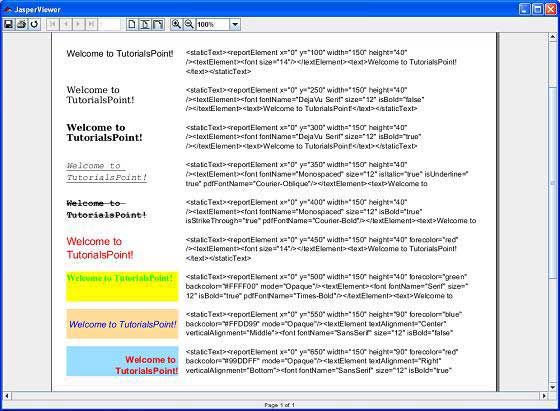
在这里,我们可以看到文本“欢迎来到 TutorialsPoint”以不同的字体格式显示。