
 数据结构
数据结构 网络
网络 关系数据库管理系统 (RDBMS)
 操作系统
操作系统 Java
Java Microsoft Excel
 iOS
iOS HTML
HTML CSS
CSS Android
 Python
 C 编程
C 编程 C++
C++ C#
C# MongoDB
 MySQL
MySQL Javascript
 PHP
PHP 物理
物理 化学
化学 生物
生物 数学
数学 英语
英语 经济学
经济学 心理学
心理学 社会学
社会学 服装学
服装学 法学
法学列出 React Native 的重要核心组件
React Native 中最重要的核心组件如下:
| React Native 组件 | Android 原生视图 | iOS 原生视图 | Web 浏览器 | 描述 |
|---|---|---|---|---|
| View - <View> | 当应用在 Android 设备上显示时,<View> 组件将更改为 <ViewGroup> | 当应用在 iOS 设备上显示时,<View> 组件将更改为 <UIView> | 在 Web 浏览器中显示时,<View> 组件将更改为 <div> 标签 | 它是支持 flexbox 布局的核心容器。它还管理触摸处理。 |
| Text - <Text> | 当应用在 Android 设备上显示时,<Text> 组件将更改为 <TextView> | 当应用在 iOS 设备上显示时,<Text> 组件将更改为 <UITextView> | 在 Web 浏览器中显示时,<Text> 组件将更改为 <p> 标签 | 用于向用户显示文本。它还处理样式和触摸事件。 |
| Image - <Image> | 当应用在 Android 设备上显示时,<Image> 组件将更改为 <ImageView> | 当应用在 iOS 设备上显示时,<Image> 组件将更改为 <UIImageView> | 在 Web 浏览器中显示时,<Image> 组件将更改为 <img> 标签 | 用于显示图像。 |
| ScrollView - <ScrollView> | 当应用在 Android 设备上显示时,<ScrollView> 组件将更改为 <ScrollView> | 当应用在 iOS 设备上显示时,<ScrollView> 组件将更改为 <UIScrollView> | 在 Web 浏览器中显示时,<ScrollView> 组件将更改为 <div> 标签 | 包含组件和视图的滚动容器。 |
| TextInput - <TextInput> | 当应用在 Android 设备上显示时,<TextInput> 组件将更改为 <EditText> | 当应用在 iOS 设备上显示时,<TextInput> 组件将更改为 <UITextField> | 在 Web 浏览器中显示时,<TextInput> 组件将更改为 <input type="text"> 标签。 | 用户可以输入文本的输入元素 |
示例
以下是使用 <View>、<Text>、<Image>、<ScrollView> 和 <TextInput> 的工作示例
要使用 Text、View、Image、ScrollView、TextInput,需要从 react-native 导入组件,如下所示:
import { View, Text, Image, ScrollView, TextInput } from 'react-native';View 组件主要用于容纳文本、按钮、图像等。该组件使用方法如下:
<View>
   <Text style={{ padding:"10%", color:"red" }}>Inside View Container</Text>
   <Image
      source={{
         uri: 'https://tutorialspoint.com/react_native/images/logo.png',
      }}
      style={{ width: 311, height: 91 }}
   />
</View>
它包含 Text 和 Image 组件。ScrollView 组件的行为类似于处理 View、Text、Image、Button 和其他 React Native 组件的父组件。
import React from 'react';
import { View, Text, Image, ScrollView, TextInput } from 'react-native';

const App = () => {
   return (
      <ScrollView>
         <Text style={{ padding:"10%", color:"green", "fontSize":"25" }}>Welcome to TutorialsPoints!</Text>
         <View>
            <Text style={{ padding:"10%", color:"red" }}>Inside View Container</Text>
            <Image
            source={{
               uri:'https://tutorialspoint.com/react_native/images/logo.png',
            }}
            style={{ width: 311, height: 91 }}
         />
      </View>
      <TextInput
         style={{
            height: 40,
            borderColor: 'black',
            borderWidth: 1
         }}
         defaultValue="Type something here"
      />
      </ScrollView>
   );
}
export default App;
输出
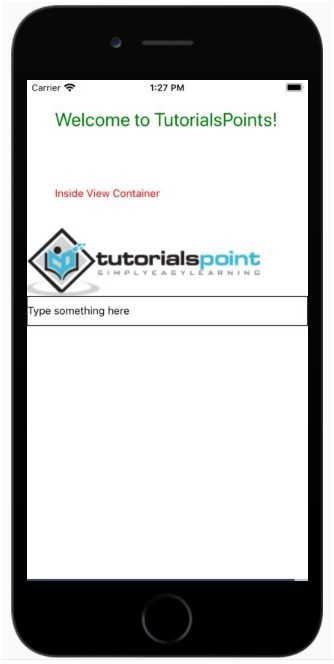

更新于:2021-07-01
378 次浏览

广告