
- MEAN.JS 教程
- MEAN.JS - 主页
- MEAN.JS - 概述
- MEAN.JS - 架构
- 构建 Node Web 应用程序
- MEAN.JS - Mean 项目设置
- 构建 Node Express 静态路由
- MEAN.JS - 构建数据模型
- MEAN.JS - REST API
- 使用 Angular 的前端
- 应用程序中的 Angular 组件
- 使用 Angular 构建单页面
- 构建 SPA:下一级别
- MEAN.JS 有用资源
- MEAN.JS - 快速入门
- MEAN.JS - 有用资源
- MEAN.JS - 讨论
MEAN.JS - 构建 Node Express 静态路由
本章演示使用Node和Express为应用程序构建路由。
在上一个章节中,我们创建了一个 node-express 应用程序。导航到名为mean-demo的项目目录。使用以下命令进入目录 -
$ cd mean-demo
设置路由
路由通过使用传入请求的 URL 作为映射服务。打开server.js文件并设置路由,如下所示 -
// modules =================================================
const express = require('express');
const app = express();

// set our port
const port = 3000;
app.get('/', (req, res) ⇒ res.send('Welcome to Tutorialspoint!'));

//defining route
app.get('/tproute', function (req, res) {
   res.send('This is routing for the application developed using Node and Express...');
});

// startup our app at https://:3000
app.listen(port, () ⇒ console.log(`Example app listening on port ${port}!`));
运行应用程序
接下来,使用以下命令运行该应用程序 -
$ npm start
你会收到一则确认,如下面的图片所示 -
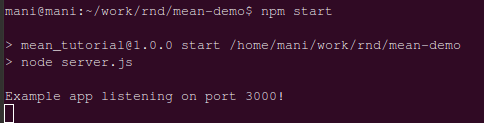
现在,转到浏览器并输入https://:3000/myroute。你会得到如下图所示的页面 -

广告