- MFC 教程
- MFC - 首页
- MFC - 概述
- MFC - 环境设置
- MFC - VC++ 项目
- MFC - 开始入门
- MFC - Windows 基础
- MFC - 对话框
- MFC - Windows 资源
- MFC - 属性表
- MFC - Windows 布局
- MFC - 控件管理
- MFC - Windows 控件
- MFC - 消息与事件
- MFC - ActiveX 控件
- MFC - 文件系统
- MFC - 标准 I/O
- MFC - 文档视图
- MFC - 字符串
- MFC - CArray
- MFC - 链表
- MFC - 数据库类
- MFC - 序列化
- MFC - 多线程
- MFC - 互联网编程
- MFC - GDI
- MFC - 库
- MFC 有用资源
- MFC - 快速指南
- MFC - 有用资源
- MFC - 讨论
MFC - 链表
链表是一种线性数据结构,其中每个元素都是一个单独的对象。列表的每个元素(我们称之为节点)包含两个项目——数据和指向下一个节点的引用。最后一个节点的引用为 null。
链表是一种数据结构,由一组节点组成,这些节点共同表示一个序列。它是一种使用结构存储数据的方法,这样程序员可以在需要时自动创建一个新的数据存储位置。它的一些主要特点是:
链表是一系列包含项目的链接。
每个链接都包含到另一个链接的连接。
列表中的每个项目都称为节点。
如果列表至少包含一个节点,则一个新节点将被定位为列表中的最后一个元素。
如果列表只有一个节点,则该节点表示第一个和最后一个项目。
链表有两种类型:
单链表
单链表是一种数据结构。在单链表中,列表中的每个节点都存储节点的内容以及指向列表中下一个节点的指针或引用。

双向链表
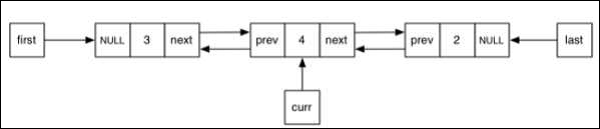
双向链表是一种链表数据结构,它由一组称为节点的顺序链接的记录组成。每个节点包含两个字段,它们分别引用序列中前一个节点和下一个节点。
CList 类
MFC 提供了一个名为CList的类,它是一个模板链表实现,并且运行良好。CList 列表的行为类似于双向链表。POSITION 类型的变量是列表的关键。您可以使用 POSITION 变量作为迭代器来顺序遍历列表,并作为书签来保存位置。
以下是 CList 对象的不同操作:
创建 CList 对象
要创建 CList 值或对象的集合,必须首先确定集合的值的类型。您可以使用现有的原始数据类型,例如 int、CString、double 等,如下面的代码所示。
CList<double, double>m_list;
添加项目
要添加项目,可以使用 CList::AddTail() 函数。它在列表末尾添加一个项目。要在列表开头添加元素,可以使用 CList::AddHead() 函数。在 OnInitDialog() 中,创建 CList 对象并添加四个值,如下面的代码所示。
CList<double, double>m_list;

//Add items to the list
m_list.AddTail(100.75);
m_list.AddTail(85.26);
m_list.AddTail(95.78);
m_list.AddTail(90.1);
检索项目
POSITION 类型的变量是列表的关键。您可以使用 POSITION 变量作为迭代器来顺序遍历列表。
步骤 1 - 要从列表中检索元素,我们可以使用以下代码,该代码将检索所有值。
//iterate the list
POSITION pos = m_list.GetHeadPosition();
while (pos) {
   double nData = m_list.GetNext(pos);
   CString strVal;
   strVal.Format(L"%.2f\n", nData);
   m_strText.Append(strVal);
}
步骤 2 - 以下是完整的 CMFCCListDemoDlg::OnInitDialog() 函数。
BOOL CMFCCListDemoDlg::OnInitDialog() {
   CDialogEx::OnInitDialog();

   // Set the icon for this dialog. The framework does this automatically
   // when the application's main window is not a dialog
   SetIcon(m_hIcon, TRUE);             // Set big icon
   SetIcon(m_hIcon, FALSE);             // Set small icon

   // TODO: Add extra initialization here
   CList<double, double>m_list;

   //Add items to the list
   m_list.AddTail(100.75);
   m_list.AddTail(85.26);
   m_list.AddTail(95.78);
   m_list.AddTail(90.1);

   //iterate the list
   POSITION pos = m_list.GetHeadPosition();
   while (pos) {
      double nData = m_list.GetNext(pos);
      CString strVal;
      strVal.Format(L"%.f\n", nData);
      m_strText.Append(strVal);
   }

   UpdateData(FALSE);

   return TRUE; // return TRUE unless you set the focus to a control
}
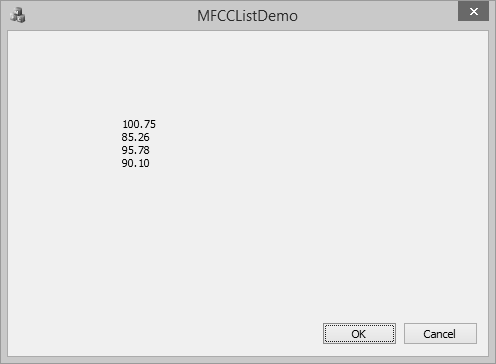
步骤 3 - 编译并执行上述代码后,您将看到以下输出。
在中间添加项目
要在列表中间添加项目,可以使用 CList::InsertAfter() 和 CList::InsertBefore() 函数。它接受两个参数——第一个是位置(可以在其中添加),第二个是值。
步骤 1 - 让我们插入一个新项目,如下面的代码所示。
BOOL CMFCCListDemoDlg::OnInitDialog() {
   CDialogEx::OnInitDialog();

   // Set the icon for this dialog. The framework does this automatically
   // when the application's main window is not a dialog
   SetIcon(m_hIcon, TRUE);             // Set big icon
   SetIcon(m_hIcon, FALSE);          // Set small icon

   // TODO: Add extra initialization here
   CList<double, double>m_list;

   //Add items to the list
   m_list.AddTail(100.75);
   m_list.AddTail(85.26);
   m_list.AddTail(95.78);
   m_list.AddTail(90.1);

   POSITION position = m_list.Find(85.26);
   m_list.InsertBefore(position, 200.0);
   m_list.InsertAfter(position, 300.0);

   //iterate the list
   POSITION pos = m_list.GetHeadPosition();
   while (pos) {
      double nData = m_list.GetNext(pos);
      CString strVal;
      strVal.Format(L"%.2f\n", nData);
      m_strText.Append(strVal);
   }

   UpdateData(FALSE);

   return TRUE; // return TRUE unless you set the focus to a control
}
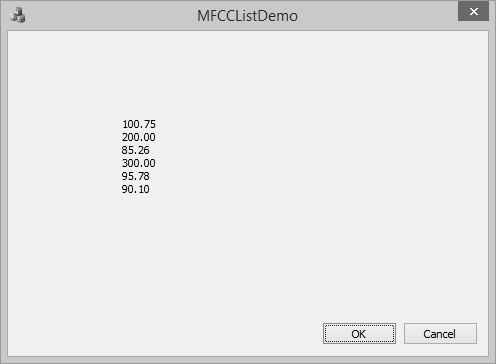
步骤 2 - 您现在可以看到我们首先检索了值 85.26 的位置,然后在其之前和之后插入了一个元素。
步骤 3 - 编译并执行上述代码后,您将看到以下输出。
更新项目值
要更新数组中间的项目,可以使用 CArray::SetAt() 函数。它接受两个参数——第一个是位置,第二个是值。
让我们将列表中的 300.00 更新为 400,如下面的代码所示。
BOOL CMFCCListDemoDlg::OnInitDialog() {
   CDialogEx::OnInitDialog();

   // Set the icon for this dialog. The framework does this automatically
   // when the application's main window is not a dialog
   SetIcon(m_hIcon, TRUE);              // Set big icon
   SetIcon(m_hIcon, FALSE);            // Set small icon

   // TODO: Add extra initialization here
   CList<double, double>m_list;

   //Add items to the list
   m_list.AddTail(100.75);
   m_list.AddTail(85.26);
   m_list.AddTail(95.78);
   m_list.AddTail(90.1);

   POSITION position = m_list.Find(85.26);
   m_list.InsertBefore(position, 200.0);
   m_list.InsertAfter(position, 300.0);

   position = m_list.Find(300.00);
   m_list.SetAt(position, 400.00);

   //iterate the list
   POSITION pos = m_list.GetHeadPosition();
   while (pos) {
      double nData = m_list.GetNext(pos);
      CString strVal;
      strVal.Format(L"%.2f\n", nData);
      m_strText.Append(strVal);
   }

   UpdateData(FALSE);

   return TRUE; // return TRUE unless you set the focus to a control
}
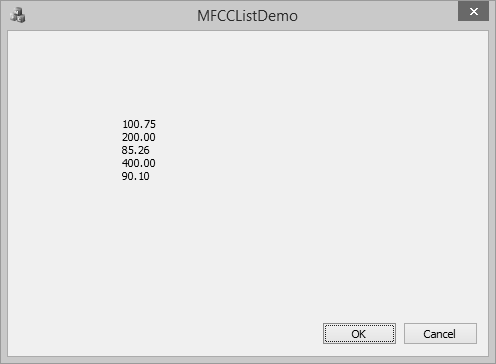
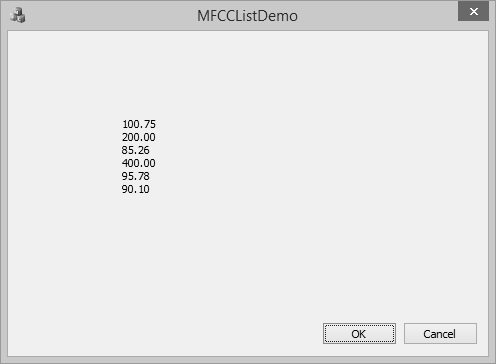
编译并执行上述代码后,您将看到以下输出。您现在可以看到 300.00 的值已更新为 400.00。
删除项目
要删除任何特定项目,可以使用 CList::RemoveAt() 函数。要从列表中删除所有元素,可以使用 CList::RemoveAll() 函数。
让我们删除值为 95.78 的元素。
BOOL CMFCCListDemoDlg::OnInitDialog() {
   CDialogEx::OnInitDialog();

   // Set the icon for this dialog. The framework does this automatically
   // when the application's main window is not a dialog
   SetIcon(m_hIcon, TRUE);              // Set big icon
   SetIcon(m_hIcon, FALSE);             // Set small icon

   // TODO: Add extra initialization here
   CList<double, double>m_list;

   //Add items to the list
   m_list.AddTail(100.75);
   m_list.AddTail(85.26);
   m_list.AddTail(95.78);
   m_list.AddTail(90.1);

   POSITION position = m_list.Find(85.26);
   m_list.InsertBefore(position, 200.0);
   m_list.InsertAfter(position, 300.0);

   position = m_list.Find(300.00);
   m_list.SetAt(position, 400.00);

   position = m_list.Find(95.78);
   m_list.RemoveAt(position);

   //iterate the list
   POSITION pos = m_list.GetHeadPosition();
   while (pos) {
      double nData = m_list.GetNext(pos);
      CString strVal;
      strVal.Format(L"%.2f\n", nData);
      m_strText.Append(strVal);
   }
   UpdateData(FALSE);

   return TRUE; // return TRUE unless you set the focus to a control
}
编译并执行上述代码后,您将看到以下输出。您现在可以看到值 95.78 不再是列表的一部分。