
- Spring MVC 基础
- Spring MVC - 首页
- Spring MVC - 概述
- Spring MVC - 环境搭建
- Spring MVC - Hello World 示例
- Spring MVC - 表单处理
- Spring MVC - 表单处理
- Spring MVC - 页面重定向
- Spring MVC - 静态页面
- Spring MVC - 表单标签库
- Spring MVC - 文本框
- Spring MVC - 密码框
- Spring MVC - 文本区域
- Spring MVC - 复选框
- Spring MVC - 复选框组
- Spring MVC - 单选按钮
- Spring MVC - 单选按钮组
- Spring MVC - 下拉列表
- Spring MVC - 列表框
- Spring MVC - 隐藏域
- Spring MVC - 错误处理
- Spring MVC - 文件上传
- Spring MVC - 处理器映射
- Bean 名称 URL 处理器映射
- 控制器类名称处理器映射
- 简单 URL 处理器映射
- Spring MVC - 控制器
- Spring MVC - 多动作控制器
- 属性方法名称解析器
- 参数方法名称解析器
- 可参数化视图控制器
- Spring MVC - 视图解析器
- 内部资源视图解析器
- Spring MVC - XML 视图解析器
- 资源包视图解析器
- 多解析器映射
- Spring MVC - 集成
- Spring MVC - Hibernate 验证器
- Spring MVC - 生成 RSS Feed
- Spring MVC - 生成 XML
- Spring MVC - 生成 JSON
- Spring MVC - 生成 Excel
- Spring MVC - 生成 PDF
- Spring MVC - 使用 log4j
- Spring 问题与解答
- Spring - 问题与解答
- Spring 有用资源
- Spring MVC - 快速指南
- Spring MVC - 有用资源
- Spring MVC - 讨论
Spring MVC - 生成Excel示例
以下示例演示了如何使用 Spring Web MVC 框架生成 Excel。首先,我们需要准备一个可用的 Eclipse IDE,并按照以下步骤开发一个基于动态表单的 Web 应用程序,使用 Spring Web 框架。
| 步骤 | 描述 |
|---|---|
| 1 | 创建一个名为 TestWeb 的项目,放在 com.tutorialspoint 包下,如 Spring MVC - Hello World 章节中所述。 |
| 2 | 在 com.tutorialspoint 包下创建 Java 类 UserExcelView 和 ExcelController。 |
| 3 | 从 Maven 仓库页面下载 Apache POI 库 Apache POI。将其放入 CLASSPATH 中。 |
| 4 | 最后一步是创建源文件和配置文件的内容,并导出应用程序,如下所述。 |
ExcelController.java
package com.tutorialspoint;

import java.util.HashMap;
import java.util.Map;

import javax.servlet.http.HttpServletRequest;
import javax.servlet.http.HttpServletResponse;

import org.springframework.web.servlet.ModelAndView;
import org.springframework.web.servlet.mvc.AbstractController;

public class ExcelController extends AbstractController {

   @Override
   protected ModelAndView handleRequestInternal(HttpServletRequest request,
      HttpServletResponse response) throws Exception {
      //user data
      Map<String,String> userData = new HashMap<String,String>();
      userData.put("1", "Mahesh");
      userData.put("2", "Suresh");
      userData.put("3", "Ramesh");
      userData.put("4", "Naresh");
      return new ModelAndView("UserSummary","userData",userData);
   }
}
UserExcelView.java
package com.tutorialspoint;

import java.util.Map;

import javax.servlet.http.HttpServletRequest;
import javax.servlet.http.HttpServletResponse;

import org.apache.poi.hssf.usermodel.HSSFRow;
import org.apache.poi.hssf.usermodel.HSSFSheet;
import org.apache.poi.hssf.usermodel.HSSFWorkbook;
import org.springframework.web.servlet.view.document.AbstractExcelView;

public class UserExcelView extends AbstractExcelView {

   @Override
   protected void buildExcelDocument(Map<String, Object> model,
      HSSFWorkbook workbook, HttpServletRequest request, HttpServletResponse response)
      throws Exception {
      Map<String,String> userData = (Map<String,String>) model.get("userData");
      //create a wordsheet
      HSSFSheet sheet = workbook.createSheet("User Report");

      HSSFRow header = sheet.createRow(0);
      header.createCell(0).setCellValue("Roll No");
      header.createCell(1).setCellValue("Name");

      int rowNum = 1;
      for (Map.Entry<String, String> entry : userData.entrySet()) {
         //create the row data
         HSSFRow row = sheet.createRow(rowNum++);
         row.createCell(0).setCellValue(entry.getKey());
         row.createCell(1).setCellValue(entry.getValue());
      }
   }
}
TestWeb-servlet.xml
<beans xmlns = "http://www.springframework.org/schema/beans"
   xmlns:context = "http://www.springframework.org/schema/context"
   xmlns:xsi = "http://www.w3.org/2001/XMLSchema-instance"
   xmlns:mvc = "http://www.springframework.org/schema/mvc"
   xsi:schemaLocation = "
   http://www.springframework.org/schema/beans
   http://www.springframework.org/schema/beans/spring-beans-3.0.xsd
   http://www.springframework.org/schema/context
   http://www.springframework.org/schema/context/spring-context-3.0.xsd
   http://www.springframework.org/schema/mvc
   http://www.springframework.org/schema/mvc/spring-mvc-3.0.xsd">

   <bean class = "org.springframework.web.servlet.mvc.support.ControllerClassNameHandlerMapping" />

   <bean class = "com.tutorialspoint.ExcelController" />

   <bean class = "org.springframework.web.servlet.view.XmlViewResolver">
      <property name = "location">
         <value>/WEB-INF/views.xml</value>
      </property>
   </bean>
</beans>
views.xml
<beans xmlns = "http://www.springframework.org/schema/beans"
   xmlns:context = "http://www.springframework.org/schema/context"
   xmlns:xsi = "http://www.w3.org/2001/XMLSchema-instance"
   xsi:schemaLocation = "
   http://www.springframework.org/schema/beans
   http://www.springframework.org/schema/beans/spring-beans-3.0.xsd
   http://www.springframework.org/schema/context
   http://www.springframework.org/schema/context/spring-context-3.0.xsd">

   <bean id = "UserSummary" class = "com.tutorialspoint.UserExcelView"></bean>
</beans>
在这里,我们创建了一个 ExcelController 和一个 ExcelView。Apache POI 库处理 Microsoft Office 文件格式,并将数据转换为 Excel 文档。
完成源文件和配置文件的创建后,导出您的应用程序。右键单击您的应用程序,使用导出 → WAR 文件选项,并将TestWeb.war文件保存到 Tomcat 的 webapps 文件夹中。
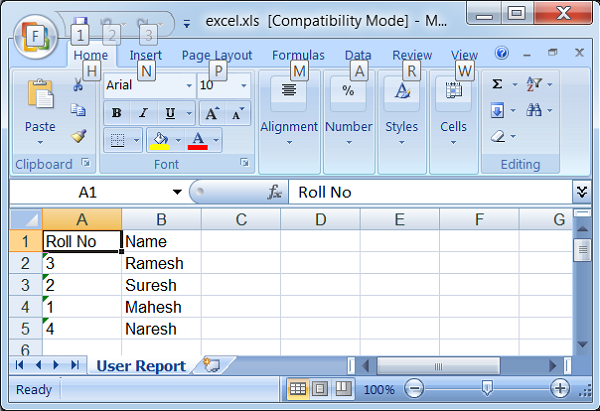
现在,启动 Tomcat 服务器,并确保您可以使用标准浏览器从 webapps 文件夹访问其他网页。尝试以下 URL:https://:8080/TestWeb/excel,我们将看到以下屏幕。
广告