- Struts 2 教程
- Struts2 - 首页
- Struts2 - 基本MVC架构
- Struts2 - 概述
- Struts2 - 环境搭建
- Struts2 - 架构
- Struts2 - 示例
- Struts2 - 配置
- Struts2 - Action
- Struts2 - 拦截器
- Struts2 - 结果类型
- Struts2 - 值栈/OGNL
- Struts2 - 文件上传
- Struts2 - 数据库访问
- Struts2 - 发送邮件
- Struts2 - 验证
- Struts2 - 国际化
- Struts2 - 类型转换
- Struts2 - 主题/模板
- Struts2 - 异常处理
- Struts2 - 注解
- Struts 2 标签
- Struts2 - 控制标签
- Struts2 - 数据标签
- Struts2 - 表单标签
- Struts2 - Ajax标签
- Struts 2 集成
- Struts2 - Spring
- Struts2 - Tiles
- Struts2 - Hibernate
- Struts 2 有用资源
- Struts2 - 问题与解答
- Struts2 - 快速指南
- Struts2 - 有用资源
- Struts2 - 讨论
Struts 2 - Append标签
假设有两个列表A和B,其值分别为A1、A2和B1、B2。合并这两个列表将得到A1、B1、A2、B2,而追加这两个列表将得到A1、A2、B1、B2。
创建Action类
首先,让我们创建一个名为Employee.java的简单类,如下所示:
package com.tutorialspoint.struts2;

import java.util.ArrayList;
import java.util.List;

import org.apache.struts2.util.SubsetIteratorFilter.Decider;

public class Employee {
   private String name;
   private String department;

   public Employee(){}
   public Employee(String name,String department) {
      this.name = name;
      this.department = department;
   }
   private List employees;
   private List contractors;

   public String execute() {
      employees = new ArrayList();
      employees.add(new Employee("George","Recruitment"));
      employees.add(new Employee("Danielle","Accounts"));
      employees.add(new Employee("Melissa","Recruitment"));
      employees.add(new Employee("Rose","Accounts"));

      contractors = new ArrayList();
      contractors.add(new Employee("Mindy","Database"));
      contractors.add(new Employee("Vanessa","Network"));
      return "success";
   }

   public Decider getRecruitmentDecider() {
      return new Decider() {
         public boolean decide(Object element) throws Exception {
            Employee employee = (Employee)element;
            return employee.getDepartment().equals("Recruitment");
         }
      };
   }

   public String getName() {
      return name;
   }

   public void setName(String name) {
      this.name = name;
   }

   public String getDepartment() {
      return department;
   }

   public void setDepartment(String department) {
      this.department = department;
   }

   public List getEmployees() {
      return employees;
   }

   public void setEmployees(List employees) {
      this.employees = employees;
   }

   public List getContractors() {
      return contractors;
   }

   public void setContractors(List contractors) {
      this.contractors = contractors;
   }

}
Employee类有两个属性 - **name** 和 **department**,我们还有两个员工列表 - 正式 **employees** 和 **contractors**。我们有一个名为 **getRecruitmentDecider** 的方法,它返回一个 **Decider** 对象。Decider实现如果员工在 **recruitment** 部门工作则返回 **true**,否则返回 **false**。
接下来,让我们创建一个 **DepartmentComparator** 来比较Employee对象:
package com.tutorialspoint.struts2;

import java.util.Comparator;

public class DepartmentComparator implements Comparator {
   public int compare(Employee e1, Employee e2) {
      return e1.getDepartment().compareTo(e2.getDepartment());
   }

   @Override
   public int compare(Object arg0, Object arg1) {
      return 0;
   }
}
如上例所示,部门经理根据部门按字母顺序比较员工。
创建视图
创建一个名为 **employee.jsp** 的文件,内容如下:
<%@ page contentType = "text/html; charset = UTF-8"%>
<%@ taglib prefix = "s" uri = "/struts-tags"%>

<html>
   <head>
      <title>Employees</title>
   </head>

   <body>
      <b>Employees and Contractors Merged together</b>

      <br />

      <s:append  id = "allemployees">
         <s:param value = "employees" />
         <s:param value = "contractors" />
      </s:append >

      <s:iterator value = "allemployees">
         <s:property value = "name"/>,
         <s:property value = "department"/><br/>
      </s:iterator>
   </body>
</html>
**append** 标签接受两个或多个列表作为参数。我们需要为append提供一个 **id**,以便以后可以重用它。在本例中,我们将employees和contractors作为参数提供给append标签。然后,我们使用“allemployees” id 遍历追加的列表并打印员工详细信息。
配置文件
你的 **struts.xml** 应该如下所示:
<?xml version = "1.0" Encoding = "UTF-8"?>
<!DOCTYPE struts PUBLIC
   "-//Apache Software Foundation//DTD Struts Configuration 2.0//EN"
   "http://struts.apache.org/dtds/struts-2.0.dtd">

<struts>
   <constant name = "struts.devMode" value = "true" />
   <package name = "helloworld" extends = "struts-default">
      <action name = "employee"
         class = "com.tutorialspoint.struts2.Employee"
         method = "execute">
         <result name = "success">/employee.jsp</result>
      </action>
   </package>
</struts>
你的 **web.xml** 应该如下所示:
<?xml version = "1.0" Encoding = "UTF-8"?>
<web-app xmlns:xsi = "http://www.w3.org/2001/XMLSchema-instance"
   xmlns = "http://java.sun.com/xml/ns/javaee"
   xmlns:web = "http://java.sun.com/xml/ns/javaee/web-app_2_5.xsd"
   xsi:schemaLocation = "http://java.sun.com/xml/ns/javaee
   http://java.sun.com/xml/ns/javaee/web-app_3_0.xsd"
   id = "WebApp_ID" version = "3.0">

   <display-name>Struts 2</display-name>

   <welcome-file-list>
      <welcome-file>index.jsp</welcome-file>
   </welcome-file-list>

   <filter>
      <filter-name>struts2</filter-name>
      <filter-class>
         org.apache.struts2.dispatcher.FilterDispatcher
      </filter-class>
   </filter>

   <filter-mapping>
      <filter-name>struts2</filter-name>
      <url-pattern>/*</url-pattern>
   </filter-mapping>
</web-app>
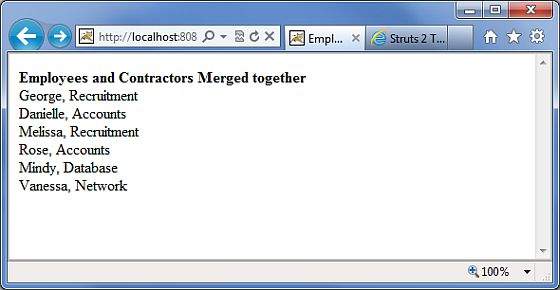
右键单击项目名称,然后单击 **导出 > WAR 文件** 以创建 WAR 文件。然后将此 WAR 部署到 Tomcat 的 webapps 目录中。最后,启动 Tomcat 服务器并尝试访问 URL **https://:8080/HelloWorldStruts2/employee.action**。这将生成以下屏幕: