
- Struts 2 教程
- Struts2 - 首页
- Struts2 - 基本 MVC 架构
- Struts2 - 概览
- Struts2 - 环境设置
- Struts2 - 架构
- Struts2 - 示例
- Struts2 - 配置
- Struts2 - 操作
- Struts2 - 拦截器
- Struts2 - 结果类型
- Struts2 - 值栈/OGNL
- Struts2 - 文件上传
- Struts2 - 数据库访问
- Struts2 - 发送电子邮件
- Struts2 - 验证
- Struts2 - 本地化
- Struts2 - 类型转换
- Struts2 - 主题/模板
- Struts2 - 异常处理
- Struts2 - 注释
- Struts 2 标签
- Struts2 - 控制标签
- Struts2 - 数据标签
- Struts2 - 表格标签
- Struts2 - Ajax 标签
- Struts 2 集成
- Struts2 - Spring
- Struts2 - Tiles
- Struts2 - Hibernate
- Struts 2 有用资源
- Struts2 - 问与答
- Struts2 - 快速指南
- Struts2 - 有用资源
- Struts2 - 讨论
Struts 2 - 日期标签
日期标签允许快速且轻松地设置日期格式。用户可以指定自定义格式(例如“dd/MM/yyyy hh:mm”),可以生成易于读取的符号(例如“2 小时 14 分钟后”),或者可以只回顾带有属性文件中的键值对“struts.date.format”的预定义格式。
创建 Action 类
package com.tutorialspoint.struts2;

import java.util.*;

public class HelloWorldAction {
   private Date currentDate;

   public String execute() throws Exception {
      setCurrentDate(new Date());
      return "success";
   }
   public void setCurrentDate(Date date) {
      this.currentDate = date;
   }
   public Date getCurrentDate() {
      return currentDate;
   }
}
创建视图
让我们在 HelloWorld.jsp 中包含以下内容 −
<%@ page contentType = "text/html; charset = UTF-8" %>
<%@ taglib prefix = "s" uri = "/struts-tags" %>

<html>
   <head>
      <title>Hello World</title>
   </head>

   <body>
      <h2>Current Date</h2>

      <h3>Day/Month/Year Format</h3>
      <s:date name = "currentDate" format = "dd/MM/yyyy" />

      <h3>Month/Day/Year Format</h3>
      <s:date name = "currentDate" format = "MM/dd/yyyy" />

   </body>
</html>
配置文件
你的 struts.xml 应该如下所示 −
<?xml version = "1.0" Encoding = "UTF-8"?>
<!DOCTYPE struts PUBLIC
   "-//Apache Software Foundation//DTD Struts Configuration 2.0//EN"
   "http://struts.apache.org/dtds/struts-2.0.dtd">
<struts>
   <constant name = "struts.devMode" value = "true" />
   <package name = "helloworld" extends = "struts-default">

      <action name = "hello"
         class = "com.tutorialspoint.struts2.HelloWorldAction"
         method = "execute">
         <result name = "success">/HelloWorld.jsp</result>
      </action>

   </package>
</struts>
你的 web.xml 应该如下所示 −
<?xml version = "1.0" Encoding = "UTF-8"?>
<web-app xmlns:xsi = "http://www.w3.org/2001/XMLSchema-instance"
   xmlns = "http://java.sun.com/xml/ns/javaee"
   xmlns:web = "http://java.sun.com/xml/ns/javaee/web-app_2_5.xsd"
   xsi:schemaLocation = "http://java.sun.com/xml/ns/javaee
   http://java.sun.com/xml/ns/javaee/web-app_3_0.xsd"
   id = "WebApp_ID" version = "3.0">

   <display-name>Struts 2</display-name>

   <welcome-file-list>
      <welcome-file>index.jsp</welcome-file>
   </welcome-file-list>

   <filter>
      <filter-name>struts2</filter-name>
      <filter-class>
         org.apache.struts2.dispatcher.FilterDispatcher
      </filter-class>
   </filter>

   <filter-mapping>
      <filter-name>struts2</filter-name>
      <url-pattern>/*</url-pattern>
   </filter-mapping>
</web-app>
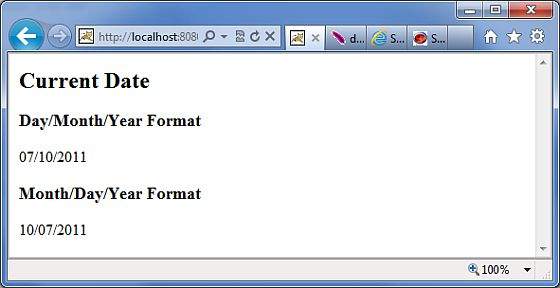
右击项目名称然后单击 导出 > WAR 文件 创建 WAR 文件。然后将这个 WAR 部署到 Tomcat 的 webapps 目录中。最后,启动 Tomcat 服务器并尝试访问 URL https://:8080/HelloWorldStruts2/hello.action。这将产生以下屏幕 −
struts_data_tags.htm
广告