
 数据结构
数据结构 网络
网络 关系数据库管理系统 (RDBMS)
 操作系统
操作系统 Java
Java MS Excel
 iOS
iOS HTML
HTML CSS
CSS Android
 Python
 C语言编程
C语言编程 C++
C++ C#
C# MongoDB
 MySQL
MySQL Javascript
 PHP
PHP 物理学
物理学 化学
化学 生物学
生物学 数学
数学 英语
英语 经济学
经济学 心理学
心理学 社会学
社会学 服装设计
服装设计 法学
法学在Snack中使用SVG圆形
有时,任务是在应用程序中绘制基本的形状,例如线条、矩形、圆形等。为此,可以使用来自“react-native-svg”的Svg。在本文中,将展示带有四个不同示例的React Native和JavaScript代码,其中第一个示例使用“react-native-svg”组件“Svg”和Circle来绘制圆形,对其进行样式化并显示它们。在第二个示例中,以同心形式绘制不同样式的圆形。第三个示例展示了如何制作可点击的圆形。单击此圆形后,简单的警报会显示一条消息。第四个示例展示了如果不需要完整的圆形,如何只让部分圆形显示在屏幕上。
算法1
步骤1 − 从'react-native'导入View、Text,从'react-native-svg'导入Circle、Svg;
步骤2 − 创建App.js并编写绘制圆形的代码。
步骤3 − 设置cx、cy、r、fill、stroke、strokeWidth、strokeDasharray等的值。
步骤4 − 在线或在个人移动设备上查看结果。
示例1:使用'react-native-svg'创建不同样式的圆形
项目中使用的重要文件是
App.js
App.js:这是该项目的主要JavaScript文件。
示例
import{Component}from'react';
import{View,Text}from'react-native';
import{Circle,Svg}from'react-native-svg';

exportdefaultclassStyledCircles_SVGExampleextendsComponent{
   render(){
      return(
         <Viewstyle={{flex:1,alignItems:"center",backgroundColor:'#000'}}>
            <Textstyle={{color:"red",marginTop:60,fontSize:20}}>ShowingCircleStyles</Text>
            <Svgstyle={{alignItems:"center",justifyContent:"center"}}>
               <Circle
               fill="#e37448"
               cx="50%"
               cy="50%"
               r="50"
               />
            </Svg>
            <Svgstyle={{alignItems:"center",justifyContent:"center"}}>
               <Circle
               cx="50%"
               cy="50%"
               r="60"
               fill="none"
               stroke="#ffaa00"
               strokeWidth={2}
               strokeLinecap="round"
               strokeDasharray="412"
               />
            </Svg>
            <Svgstyle={{alignItems:"center",justifyContent:"center",marginTop:20}}>
               <Circle
               cx="50%"
               cy="50%"
               r="70"
               fill="#faf"
               stroke="#00ffff"
               strokeWidth={11}
               strokeDasharray="4"
               />
            </Svg>
         </View>
      );
   }
}
输出
结果可以在线查看。
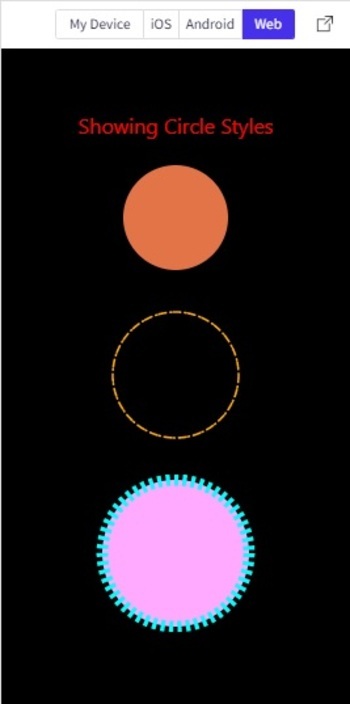
在Web视图中显示不同样式的SVG圆形
算法2
步骤1 − 从'react-native'导入View,从'react-native-svg'导入Circle、Svg;
步骤2 − 创建App.js并编写绘制圆形的代码。
步骤3 − 绘制圆形时,保持cx、cy的值相同,并更改r。更改fill、stroke、strokeWidth、strokeDasharray等是可选的。
步骤4 − 在线或在个人移动设备上查看结果。
示例2:创建具有不同样式的同心圆。
项目中使用的重要文件是
App.js
App.js:这是该项目的主要JavaScript文件。
示例
import {Component} from 'react';
import { View} from 'react-native';
import {Circle, Svg} from 'react-native-svg';
export default class manyCircles_SVGExample extends Component {
   render() {
      return (
         <View style={{flex:1, padding:10}}>
            <Svg height="300" width="300" >
               <Circle cx="50%" cy="50%" r="10%" fill="none" stroke="#fa0" strokeWidth={3} strokeDasharray="5" />
               <Circle cx="50%" cy="50%" r="20%" fill="none" stroke="#f00" strokeWidth={7} strokeDasharray="4" />
               <Circle cx="50%" cy="50%" r="25%" fill="none" stroke="#0ff" strokeWidth={2} strokeDasharray="4" />
               <Circle cx="50%" cy="50%" r="30%" fill="none" stroke="#f00" strokeWidth={3} strokeDasharray="3" />
               <Circle cx="50%" cy="50%" r="35%" fill="none" stroke="#ff0" strokeWidth={4} strokeDasharray="3" />
               <Circle cx="50%" cy="50%" r="40%" fill="none" stroke="#0f0" strokeWidth={5} strokeDasharray="2" />
               <Circle cx="50%" cy="50%" r="45%" fill="none" stroke="#0ff" strokeWidth={6} strokeDasharray="2" />
               <Circle cx="50%" cy="50%" r="50%" fill="none" stroke="#000" strokeWidth={1} strokeDasharray="1" />
            </Svg>
         </View>
      );
   }
}
输出
结果可以在线查看。此处显示iOS视图。
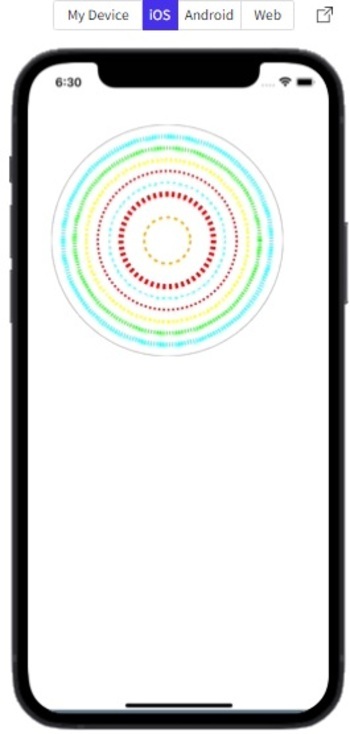
使用iOS模拟器显示同心圆。
算法3
步骤1 − 从'react-native'导入View、TouchableOpacity、Text,从'react-native-svg'导入Circle、Svg;
步骤2 − 创建App.js并编写绘制圆形的代码。
步骤3 − 将Svg和Circle标签放在TouchableOpacity标签内以使圆形可点击。
步骤4 − 检查结果。
示例3:创建可点击的圆形。
项目中使用的重要文件是
App.js
App.js:这是该项目的主要JavaScript文件。
示例
import{Component}from'react';
import{View,TouchableOpacity,Text}from'react-native';
import{Circle,Svg}from'react-native-svg';
exportdefaultclassClickableCircles_SVGExampleextendsComponent{
   render(){
      return(
         <Viewstyle={{flex:1,alignItems:"center",backgroundColor:'#000'}}>
            <Textstyle={{color:"red",marginTop:60,fontSize:20}}>PresstheCircleToseetheMessage</Text>
            <TouchableOpacitystyle={{marginTop:30,marginLeft:200}}onPress={()=>alert("SVGCircleExample")}>
            <Svgstyle={{alignItems:"center",justifyContent:"center"}}>
               <Circle
               fill="#e37448"
               cx="50"
               cy="50"
               r="50"
               />
            </Svg>
            </TouchableOpacity>
         </View>

      );
   }
}
输出
结果可以在线查看。
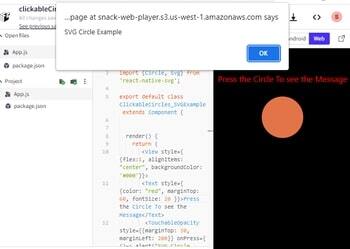
在Web视图中点击圆形后显示警报消息
算法4
步骤1 − 从'react-native'导入View,从'react-native-svg'导入Circle、Svg;
步骤2 − 创建App.js并编写绘制圆形的代码。
步骤3 − 设置Svg的宽度和高度以及圆形的cx、cy和r,以控制圆形部分的显示。
步骤4 − 检查结果。
示例4:仅显示给定圆形的部分。
项目中使用的重要文件是
App.js
App.js:这是该项目的主要JavaScript文件。
示例
import {Component} from 'react';
import { View, Text} from 'react-native';
import {Circle, Svg} from 'react-native-svg';

export default class NotFullCircles_SVGExample extends Component {
   render() {
      return (
         <View style={{flex:1}}>
            <Svg height="300" width="200" >
               <Circle cx="200" cy="220" r="20%"
               fill="red" stroke="#000" strokeWidth={11} strokeDasharray="4" />
            </Svg>
            <Svg height="100" width="100" >
               <Circle cx="0" cy="60" r="90%"
               fill="none" stroke="#000" strokeWidth={3} />
            </Svg>
         </View>
      );
   }
}
输出
结果可以在线查看。
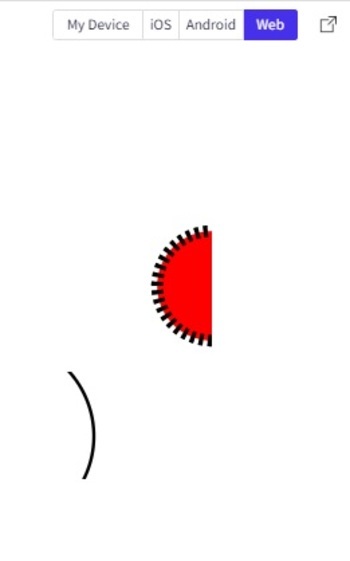
在Web视图中仅显示给定圆形的部分
本文通过四个不同的示例,介绍了如何在Snack中创建圆形的方法。首先介绍了对圆形进行样式化的方法,然后展示了如何创建同心圆。还展示了如何创建可点击的圆形以及显示圆形部分的方法。

浏览量:1K+
