
- WebRTC 教程
- WebRTC - 首页
- WebRTC - 概述
- WebRTC - 架构
- WebRTC - 环境
- WebRTC - MediaStream APIs
- WebRTC - RTCPeerConnection APIs
- WebRTC - RTCDataChannel APIs
- WebRTC - 发送消息
- WebRTC - 信令
- WebRTC - 浏览器支持
- WebRTC - 移动端支持
- WebRTC - 视频演示
- WebRTC 语音演示
- WebRTC - 文本演示
- WebRTC - 安全性
- WebRTC 资源
- WebRTC - 快速指南
- WebRTC - 有用资源
- WebRTC - 讨论
WebRTC 语音演示
本章我们将构建一个客户端应用程序,允许两个在不同设备上的用户使用 WebRTC 音频流进行通信。我们的应用程序将包含两个页面:一个用于登录,另一个用于向另一个用户发起音频呼叫。
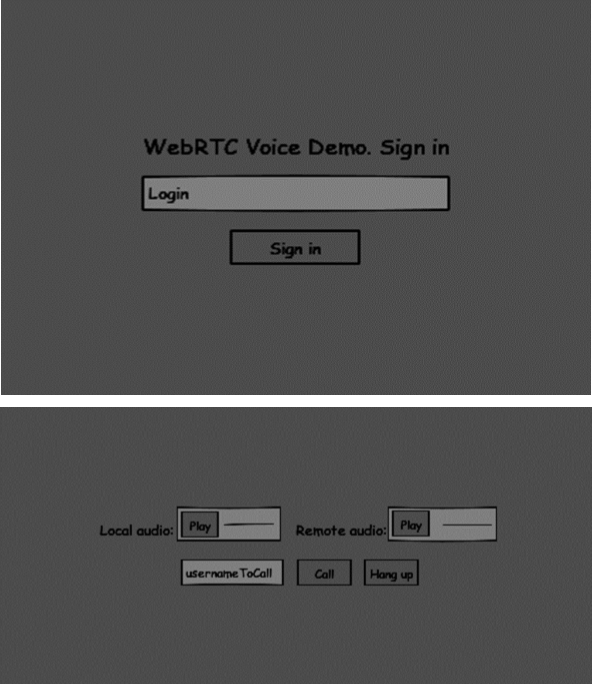
这两个页面将使用`div`标签。大部分输入都是通过简单的事件处理程序完成的。
信令服务器
要创建 WebRTC 连接,客户端必须能够在不使用 WebRTC 对等连接的情况下传输消息。在这里,我们将使用 HTML5 WebSockets——在两个端点(Web 服务器和 Web 浏览器)之间进行双向套接字连接。现在让我们开始使用 WebSocket 库。创建`server.js`文件并插入以下代码:
//require our websocket library
var WebSocketServer = require('ws').Server;

//creating a websocket server at port 9090
var wss = new WebSocketServer({port: 9090});

//when a user connects to our sever
wss.on('connection', function(connection) {
   console.log("user connected");

   //when server gets a message from a connected user
   connection.on('message', function(message) {
      console.log("Got message from a user:", message);
   });

   connection.send("Hello from server");
});
第一行需要我们已经安装的 WebSocket 库。然后我们在端口 9090 上创建一个套接字服务器。接下来,我们监听`connection`事件。当用户与服务器建立 WebSocket 连接时,将执行此代码。然后我们监听用户发送的任何消息。最后,我们向已连接的用户发送“来自服务器的问候”。
在我们的信令服务器中,我们将为每个连接使用基于字符串的用户名,以便我们知道将消息发送到哪里。让我们稍微更改一下我们的`connection`处理程序:
connection.on('message', function(message) {
   var data;

   //accepting only JSON messages
   try {
      data = JSON.parse(message);
   } catch (e) {
      console.log("Invalid JSON");
      data = {};
   }
});
这样我们只接受 JSON 消息。接下来,我们需要将所有已连接的用户存储在某个地方。我们将为此使用一个简单的 Javascript 对象。修改我们文件顶部:
//require our websocket library
var WebSocketServer = require('ws').Server;

//creating a websocket server at port 9090
var wss = new WebSocketServer({port: 9090});

//all connected to the server users
var users = {};
我们将为来自客户端的每条消息添加一个`type`字段。例如,如果用户想要登录,他发送`login`类型的消息。让我们定义它:
connection.on('message', function(message) {

   var data;
   //accepting only JSON messages
   try {
      data = JSON.parse(message);
   } catch (e) {
      console.log("Invalid JSON");
      data = {};
   }

   //switching type of the user message
   switch (data.type) {
      //when a user tries to login
      case "login":
         console.log("User logged:", data.name);

         //if anyone is logged in with this username then refuse
         if(users[data.name]) {
            sendTo(connection, {
               type: "login",
               success: false
            });
         } else {
            //save user connection on the server
            users[data.name] = connection;
            connection.name = data.name;

            sendTo(connection, {
               type: "login",
               success: true
            });
         }

         break;

      default:
         sendTo(connection, {
            type: "error",
            message: "Command no found: " + data.type
         });

         break;
   }
});
如果用户发送带有`login`类型的消息,我们将:
- 检查是否有人已经使用此用户名登录。
- 如果是,则告诉用户他登录未成功。
- 如果没有人使用此用户名,我们将用户名作为键添加到连接对象。
- 如果命令无法识别,我们将发送错误。
以下代码是用于向连接发送消息的辅助函数。将其添加到`server.js`文件:
function sendTo(connection, message) {
   connection.send(JSON.stringify(message));
}
当用户断开连接时,我们应该清理其连接。当`close`事件触发时,我们可以删除用户。将以下代码添加到`connection`处理程序:
connection.on("close", function() {
   if(connection.name) {
      delete users[connection.name];
   }
});
成功登录后,用户想要呼叫另一个用户。他应该向另一个用户发出`offer`来实现它。添加`offer`处理程序:
case "offer":
   //for ex. UserA wants to call UserB
   console.log("Sending offer to: ", data.name);

   //if UserB exists then send him offer details
   var conn = users[data.name];

   if(conn != null) {
      //setting that UserA connected with UserB
      connection.otherName = data.name;
      sendTo(conn, {
         type: "offer",
         offer: data.offer,
         name: connection.name
      });
   }

   break;
首先,我们获取我们尝试呼叫的用户连接。如果它存在,我们向他发送`offer`详细信息。我们还将`otherName`添加到`connection`对象中。这是为了简化以后查找它。
对响应的回答与我们在`offer`处理程序中使用的模式相似。我们的服务器只是将所有消息作为`answer`传递给另一个用户。在`offer`处理程序之后添加以下代码:
case "answer":
   console.log("Sending answer to: ", data.name);
   //for ex. UserB answers UserA
   var conn = users[data.name];

   if(conn != null) {
      connection.otherName = data.name;

      sendTo(conn, {
         type: "answer",
         answer: data.answer
      });
   }

   break;
最后一部分是在用户之间处理 ICE 候选者。我们使用相同的技术,只是在用户之间传递消息。主要区别在于,候选消息可能每个用户多次发生,并且顺序可能不同。添加`candidate`处理程序:
case "candidate":
   console.log("Sending candidate to:",data.name);
   var conn = users[data.name];

   if(conn != null) {
      sendTo(conn, {
         type: "candidate",
         candidate: data.candidate
      });
   }

   break;
为了允许我们的用户断开与另一个用户的连接,我们应该实现挂断功能。它还会告诉服务器删除所有用户引用。添加`leave`处理程序:
case "leave":
   console.log("Disconnecting from", data.name);
   var conn = users[data.name];
   conn.otherName = null;

   //notify the other user so he can disconnect his peer connection
   if(conn != null) {
      sendTo(conn, {
         type: "leave"
      });
   }

   break;
这也会向另一个用户发送`leave`事件,以便他可以相应地断开其对等连接。我们还应该处理用户从信令服务器断开连接的情况。让我们修改我们的`close`处理程序:
connection.on("close", function() {

   if(connection.name) {
      delete users[connection.name];

      if(connection.otherName) {
         console.log("Disconnecting from ", connection.otherName);
         var conn = users[connection.otherName];
         conn.otherName = null;

         if(conn != null) {
            sendTo(conn, {
               type: "leave"
            });
         }

      }
   }
});
以下是我们的信令服务器的完整代码:
//require our websocket library
var WebSocketServer = require('ws').Server;

//creating a websocket server at port 9090
var wss = new WebSocketServer({port: 9090});

//all connected to the server users
var users = {};

//when a user connects to our sever
wss.on('connection', function(connection) {

   console.log("User connected");

   //when server gets a message from a connected user
   connection.on('message', function(message) {

      var data;

      //accepting only JSON messages
      try {
         data = JSON.parse(message);
      } catch (e) {
         console.log("Invalid JSON");
         data = {};
      }

      //switching type of the user message
      switch (data.type) {
         //when a user tries to login
         case "login":
            console.log("User logged", data.name);

            //if anyone is logged in with this username then refuse
            if(users[data.name]) {
               sendTo(connection, {
                  type: "login",
                  success: false
               });
            } else {
               //save user connection on the server
               users[data.name] = connection;
               connection.name = data.name;

               sendTo(connection, {
                  type: "login",
                  success: true
               });
            }

            break;

         case "offer":
            //for ex. UserA wants to call UserB
            console.log("Sending offer to: ", data.name);

            //if UserB exists then send him offer details
            var conn = users[data.name];

            if(conn != null) {
               //setting that UserA connected with UserB
               connection.otherName = data.name;

               sendTo(conn, {
                  type: "offer",
                  offer: data.offer,
                  name: connection.name
               });
            }

            break;

         case "answer":
            console.log("Sending answer to: ", data.name);
            //for ex. UserB answers UserA
            var conn = users[data.name];

            if(conn != null) {
               connection.otherName = data.name;
               sendTo(conn, {
                  type: "answer",
                  answer: data.answer
               });
            }

            break;

         case "candidate":
            console.log("Sending candidate to:",data.name);
            var conn = users[data.name];

            if(conn != null) {
               sendTo(conn, {
                  type: "candidate",
                  candidate: data.candidate
               });
            }

            break;

         case "leave":
            console.log("Disconnecting from", data.name);
            var conn = users[data.name];
            conn.otherName = null;

            //notify the other user so he can disconnect his peer connection
            if(conn != null) {
               sendTo(conn, {
                  type: "leave"
               });
            }

            break;

         default:
            sendTo(connection, {
               type: "error",
               message: "Command not found: " + data.type
            });

            break;
      }
   });

   //when user exits, for example closes a browser window
   //this may help if we are still in "offer","answer" or "candidate" state
   connection.on("close", function() {

      if(connection.name) {
         delete users[connection.name];

         if(connection.otherName) {
            console.log("Disconnecting from ", connection.otherName);
            var conn = users[connection.otherName];
            conn.otherName = null;

            if(conn != null) {
               sendTo(conn, {
                  type: "leave"
              });
            }
         }
      }
   });

   connection.send("Hello world");
});

function sendTo(connection, message) {
   connection.send(JSON.stringify(message));
}
客户端应用程序
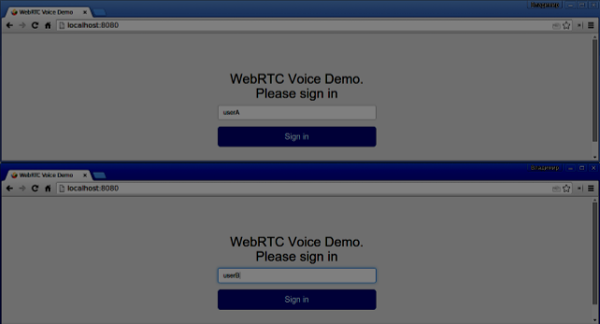
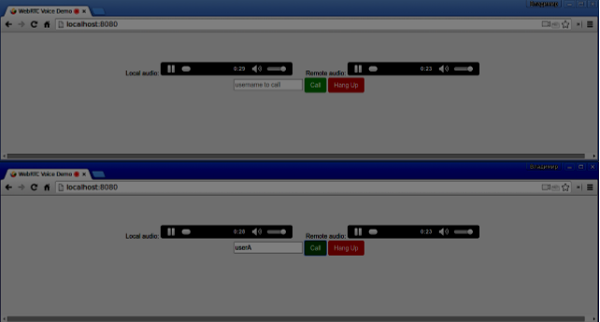
测试此应用程序的一种方法是打开两个浏览器标签页并尝试互相进行音频通话。
首先,我们需要安装`bootstrap`库。Bootstrap 是一个用于开发 Web 应用程序的前端框架。您可以在https://bootstrap.ac.cn/了解更多信息。创建一个名为“audiochat”的文件夹,这将是我们的根应用程序文件夹。在这个文件夹中创建一个`package.json`文件(这对于管理 npm 依赖项是必要的),并添加以下内容:
{
   "name": "webrtc-audiochat",
   "version": "0.1.0",
   "description": "webrtc-audiochat",
   "author": "Author",
   "license": "BSD-2-Clause"
}
然后运行`npm install bootstrap`。这将在`audiochat/node_modules`文件夹中安装 bootstrap 库。
现在我们需要创建一个基本的 HTML 页面。在根文件夹中创建一个`index.html`文件,其中包含以下代码:
<html>

   <head>
      <title>WebRTC Voice Demo</title>
      <link rel = "stylesheet" href = "node_modules/bootstrap/dist/css/bootstrap.min.css"/>
   </head>

   <style>
      body {
         background: #eee;
         padding: 5% 0;
      }
   </style>

   <body>
      <div id = "loginPage" class = "container text-center">

         <div class = "row">
            <div class = "col-md-4 col-md-offset-4">

               <h2>WebRTC Voice Demo. Please sign in</h2>

               <label for = "usernameInput" class = "sr-only">Login</label>
               <input type = "email" id = "usernameInput"
                  class = "form-control formgroup"
                  placeholder = "Login" required = "" autofocus = "">
               <button id = "loginBtn" class = "btn btn-lg btn-primary btnblock">
                  Sign in</button>
            </div>
         </div>

      </div>

      <div id = "callPage" class = "call-page">

         <div class = "row">

            <div class = "col-md-6 text-right">
               Local audio: <audio id = "localAudio"
               controls autoplay></audio>
            </div>

            <div class = "col-md-6 text-left">
               Remote audio: <audio id = "remoteAudio"
                  controls autoplay></audio>
            </div>

         </div>

         <div class = "row text-center">
            <div class = "col-md-12">
               <input id = "callToUsernameInput"
                  type = "text" placeholder = "username to call" />
               <button id = "callBtn" class = "btn-success btn">Call</button>
               <button id = "hangUpBtn" class = "btn-danger btn">Hang Up</button>
            </div>
         </div>

      </div>

      <script src = "client.js"></script>

   </body>

</html>
此页面应该很熟悉。我们添加了`bootstrap` css 文件。我们还定义了两个页面。最后,我们创建了几个文本字段和按钮来获取用户的信息。您应该看到用于本地和远程音频流的两个音频元素。请注意,我们添加了指向`client.js`文件的链接。
现在我们需要与我们的信令服务器建立连接。在根文件夹中创建`client.js`文件,其中包含以下代码:
//our username
var name;
var connectedUser;

//connecting to our signaling server
var conn = new WebSocket('ws://:9090');

conn.onopen = function () {
   console.log("Connected to the signaling server");
};

//when we got a message from a signaling server
conn.onmessage = function (msg) {
   console.log("Got message", msg.data);
   var data = JSON.parse(msg.data);

   switch(data.type) {
      case "login":
         handleLogin(data.success);
         break;
      //when somebody wants to call us
      case "offer":
         handleOffer(data.offer, data.name);
         break;
      case "answer":
         handleAnswer(data.answer);
         break;
      //when a remote peer sends an ice candidate to us
      case "candidate":
         handleCandidate(data.candidate);
         break;
      case "leave":
         handleLeave();
         break;
      default:
         break;
   }
};

conn.onerror = function (err) {
   console.log("Got error", err);
};

//alias for sending JSON encoded messages
function send(message) {
   //attach the other peer username to our messages
   if (connectedUser) {
      message.name = connectedUser;
   }

   conn.send(JSON.stringify(message));
};
现在通过`node server`运行我们的信令服务器。然后,在根文件夹中运行`static`命令并在浏览器中打开页面。您应该看到以下控制台输出:
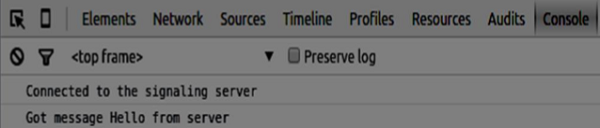
下一步是实现使用唯一用户名的用户登录。我们只需向服务器发送用户名,然后服务器告诉我们它是否已被占用。
//******
//UI selectors block
//******

var loginPage = document.querySelector('#loginPage');
var usernameInput = document.querySelector('#usernameInput');
var loginBtn = document.querySelector('#loginBtn');

var callPage = document.querySelector('#callPage');
var callToUsernameInput = document.querySelector('#callToUsernameInput');
var callBtn = document.querySelector('#callBtn');

var hangUpBtn = document.querySelector('#hangUpBtn');

callPage.style.display = "none";

// Login when the user clicks the button
loginBtn.addEventListener("click", function (event) {
   name = usernameInput.value;

   if (name.length > 0) {
      send({
         type: "login",
         name: name
      });
   }

});

function handleLogin(success) {
   if (success === false) {
      alert("Ooops...try a different username");
   } else {
      loginPage.style.display = "none";
      callPage.style.display = "block";

      //**********************
      //Starting a peer connection
      //**********************

   }

};
首先,我们选择页面上元素的一些引用。然后我们隐藏呼叫页面。然后,我们在登录按钮上添加一个事件侦听器。当用户点击它时,我们将他的用户名发送到服务器。最后,我们实现`handleLogin`回调。如果登录成功,我们将显示呼叫页面并开始设置对等连接。
要启动对等连接,我们需要:
- 从麦克风获取音频流
- 创建 RTCPeerConnection 对象
将以下代码添加到“UI 选择器块”:
var localAudio = document.querySelector('#localAudio');
var remoteAudio = document.querySelector('#remoteAudio');

var yourConn;
var stream;
修改`handleLogin`函数:
function handleLogin(success) {
   if (success === false) {
      alert("Ooops...try a different username");
   } else {
      loginPage.style.display = "none";
      callPage.style.display = "block";

      //**********************
      //Starting a peer connection
      //**********************

      //getting local audio stream
      navigator.webkitGetUserMedia({ video: false, audio: true }, function (myStream) {
         stream = myStream;

         //displaying local audio stream on the page
         localAudio.src = window.URL.createObjectURL(stream);

         //using Google public stun server
         var configuration = {
            "iceServers": [{ "url": "stun:stun2.1.google.com:19302" }]
         };

         yourConn = new webkitRTCPeerConnection(configuration);

         // setup stream listening
         yourConn.addStream(stream);

         //when a remote user adds stream to the peer connection, we display it
         yourConn.onaddstream = function (e) {
            remoteAudio.src = window.URL.createObjectURL(e.stream);
         };

         // Setup ice handling
         yourConn.onicecandidate = function (event) {
            if (event.candidate) {
               send({
                  type: "candidate",
               });
            }
         };

      }, function (error) {
         console.log(error);
      });

   }
};
现在,如果您运行代码,页面应该允许您登录并在页面上显示您的本地音频流。

现在我们可以发起呼叫了。首先,我们向另一个用户发送`offer`。一旦用户收到`offer`,他就会创建一个`answer`并开始交换 ICE 候选者。将以下代码添加到`client.js`文件:
//initiating a call
callBtn.addEventListener("click", function () {
   var callToUsername = callToUsernameInput.value;

   if (callToUsername.length > 0) {
      connectedUser = callToUsername;

      // create an offer
      yourConn.createOffer(function (offer) {
         send({
            type: "offer",
            offer: offer
         });

         yourConn.setLocalDescription(offer);

      }, function (error) {
         alert("Error when creating an offer");
      });
   }

});

//when somebody sends us an offer
function handleOffer(offer, name) {
   connectedUser = name;
   yourConn.setRemoteDescription(new RTCSessionDescription(offer));

   //create an answer to an offer
   yourConn.createAnswer(function (answer) {
      yourConn.setLocalDescription(answer);

      send({
         type: "answer",
         answer: answer
      });

   }, function (error) {
      alert("Error when creating an answer");
   });

};

//when we got an answer from a remote user
function handleAnswer(answer) {
   yourConn.setRemoteDescription(new RTCSessionDescription(answer));
};

//when we got an ice candidate from a remote user
function handleCandidate(candidate) {
   yourConn.addIceCandidate(new RTCIceCandidate(candidate));
};
我们向“呼叫”按钮添加一个`click`处理程序,它会发起`offer`。然后我们实现`onmessage`处理程序预期的几个处理程序。它们将异步处理,直到两个用户都建立连接。
最后一步是实现挂断功能。这将停止传输数据并告诉另一个用户关闭呼叫。添加以下代码:
//hang up
hangUpBtn.addEventListener("click", function () {
   send({
      type: "leave"
   });

   handleLeave();
});

function handleLeave() {
   connectedUser = null;
   remoteAudio.src = null;

   yourConn.close();
   yourConn.onicecandidate = null;
   yourConn.onaddstream = null;
};
当用户点击“挂断”按钮时:
- 它将向另一个用户发送“leave”消息
- 它将关闭 RTCPeerConnection 并本地销毁连接
现在运行代码。您应该能够使用两个浏览器标签页登录服务器。然后您可以向标签页发起音频呼叫并挂断呼叫。
以下是完整的`client.js`文件:
//our username
var name;
var connectedUser;

//connecting to our signaling server
var conn = new WebSocket('ws://:9090');

conn.onopen = function () {
   console.log("Connected to the signaling server");
};

//when we got a message from a signaling server
conn.onmessage = function (msg) {
   console.log("Got message", msg.data);
   var data = JSON.parse(msg.data);

   switch(data.type) {
      case "login":
         handleLogin(data.success);
         break;
      //when somebody wants to call us
      case "offer":
         handleOffer(data.offer, data.name);
         break;
      case "answer":
         handleAnswer(data.answer);
         break;
      //when a remote peer sends an ice candidate to us
      case "candidate":
         handleCandidate(data.candidate);
         break;
      case "leave":
         handleLeave();
         break;
      default:
         break;
   }
};

conn.onerror = function (err) {
   console.log("Got error", err);
};

//alias for sending JSON encoded messages
function send(message) {
   //attach the other peer username to our messages
   if (connectedUser) {
      message.name = connectedUser;
   }

   conn.send(JSON.stringify(message));
};

//******
//UI selectors block
//******

var loginPage = document.querySelector('#loginPage');
var usernameInput = document.querySelector('#usernameInput');
var loginBtn = document.querySelector('#loginBtn');

var callPage = document.querySelector('#callPage');
var callToUsernameInput = document.querySelector('#callToUsernameInput');
var callBtn = document.querySelector('#callBtn');

var hangUpBtn = document.querySelector('#hangUpBtn');
var localAudio = document.querySelector('#localAudio');
var remoteAudio = document.querySelector('#remoteAudio');

var yourConn;
var stream;

callPage.style.display = "none";

// Login when the user clicks the button
loginBtn.addEventListener("click", function (event) {
   name = usernameInput.value;

   if (name.length > 0) {
      send({
         type: "login",
         name: name
      });
   }

});

function handleLogin(success) {
   if (success === false) {
      alert("Ooops...try a different username");
   } else {
      loginPage.style.display = "none";
      callPage.style.display = "block";

      //**********************
      //Starting a peer connection
      //**********************

      //getting local audio stream
      navigator.webkitGetUserMedia({ video: false, audio: true }, function (myStream) {
         stream = myStream;

         //displaying local audio stream on the page
         localAudio.src = window.URL.createObjectURL(stream);

         //using Google public stun server
         var configuration = {
            "iceServers": [{ "url": "stun:stun2.1.google.com:19302" }]
         };

         yourConn = new webkitRTCPeerConnection(configuration);

         // setup stream listening
         yourConn.addStream(stream);

         //when a remote user adds stream to the peer connection, we display it
         yourConn.onaddstream = function (e) {
            remoteAudio.src = window.URL.createObjectURL(e.stream);
         };

         // Setup ice handling
         yourConn.onicecandidate = function (event) {
            if (event.candidate) {
               send({
                  type: "candidate",
                  candidate: event.candidate
               });
            }
         };

      }, function (error) {
         console.log(error);
      });

   }
};

//initiating a call
callBtn.addEventListener("click", function () {
   var callToUsername = callToUsernameInput.value;

   if (callToUsername.length > 0) {
      connectedUser = callToUsername;

      // create an offer
      yourConn.createOffer(function (offer) {
         send({
            type: "offer",
            offer: offer
         });

         yourConn.setLocalDescription(offer);
      }, function (error) {
         alert("Error when creating an offer");
      });
   }
});

//when somebody sends us an offer
function handleOffer(offer, name) {
   connectedUser = name;
   yourConn.setRemoteDescription(new RTCSessionDescription(offer));

   //create an answer to an offer
   yourConn.createAnswer(function (answer) {
      yourConn.setLocalDescription(answer);

      send({
         type: "answer",
         answer: answer
      });

   }, function (error) {
      alert("Error when creating an answer");
   });

};

//when we got an answer from a remote user
function handleAnswer(answer) {
   yourConn.setRemoteDescription(new RTCSessionDescription(answer));
};

//when we got an ice candidate from a remote user
function handleCandidate(candidate) {
   yourConn.addIceCandidate(new RTCIceCandidate(candidate));
};

//hang up
hangUpBtn.addEventListener("click", function () {
   send({
      type: "leave"
   });

   handleLeave();
});

function handleLeave() {
   connectedUser = null;
   remoteAudio.src = null;

   yourConn.close();
   yourConn.onicecandidate = null;
   yourConn.onaddstream = null;
};