
- BabylonJS 教程
- BabylonJS - 主页
- BabylonJS - 介绍
- BabylonJS - 环境设置
- BabylonJS - 概览
- BabylonJS - 基本元素
- BabylonJS - 材质
- BabylonJS - 动画
- BabylonJS - 相机
- BabylonJS - 光
- BabylonJS - 参数形状
- BabylonJS - 网格
- 矢量位置和旋转
- BabylonJS - 贴花
- BabylonJS - Curve3
- BabylonJS - 动态纹理
- BabylonJS - 视差映射
- BabylonJS - 镜头耀斑
- BabylonJS - 创建屏幕截图
- BabylonJS - 反射探针
- 标准渲染管线
- BabylonJS - ShaderMaterial
- BabylonJS - 骨骼和动画骨架
- BabylonJS - 物理引擎
- BabylonJS - 播放声音和音乐
- BabylonJS 实用资源
- BabylonJS - 快速指南
- BabylonJS - 实用资源
- BabylonJS - 讨论
BabylonJS - 旋转
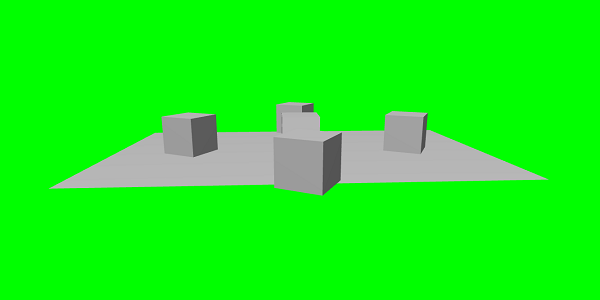
以下展示的演示中,我们将旋转我们在上面看到的盒子。
演示
<!doctype html>
<html>
   <head>
      <meta charset = "utf-8">
      <title>BabylonJs - Basic Element-Creating Scene</title>
      <script src = "babylon.js"></script>
      <style>
         canvas {width: 100%; height: 100%;}
      </style>
   </head>

   <body>
      <canvas id = "renderCanvas"></canvas>
      <script type = "text/javascript">
         var canvas = document.getElementById("renderCanvas");
         var engine = new BABYLON.Engine(canvas, true);
         var createScene  = function() {
            var scene = new BABYLON.Scene(engine);
            scene.clearColor = new BABYLON.Color3(0, 1, 0);

            var camera = new BABYLON.ArcRotateCamera("Camera", 1, 0.8, 10, new BABYLON.Vector3(0, 0, 0), scene);
            scene.activeCamera.attachControl(canvas);

            var light = new BABYLON.PointLight("Omni", new BABYLON.Vector3(0, 100, 100), scene);

            var boxa = BABYLON.Mesh.CreateBox("BoxA", 1.0, scene);
            boxa.position = new BABYLON.Vector3(0,0.5,0);

            var boxb = BABYLON.Mesh.CreateBox("BoxB", 1.0, scene);
            boxb.position = new BABYLON.Vector3(3,0.5,0);
            boxb.rotation = new BABYLON.Vector3(Math.PI/2,0.5,0);

            var boxc = BABYLON.Mesh.CreateBox("BoxC", 1.0, scene);
            boxc.position = new BABYLON.Vector3(-3,0.5,0);
            boxc.rotation = new BABYLON.Vector3(Math.PI/2,0.5,0);

            var boxd = BABYLON.Mesh.CreateBox("BoxD", 1.0, scene);
            boxd.position = new BABYLON.Vector3(0,0.5,3);
            boxd.rotation = new BABYLON.Vector3(0,0.5,Math.PI/2);

            var boxe = BABYLON.Mesh.CreateBox("BoxE", 1.0, scene);
            boxe.position = new BABYLON.Vector3(0,0.5,-3);
            boxe.rotation = new BABYLON.Vector3(0,0.5,Math.PI/2);

            var ground = BABYLON.Mesh.CreateGround("ground1", 10, 6, 2, scene);
            ground.position = new BABYLON.Vector3(0,0,0);
            return scene;
         };
         var scene = createScene();
         engine.runRenderLoop(function() {
            scene.render();
         });
      </script>
   </body>
</html>
示例
考虑以下示例以了解上述代码如何运行 −
说明
我们使用 new BABYLON.Vector3(x,y,z) 定位的方式与旋转相同。在此,你可以使用 new BABYLON.Vector3(x,y,z) 进行旋转,也可以使用 box.rotation.x,box.rotation.y,box.rotation.z。
要旋转,必须给出以弧度为单位的角度。一角度等于 0.01745329252 弧度: 1° = π/180° = 0.01745329252 rad。例如,boxb.rotation = new BABYLON.Vector3(Math.PI/2,0.5,0);
babylonjs_basic_elements.htm
广告