
- BabylonJS 教程
- BabylonJS - 主页
- BabylonJS - 简介
- BabylonJS - 环境设置
- BabylonJS - 概览
- BabylonJS - 基本元素
- BabylonJS - 材质
- BabylonJS - 动画
- BabylonJS - 摄像机
- BabylonJS - 光线
- BabylonJS - 参数化形状
- BabylonJS - 蒙皮
- 向量位置和旋转
- BabylonJS - 贴花
- BabylonJS - Curve3
- BabylonJS - 动态纹理
- BabylonJS - 视差贴图
- BabylonJS - 镜头光晕
- BabylonJS - 创建屏幕截图
- BabylonJS - 反射探针
- 标准渲染管道
- BabylonJS - ShaderMaterial
- BabylonJS - 骨骼和骨架
- BabylonJS - 物理引擎
- BabylonJS - 声音播放和音乐播放
- BabylonJS 实用资源
- BabylonJS - 快速指南
- BabylonJS - 实用资源
- BabylonJS - 讨论
BabylonJS - 镜像纹理凹凸纹理
使用镜像纹理,可获得所创建蒙皮的镜像反射。
镜像纹理语法
mirrorMaterial.reflectionTexture = new BABYLON.MirrorTexture("mirror", 512, scene, true); //Create a mirror texture
mirrorMaterial.reflectionTexture.mirrorPlane = new BABYLON.Plane(0, -1.0, 0, -10.0);
凹凸纹理会在附加材质的蒙皮表面创建凹凸和皱纹。
凹凸纹理语法
bumpMaterial.bumpTexture = new BABYLON.Texture("images/btexture1.jpg", scene);
演示
<!doctype html>
<html>
   <head>
      <meta charset = "utf-8">
      <title>BabylonJs - Basic Element-Creating Scene</title>
      <script src = "babylon.js"></script>
      <style>
         canvas {width: 100%; height: 100%;}
      </style>
   </head>

   <body>
      <canvas id = "renderCanvas"></canvas>
      <script type = "text/javascript">
         var canvas = document.getElementById("renderCanvas");
         var engine = new BABYLON.Engine(canvas, true);

         var createScene  = function() {
            var scene = new BABYLON.Scene(engine);
            scene.clearColor = new BABYLON.Color3(0, 0, 1);

            var light = new BABYLON.PointLight("Omni", new BABYLON.Vector3(10, 10, 50), scene);

            var light2 = new BABYLON.PointLight("Omni", new BABYLON.Vector3(10, 10, -20), scene);

            var camera = new BABYLON.ArcRotateCamera("Camera", -Math.PI/2, Math.PI/4, 25, BABYLON.Vector3.Zero(), scene);
            camera.attachControl(canvas, true);

            var sphere1 = BABYLON.Mesh.CreateSphere("Sphere1", 16.0, 10.0, scene);
            var box1 = BABYLON.Mesh.CreateBox("box", 5.0, scene);

            var sphere3 = BABYLON.Mesh.CreateSphere("Sphere3", 16.0, 10.0, scene);
            var box2 = BABYLON.Mesh.CreateBox("box1", 3.0, scene);

            sphere1.position.x = -20;
            box1.position.x = 0;
            sphere3.position.x = 20;
            box2.position.z = 10;

            // Mirror
            var plane = BABYLON.Mesh.CreatePlane("plan", 70, scene);
            plane.position.y = -10;
            plane.rotation = new BABYLON.Vector3(Math.PI / 2, 0, 0);

            var bumpMaterial = new BABYLON.StandardMaterial("texture1", scene);
            bumpMaterial.diffuseColor = new BABYLON.Color3(0, 0, 1);//Blue
            bumpMaterial.bumpTexture = new BABYLON.Texture("images/btexture1.jpg", scene);

            var simpleMaterial = new BABYLON.StandardMaterial("texture2", scene);
            simpleMaterial.diffuseColor = new BABYLON.Color3(1, 0, 0);//Red

            var textMat = new BABYLON.StandardMaterial("texture3", scene);
            textMat.diffuseTexture = new BABYLON.Texture("images/btexture1.jpg", scene);

            // Multimaterial
            var multimat = new BABYLON.MultiMaterial("multi", scene);
            multimat.subMaterials.push(simpleMaterial);
            multimat.subMaterials.push(bumpMaterial);
            multimat.subMaterials.push(textMat);

            //Creation of a mirror material
            var mirrorMaterial = new BABYLON.StandardMaterial("texture4", scene);

            mirrorMaterial.diffuseColor = new BABYLON.Color3(0.4, 0.4, 0.4);

            mirrorMaterial.reflectionTexture = new BABYLON.MirrorTexture("mirror", 512, scene, true); //Create a mirror texture

            mirrorMaterial.reflectionTexture.mirrorPlane = new BABYLON.Plane(0, -1.0, 0, -10.0);

            mirrorMaterial.reflectionTexture.renderList = [sphere1, box1, sphere3, box2];

            mirrorMaterial.reflectionTexture.level = 0.4;//Select the level (0.0 > 1.0) of the reflection

            box1.subMeshes = [];
            var verticesCount = box1.getTotalVertices();
            box1.subMeshes.push(new BABYLON.SubMesh(0, 0, verticesCount, 0, 6, box1));
            box1.subMeshes.push(new BABYLON.SubMesh(1, 1, verticesCount, 6, 6, box1));
            box1.subMeshes.push(new BABYLON.SubMesh(2, 2, verticesCount, 12, 6, box1));
            box1.subMeshes.push(new BABYLON.SubMesh(3, 3, verticesCount, 18, 6, box1));
            box1.subMeshes.push(new BABYLON.SubMesh(4, 4, verticesCount, 24, 6, box1));
            box1.subMeshes.push(new BABYLON.SubMesh(5, 5, verticesCount, 30, 6, box1));

            plane.material = mirrorMaterial;
            sphere1.material = bumpMaterial;
            sphere3.material = simpleMaterial;
            box1.material = multimat;//simpleMaterial;
            return scene;
         };
         var scene = createScene();
         engine.runRenderLoop(function() {
            scene.render();
         });
      </script>
   </body>
</html>
输出
以下代码行会生成以下输出 −

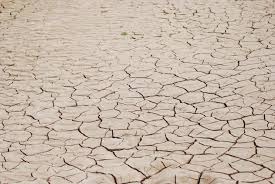
在该演示中,我们使用了名为 btexture1.jpg 的图像。这些图像存储在本地 images/ 文件夹中,为方便参考也粘贴在下方。你可以下载任何你喜欢的图像,然后在演示链接中使用。
images/btexture1.jpg
以下为用于凹凸结构的图像 −
说明
首先,我们将创建一个标准材质,并以如下方式应用凹凸纹理 −
bumpMaterial.bumpTexture = new BABYLON.Texture("images/btexture1.jpg", scene);
创建一个标准材质,并以如下方式应用镜像纹理 −
mirrorMaterial.reflectionTexture = new BABYLON.MirrorTexture("mirror", 512, scene, true); //Create a mirror texture
对于相同的标准材质,创建一个镜像平面,并以如下方式添加需要通过镜像观看的蒙皮 −
mirrorMaterial.reflectionTexture.mirrorPlane = new BABYLON.Plane(0, -1.0, 0, -10.0);
mirrorMaterial.reflectionTexture.renderList = [sphere1, box1, sphere3, box2];
mirrorMaterial.reflectionTexture.level = 0.4;//Select the level (0.0 > 1.0) of the reflection
babylonjs_mesh.htm
广告