
- BabylonJS 教程
- BabylonJS - 首页
- BabylonJS - 介绍
- BabylonJS - 环境设置
- BabylonJS - 概览
- BabylonJS - 基本元素
- BabylonJS - 材质
- BabylonJS - 动画
- BabylonJS - 相机
- BabylonJS - 光照
- BabylonJS - 参数化形状
- BabylonJS - 网格
- 向量位置和旋转
- BabylonJS - 贴花
- BabylonJS - Curve3
- BabylonJS - 动态纹理
- BabylonJS - 视差映射
- BabylonJS - 镜头光晕
- BabylonJS - 创建屏幕截图
- BabylonJS - 反射探测器
- 标准渲染管道
- BabylonJS - ShaderMaterial
- BabylonJS - 骨骼和骨架
- BabylonJS - 物理引擎
- BabylonJS - 播放声音和音乐
- BabylonJS 实用资源
- BabylonJS - 快速指南
- BabylonJS - 实用资源
- BabylonJS - 论坛
BabylonJS - 透明度
它也称为 Alpha 透明度。它基本上通过将图像与背景相结合,来创建部分或全部透明的外观。
语法
以下为与透明度相关的语法 −
materialforbox.alpha = 0.5;
仅使用材质的演示
<!doctype html>
<html>
   <head>
      <meta charset = "utf-8">
      <title>BabylonJs - Basic Element-Creating Scene</title>
      <script src = "babylon.js"></script>
      <style>
         canvas {width: 100%; height: 100%;}
      </style>
   </head>

   <body>
      <canvas id = "renderCanvas"></canvas>
      <script type = "text/javascript">
         var canvas = document.getElementById("renderCanvas");
         var engine = new BABYLON.Engine(canvas, true);
         var createScene  = function() {
            var scene = new BABYLON.Scene(engine);
            scene.clearColor = new BABYLON.Color3(0, 1, 0);
            var camera = new BABYLON.ArcRotateCamera("Camera", 1, 0.8, 10, new BABYLON.Vector3(0, 0, 0), scene);
            camera.attachControl(canvas, true);
            var light = new BABYLON.HemisphericLight("light1", new BABYLON.Vector3(0, 1, 0), scene);
            light.intensity = 0.7;
            var materialforbox = new BABYLON.StandardMaterial("texture1", scene);
            var box = BABYLON.Mesh.CreateBox("box", '3', scene);
            box.material = materialforbox;
            return scene;
         };
         var scene = createScene();
         engine.runRenderLoop(function() {
            scene.render();
         });
      </script>
   </body>
</html>
输出
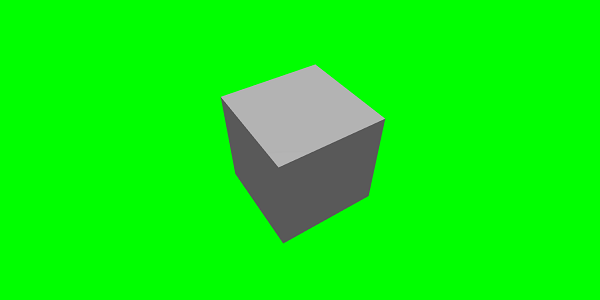
上面的演示使用的是标准材质,并且什么都没有更改。让我们逐一使用标准材质属性,并观察事物是如何变化的。
使用透明度的演示
<!doctype html>
<html>
   <head>
      <meta charset = "utf-8">
      <title>BabylonJs - Basic Element-Creating Scene</title>
      <script src = "babylon.js"></script>
      <style>
         canvas {width: 100%; height: 100%;}
      </style>
   </head>

   <body>
      <canvas id = "renderCanvas"></canvas>
      <script type = "text/javascript">
         var canvas = document.getElementById("renderCanvas");
         var engine = new BABYLON.Engine(canvas, true);
         var createScene  = function() {
            var scene = new BABYLON.Scene(engine);
            scene.clearColor = new BABYLON.Color3(0, 1, 0);

            var camera = new BABYLON.ArcRotateCamera("Camera", 1, 0.8, 10, new BABYLON.Vector3(0, 0, 0), scene);
            camera.attachControl(canvas, true);

            var light = new BABYLON.HemisphericLight("light1", new BABYLON.Vector3(0, 1, 0), scene);
            light.intensity = 0.7;
            var materialforbox = new
            BABYLON.StandardMaterial("texture1", scene);

            var box = BABYLON.Mesh.CreateBox("box", '3', scene);
            box.material  = materialforbox;
            materialforbox.alpha = 0.3; // value of 0.3 is applied fro transparency
            return scene;
         };
         var scene = createScene();
         engine.runRenderLoop(function() {
            scene.render();
         });
      </script>
   </body>
</html>
输出
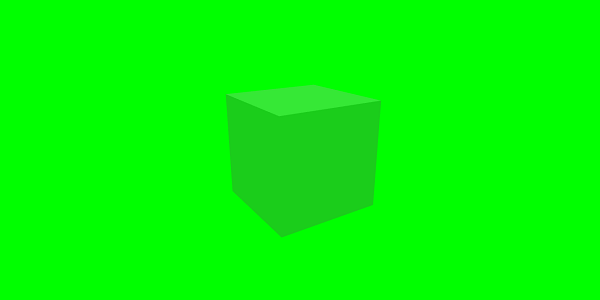
该演示显示了透明度属性。尝试更改值,并观察盒子在场景中如何显示。
babylonjs_materials.htm
广告