
- Behave 教程
- Behave - 首页
- Behave - 简介
- Behave - 安装
- Behave - 命令行
- Behave - 配置文件
- Behave - 特性测试设置
- Behave - Gherkin 关键字
- Behave - 特性文件
- Behave - 步骤实现
- Behave - 初步步骤
- Behave - 支持的语言
- Behave - 步骤参数
- Behave - 场景大纲
- Behave - 多行文本
- Behave - 设置表格
- Behave - 步骤中的步骤
- Behave - 背景
- Behave - 数据类型
- Behave - 标签
- Behave - 枚举
- Behave - 步骤匹配器
- Behave - 正则表达式
- Behave - 可选部分
- Behave - 多方法
- Behave - 步骤函数
- Behave - 步骤参数
- Behave - 运行脚本
- Behave - 排除测试
- Behave - 重试机制
- Behave - 报告
- Behave - 钩子
- Behave - 调试
- Behave 有用资源
- Behave - 快速指南
- Behave - 有用资源
- Behave - 讨论
Behave - 多方法
特性文件中可能存在步骤,这些步骤具有几乎相同的短语。例如,
Given user makes payment of 100 INR
And user makes payment of 10 Dollar
这里,我们可以使用不同的步骤定义来区分印度卢比和美元。为此,我们可以使用多方法方法,其中必须为不同的数据类型提供不同的正则表达式。
特性文件(几乎相同的步骤)
请考虑以下特性文件:
Feature − Multi-Methods
   Scenario − Purchase
      Given User is on shop
      When user purchases 3 shirts
      And user purchases 4 pants
在步骤实现文件中,**TypeBuilder.make_choice** 函数评估为提供的选项提供的正则表达式模式。method register_type 用于注册用户定义的类型,该类型可以在匹配步骤时用于任何类型转换。
此外,我们将传递参数:用“{}”括起来的用户定义数据类型。
相应的步骤实现文件
步骤实现文件如下所示:
from behave import *
from behave import register_type
from parse_type import TypeBuilder
parse_dress = TypeBuilder.make_choice(["shirts", "t-shirts"])
#register user-defined datatype
register_type(Dress=parse_dress)
parse_pant = TypeBuilder.make_choice(["pants", "gowns"])
#register user-defined datatype
register_type(Pant=parse_pant)
@given("User is on shop")
def step_user_shop(context):
      pass
# multiple methods being used .
@when(u"user purchases {count:n} {d:Dress}")
def step_dress(context, count, d):
      print("User purchased: ")
      print(d)
      print("Count is:")
      print(count)
@when(u"user purchases {count:n} {p:Pant}")
def step_pant(context, count, p):
      print("User purchased: ")
      print(p)
      print("Count is:")
      print(count)
输出
运行特性文件后获得的输出如下所示,使用的命令为**behave --no-capture -f plain**。
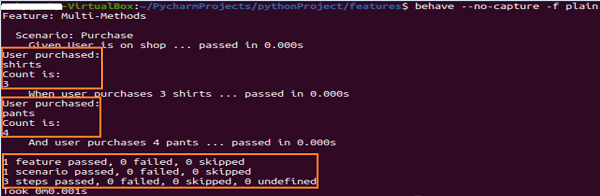
输出显示了购买的商品及其数量。这两个值已在特性文件中使用几乎相同的步骤(但数据类型不同)传递。在步骤实现中,我们使用了多种方法来获取这些值。
广告