
- Behave 教程
- Behave - 主页
- Behave - 介绍
- Behave - 安装
- Behave - 命令行
- Behave - 配置文件
- Behave - 功能测试设置
- Behave - Gherkin 关键字
- Behave - 功能文件
- Behave - 步骤实现
- Behave - 第一步
- Behave - 支持的语言
- Behave - 步骤参数
- Behave - 场景大纲
- Behave - 多行文本
- Behave - 设置表
- Behave - 步骤中的步骤
- Behave - 背景
- Behave - 数据类型
- Behave - 标签
- Behave - 枚举
- Behave - 步骤匹配器
- Behave - 正则表达式
- Behave - 可选部分
- Behave - 多方法
- Behave - 步骤函数
- Behave - 步骤参数
- Behave - 运行程序脚本
- Behave - 排除测试
- Behave - 重试机制
- Behave - 报告
- Behave - 挂钩
- Behave - 调试
- Behave 有用资源
- Behave - 快速指南
- Behave - 有用资源
- Behave - 讨论
Behave - 多行文本
用 """ 括起来的步骤之后的文本块将与该步骤关联。在此,解析缩进。文本开头的所有空格都会从文本中删除,所有后续行至少必须有一个最小空格作为起始行。
通过 context 变量(在步骤函数中传递)中的 .text 属性,可以在实现 Python 代码中访问文本。
特征文件
标题为用户信息的特征文件如下所示 −
Feature − User information
Scenario − Check login functionality
   Given user enters name and password
         """
         Tutorialspoint Behave
          Topic – Multiline Text
         """
   Then user should be logged in
相应的步骤实现文件
该特征的相应步骤实现文件如下所示 −
from behave import *
@given('user enters name and password')
def step_impl(context):
#access multiline text with .text attribute
      print("Multiline Text: " + context.text)
@then('user should be logged in')
def step_impl(context):
      pass
输出
运行特征文件后获得的输出如下所示,使用的命令是 behave --no-capture -f plain。
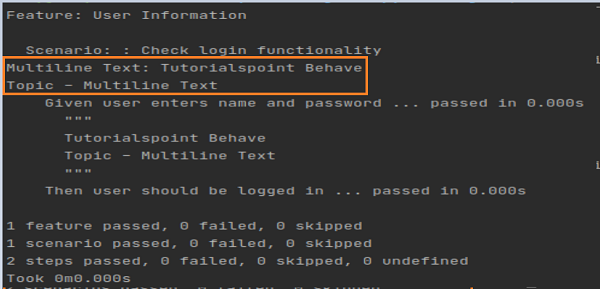
输出显示打印的多行文本。
广告