
- Behave教程
- Behave - 主页
- Behave - 简介
- Behave - 安装
- Behave - 命令行
- Behave - 配置文件
- Behave - Feature测试设置
- Behave - Gherkin关键字
- Behave - Feature文件
- Behave - 步骤实现
- Behave - 初始步骤
- Behave - 支持语言
- Behave - 步骤参数
- Behave - 场景纲要
- Behave - 多行文本
- Behave - 设置表
- Behave - 步骤中的步骤
- Behave - 背景
- Behave - 数据类型
- Behave - 标签
- Behave - 枚举
- Behave - 步骤匹配器
- Behave - 正则表达式
- Behave - 可选项
- Behave - 多方法
- Behave - 步骤方法
- Behave - 步骤参数
- Behave - 运行器脚本
- Behave - 排除测试
- Behave - 重试机制
- Behave - 报告
- Behave - 挂钩
- Behave - 调试
- Behave可用资源
- Behave - 快速指南
- Behave - 可用资源
- Behave - 讨论
Behave - 重试机制
我们可以在Behave中的Feature文件中重新运行失败的场景。可以借助格式化程序完成这项操作。
可以通过以下命令查看Behave中所有可用的格式化程序−
behave –f help
使用此命令后,可以看到以下屏幕−
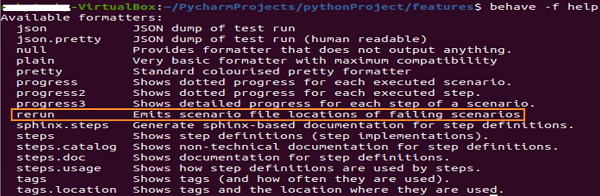
重新运行格式化程序用于捕获失败场景,并将它输出到单独的文件中。让我们举一个例子,在这个例子中,我们有一个失败的Feature。

然后,使用以下命令将失败的Feature捕获到另一个Feature文件−
behave –f rerun –o failed_features.feature
可以看到以下内容−

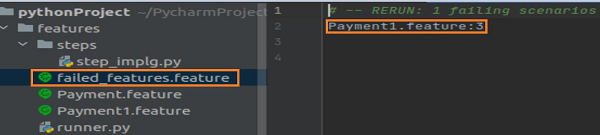
failed_features.feature文件会在项目中生成。其中包含Feature文件名称Payment1.feature,在这个文件中我们遇到失败。
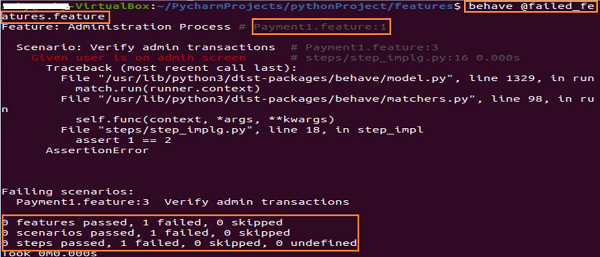
若要只重新触发失败的场景,我们必须运行以下所示的命令−
behave @failed_features.feature
将看到以下屏幕−
广告