
 数据结构
数据结构 网络
网络 RDBMS
RDBMS 操作系统
操作系统 Java
Java MS Excel
 iOS
iOS HTML
HTML CSS
CSS Android
 Python
 C 编程
C 编程 C++
C++ C#
C# MongoDB
 MySQL
MySQL Javascript
 PHP
PHP 物理
物理 化学
化学 生物
生物 数学
数学 英语
英语 经济
经济 心理学
心理学 社会科学
社会科学 时尚研究
时尚研究 法律研究
法律研究HTML DOM Window stop() 方法
HTML DOM Window stop() 为用户提供停止加载某个窗口资源的功能,而无需单击浏览器的停止按钮。
语法
以下是语法 −
window.stop()
示例
让我们看一个 HTML DOM Window stop() 方法示例 −
<!DOCTYPE html>
<html>
<head>
<title>HTML DOM Window stop()</title>
<style>
   * {
      padding: 2px;
      margin:5px;
   }
   form {
      width:70%;
      margin: 0 auto;
      text-align: center;
   }
   input[type="button"] {
      border-radius: 10px;
</style>
</head>
<body>
   <form>
      <fieldset>
         <legend>HTML-DOM-Window-stop( )</legend>
         <input id="urlSelect" type="url" placeholder="Type URL here..."><br>
         <input id="textSelect" type="text" placeholder="Full Name"><br>
         <input type="button" value="Go To" onclick="openWindow()">
         <input type="button" value="Close" onclick="closeWindow()">
         <input type="button" value="Restore" onclick="restoreWindow()">
         <div id="divDisplay"></div>
      </fieldset>
   </form>
   <script>
      var urlSelect = document.getElementById("urlSelect");
      var textSelect = document.getElementById("textSelect");
      var winSource;
      function openWindow() {
         if(textSelect.value === 'admin'){
            browseWindow = window.open(urlSelect.value, "browseWindow", "width=400, height200");
            winSource = urlSelect.value;
            browseWindow.opener.document.getElementById("divDisplay").textContent = "Child
            Window Active";
         } else {
            window.stop();
            document.getElementById("divDisplay").textContent = "Child Window Stopped";
         }
      }
      function closeWindow(){
         if(browseWindow){
            browseWindow.close();
            browseWindow.opener.document.getElementById("divDisplay").textContent = "Child
            Window Closed";
         }
      }
      function restoreWindow(){
         if(browseWindow.closed){
            browseWindow = window.open(winSource, "browseWindow", "width=400, height=200");
            browseWindow.opener.document.getElementById("divDisplay").textContent = "Child
            Window Restored";
         }
      }
   </script>
</body>
</html>
输出
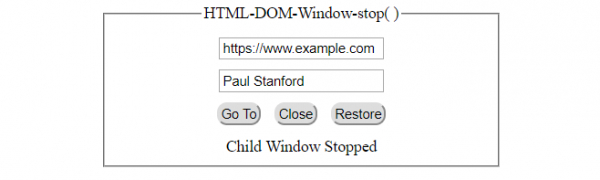
单击以未授权的“姓名”设置“转到”按钮 −
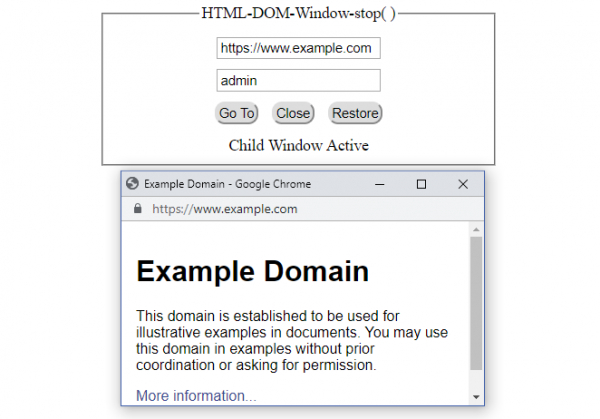
单击以授权的“姓名”设置“转到”按钮 −

更新时间:2021 年 2 月 15 日
201 次浏览

广告