
- HTML Canvas 教程
- HTML Canvas - 首页
- HTML Canvas - 简介
- 环境设置
- HTML Canvas - 第一个应用
- HTML Canvas - 绘制二维图形
- HTML Canvas - 路径元素
- 使用路径元素绘制二维图形
- HTML Canvas - 颜色
- HTML Canvas - 添加样式
- HTML Canvas - 添加文本
- HTML Canvas - 添加图像
- HTML Canvas - 画布时钟
- HTML Canvas - 变换
- 合成和裁剪
- HTML Canvas - 基本动画
- 高级动画
- HTML Canvas API 函数
- HTML Canvas - 元素
- HTML Canvas - 矩形
- HTML Canvas - 线
- HTML Canvas - 路径
- HTML Canvas - 文本
- HTML Canvas - 颜色和样式
- HTML Canvas - 图像
- HTML Canvas - 阴影和变换
- HTML Canvas 有用资源
- HTML Canvas - 快速指南
- HTML Canvas - 有用资源
- HTML Canvas - 讨论
HTML Canvas - 画布时钟
画布时钟主要用于向网站添加时钟功能。如今,大多数网站都使用 Canvas 元素在其网站上实现基于时间的应用程序,因为它非常易于实现,并且 Canvas 可以制作出良好的客户端动画。
在本节中,我们将构建一个实时模拟时钟。让我们在其中绘制一个基本的画布和一个圆圈,以便我们可以使用 JavaScript 制作一个模拟时钟。代码如下所示。
<!DOCTYPE html>
<html lang="en">
   <head>
      <title>canvas clock</title>
   </head>
   <body onload="clock();">
      <canvas id="canvas" width="400" height="400" style="border: 10px solid black;background-color: burlywood;"></canvas>
      <script>
         var canvas = document.getElementById("canvas");
         var context = canvas.getContext("2d");
         var radius = canvas.height / 2;
         context.translate(radius, radius);
         radius = radius * 0.90;
         Clock();

         function Clock() {
            context.arc(0, 0, radius, 0, 2 * Math.PI);
            context.lineWidth = 15;
            context.strokeStyle = "black";
            context.stroke();
            context.fillStyle = "#dddddd";
            context.fill();
         }
      </script>
   </body>
</html>
这将返回画布的主体为
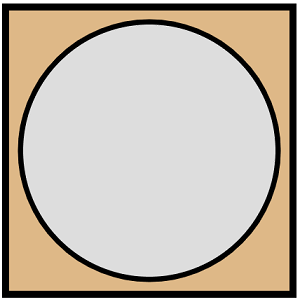
向画布添加表盘
我们必须首先绘制一个画布,然后在画布内使用弧线绘制圆圈,以便我们可以在其中实现时钟。要绘制圆圈,我们必须确保画布的中心是圆圈的中心点,这有助于使其看起来更好。以下代码绘制了 Canvas 元素并将时钟表盘实现到其中。
<!DOCTYPE html>
<html lang="en">
   <head>
      <title>canvas clock</title>
   </head>
   <body onload="clock();">
      <canvas id="canvas" width="400" height="400" style="border: 10px;"></canvas>
      <script>
         var canvas = document.getElementById("canvas");
         var context = canvas.getContext("2d");
         var radius = canvas.height / 2;
         context.translate(radius, radius);
         radius = radius * 0.90
         Clock();

         function Clock() {
            Face(context, radius);
         }

         function Face(context, radius) {
            var gradient;
            context.beginPath();
            context.arc(0, 0, radius, 0, 2 * Math.PI);
            context.fillStyle = 'white';
            context.fill();
            gradient = context.createRadialGradient(0, 0, radius * 0.95, 0, 0, radius * 1.05);
            gradient.addColorStop(0, '#555555');
            gradient.addColorStop(0.5, 'lightblue');
            gradient.addColorStop(1, '#555555');
            context.strokeStyle = gradient;
            context.lineWidth = 25;
            context.stroke();
            context.closePath();
            context.beginPath();
            context.arc(0, 0, radius * 0.1, 0, 2 * Math.PI);
            context.fillStyle = '#555555';
            context.fill();
            context.closePath()
         }
      </script>
   </body>
</html>
代码返回的输出为
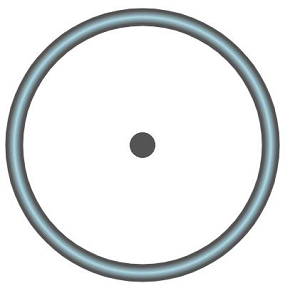
添加数字和指针
每个时钟都需要数字和指针来识别时间。因此,我们将对时钟区域进行对称编号,并绘制指针,就像我们在真实的机械时钟中通常看到的那样。实现代码如下所示。
<!DOCTYPE html>
<html lang="en">
   <head>
      <title>canvas clock</title>
   </head>
   <body onload="clock();">
      <canvas id="canvas" width="400" height="400" style="border: 10px;"></canvas>
      <script>
         var canvas = document.getElementById("canvas");
         var context = canvas.getContext("2d");
         var radius = canvas.height / 2;
         context.translate(radius, radius);
         radius = radius * 0.90;
         Clock();

         function Clock() {
            Face(context, radius);
            Numbers(context, radius);
            Time(context, radius);
         }

         function Face(context, radius) {
            var gradient;
            context.beginPath();
            context.arc(0, 0, radius, 0, 2 * Math.PI);
            context.fillStyle = 'white';
            context.fill();
            gradient = context.createRadialGradient(0, 0, radius * 0.95, 0, 0, radius * 1.05);
            gradient.addColorStop(0, '#555555');
            gradient.addColorStop(0.5, 'lightblue');
            gradient.addColorStop(1, '#555555');
            context.strokeStyle = gradient;
            context.lineWidth = 20;
            context.stroke();
            context.closePath();
            context.beginPath();
            context.arc(0, 0, radius * 0.1, 0, 2 * Math.PI);
            context.fillStyle = '#555555';
            context.fill();
            context.closePath()
         }

         function Numbers(context, radius) {
            var angle;
            var number;
            context.font = radius * 0.15 + "px Verdana";
            context.textBaseline = "middle";
            context.textAlign = "center";
            for (number = 1; number < 13; number++) {
               angle = number * Math.PI / 6;
               context.rotate(angle);
               context.translate(0, -radius * 0.85);
               context.rotate(-angle);
               context.fillText(number.toString(), 0, 0);
               context.rotate(angle);
               context.translate(0, radius * 0.85);
               context.rotate(-angle);
            }
         }

         function Time(context, radius) {
            var Present_Time = new Date();
            var hours = Present_Time.getHours();
            var minutes = Present_Time.getMinutes();
            var seconds = Present_Time.getSeconds();
            hours = hours % 12;
            hours = (hours * Math.PI / 6) + (minutes * Math.PI / (6 * 60)) + (seconds * Math.PI / (360 * 60));
            Hands(context, hours, radius * 0.5, radius * 0.07);
            minutes = (minutes * Math.PI / 30) + (seconds * Math.PI / (30 * 60));
            Hands(context, minutes, radius * 0.8, radius * 0.07);
            seconds = (seconds * Math.PI / 30);
            Hands(context, seconds, radius * 0.9, radius * 0.02);
         }

         function Hands(context, pos, length, width) {
            context.beginPath();
            context.lineWidth = width;
            context.lineCap = "round";
            context.moveTo(0, 0);
            context.rotate(pos);
            context.lineTo(0, -length);
            context.stroke();
            context.rotate(-pos);
            context.closePath();
         }
      </script>
   </body>
</html>
在使用上述代码添加数字和指针后生成的时钟为
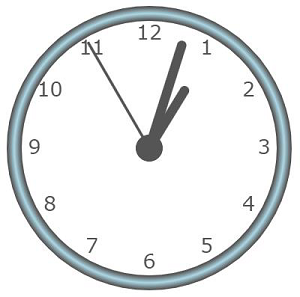
启动时钟
到目前为止,我们已经使用 Canvas 元素构建了一个功能正常的模拟时钟,但它不会自动运行,除非我们每次都刷新 HTML 页面。因此,我们将添加另一个函数以使时钟自主运行,以便我们可以使用它来识别时间而不会出现任何错误。
这使得时钟自动化,并且无需更新时间即可工作。实现代码如下所示。
<!DOCTYPE html>
<html lang="en">
   <head>
      <title>canvas clock</title>
   </head>
   <body onload="clock();">
      <canvas id="canvas" width="400" height="400" style="border: 10px;"></canvas>
      <script>
         var canvas = document.getElementById("canvas");
         var context = canvas.getContext("2d");
         var radius = canvas.height / 2;
         context.translate(radius, radius);
         radius = radius * 0.90;
         setInterval(Clock, 1000);

         function Clock() {
            Face(context, radius);
            Numbers(context, radius);
            Time(context, radius);
         }

         function Face(context, radius) {
            var gradient;
            context.beginPath();
            context.arc(0, 0, radius, 0, 2 * Math.PI);
            context.fillStyle = 'white';
            context.fill();
            gradient = context.createRadialGradient(0, 0, radius * 0.95, 0, 0, radius * 1.05);
            gradient.addColorStop(0, '#555555');
            gradient.addColorStop(0.5, 'lightblue');
            gradient.addColorStop(1, '#555555');
            context.strokeStyle = gradient;
            context.lineWidth = 20;
            context.stroke();
            context.closePath();
            context.beginPath();
            context.arc(0, 0, radius * 0.1, 0, 2 * Math.PI);
            context.fillStyle = '#555555';
            context.fill();
            context.closePath()
         }

         function Numbers(context, radius) {
            var angle;
            var number;
            context.font = radius * 0.15 + "px Verdana";
            context.textBaseline = "middle";
            context.textAlign = "center";
            for (number = 1; number < 13; number++) {
               angle = number * Math.PI / 6;
               context.rotate(angle);
               context.translate(0, -radius * 0.85);
               context.rotate(-angle);
               context.fillText(number.toString(), 0, 0);
               context.rotate(angle);
               context.translate(0, radius * 0.85);
               context.rotate(-angle);
            }
         }

         function Time(context, radius) {
            var Present_Time = new Date();
            var hours = Present_Time.getHours();
            var minutes = Present_Time.getMinutes();
            var seconds = Present_Time.getSeconds();
            hours = hours % 12;
            hours = (hours * Math.PI / 6) + (minutes * Math.PI / (6 * 60)) + (seconds * Math.PI / (360 * 60));
            Hands(context, hours, radius * 0.5, radius * 0.07);
            minutes = (minutes * Math.PI / 30) + (seconds * Math.PI / (30 * 60));
            Hands(context, minutes, radius * 0.8, radius * 0.07);
            seconds = (seconds * Math.PI / 30);
            Hands(context, seconds, radius * 0.9, radius * 0.02);
         }

         function Hands(context, pos, length, width) {
            context.beginPath();
            context.lineWidth = width;
            context.lineCap = "round";
            context.moveTo(0, 0);
            context.rotate(pos);
            context.lineTo(0, -length);
            context.stroke();
            context.rotate(-pos);
            context.closePath();
         }
      </script>
   </body>
</html>
上述代码生成的自动模拟时钟为
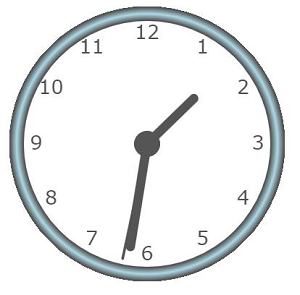
广告